

Varnish is a high-performance open-source HTTP accelerator. Norway’s largest online newspaper, Verdens Gang, used 3 Varnish servers to replace 12 Squid servers, achieving even better performance.
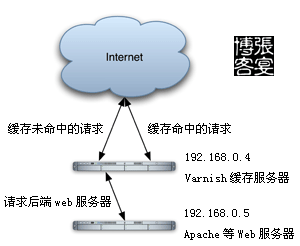
However, compared to the veteran Squid, each has its own strengths and weaknesses. Many online comparisons merely reflect an individual’s ability to maximize performance within their familiar application scenarios. Perhaps Squid can only unleash its full power in the hands of a truly capable person.
Varnish uses “Visual Page Cache” technology. In terms of memory utilization, Varnish has an advantage over Squid, as it avoids Squid’s frequent swapping of files between memory and disk, resulting in higher performance.
Through the Varnish management port, you can use regular expressions to quickly and batch-purge specific parts of the cache, a feature Squid lacks.
############Below is the configuration file content and comments#######################
#HTTP request handling process
#1, receive: request entry state, determines via VCL whether to pass or perform a local lookup
#lookup: searches for data in the hash table; if found, enters the hit state, otherwise enters the fetch state
#pass: selects a backend and enters the fetch state
#fetch: fetches the request from the backend, sends the request, obtains data, and stores it locally
#deliver: sends the data to the client, then enters done
#done: processing ends
##########Configure Backend Servers##############
backend linuxidc01 {
.host = "192.168.1.142";
.port = "7070";
.probe = {
.timeout = 5s;
.interval = 2s;
.window = 10;
.threshold = 8;
}
}
backend linuxidc02 {
.host = "192.168.1.141";
.port = "7070";
.probe = {
.timeout = 5s;
.interval = 2s;
.window = 10;
.threshold = 8;
}
}
##############Configure backend server group, health check every 6 seconds, use random method to set weights########
#########The alternative method round-robin uses the default polling mechanism####################
director linuxidc15474 random
{ .retries = 6;
{ .backend = linuxidc02;
.weight = 2;
}
{ .backend = linuxidc01;
.weight = 2;
}
}
##########Define access list, allow the following addresses to purge varnish cache#######################
acl local {
"localhost";
"127.0.0.1";
}
########Determine which backend server and cache configuration applies based on the URL############################
sub vcl_recv
{
if (req.http.host ~ "^linuxidc15474.vicp.net") #Match domain name and direct to backend server
{ set req.backend = linuxidc15474; }
else { error 404 "Unknown HostName!"; }
if (req.request == "PURGE") #Do not allow IPs not in the access control list to purge varnish cache
{ if (!client.ip ~ local)
{
error 405 "Not Allowed.";
return (lookup);
}
}
#Remove cookies for URLs containing files like jpg
if (req.request == "GET" && req.url ~ "/.(jpg|png|gif|swf|jpeg|ico)$")
{
unset req.http.cookie;
}
#Check req.http.X-Forwarded-For; if there are multiple reverse proxies in front, this can obtain the client IP address.
if (req.http.x-forwarded-for)
{
set req.http.X-Forwarded-For = req.http.X-Forwarded-For ", " client.ip;
}
else { set req.http.X-Forwarded-For = client.ip; }
##Varnish implementation of image hotlink protection
# if (req.http.referer ~ "http://.*)
# {
# if ( !(req.http.referer ~ "http://.*vicp/.net" ||
# req.http.referer ~ "http://.*linuxidc15474/.net" ) )
# {
# set req.http.host = "linuxidc15474.vicp.net";
# set req.url = "/referer.jpg";
# }
# return(lookup);
# }
# else {return(pass);}
if (req.request != "GET" &&
req.request != "HEAD" &&
req.request != "PUT" &&
req.request != "POST" &&
req.request != "TRACE" &&
req.request != "OPTIONS" &&
req.request != "DELETE")
{ return (pipe); }
# Forward non-GET|HEAD requests directly to the backend server
if (req.request != "GET" && req.request != "HEAD")
{ return (pass); }
## For GET requests where the URL ends with .php or .php?, forward directly to the backend server
if (req.request == "GET" && req.url ~ "/.(php)($|/?)")
{ return (pass); }
## For requests containing authorization headers or cookies, forward directly to the backend server
if (req.http.Authorization || req.http.Cookie)
{ return (pass);}
{
## For all other requests not covered above, look up from cache
return (lookup);
}
## Do not cache the specified font directory
if (req.url ~ "^/fonts/")
{ return (pass); }
}
sub vcl_pipe
{ return (pipe); }
## Enter pass mode: request is sent to the backend, backend returns data to the client, but it does not enter cache processing
sub vcl_pass
{ return (pass); }
sub vcl_hash
{
set req.hash += req.url;
if (req.http.host)
{ set req.hash += req.http.host; }
else { set req.hash += server.ip; }
return (hash);
}
## After lookup, if a cached request is found, it generally ends with one of the following keywords
sub vcl_hit
{
if (!obj.cacheable)
{ return (pass); }
return (deliver);
}
## Called when no cache is found after lookup; ends with one of the following keywords, and calls the fetch parameter to re-test whether to add to cache
sub vcl_miss
{ return (fetch); }
# The types of content the Varnish server caches; called after fetching data from the backend
sub vcl_fetch
{ if (!beresp.cacheable)
{ return (pass); }
if (beresp.http.Set-Cookie)
{ return (pass); }
## For content specified by the WEB server as non-cacheable, the Varnish server will not cache it
if (beresp.http.Pragma ~ "no-cache" || beresp.http.Cache-Control ~ "no-cache" || beresp.http.Cache-Control ~ "private")
{ return (pass); }
## Cache GET requests containing file formats like jpg, png, etc.; cache time is 7 days (s = seconds)
if (req.request == "GET" && req.url ~ "/.(js|css|mp3|jpg|png|gif|swf|jpeg|ico)$")
{ set beresp.ttl = 7d; }
## Cache GET requests containing static pages like htm for 300 seconds
if (req.request == "GET" && req.url ~ "//[0-9]/.htm$")
{ set beresp.ttl = 300s; }
return (deliver);
}
#### Add the following to the page head information to check the cache hit status ########
sub vcl_deliver
{
set resp.http.x-hits = obj.hits ;
if (obj.hits > 0)
{ set resp.http.X-Cache = "HIT cqtel-bbs"; }
else { set resp.http.X-Cache = "MISS cqtel-bbs"; }
}
######################### End of Varnish Configuration ##########################
Create User:
groupadd www
useradd www -g www
Create cache directory for varnish_cache
mkdir /data/varnish_cache
Start Varnish
ulimit -SHn 8192 #### Set file descriptor limit. Adjust according to your server performance
/usr/local/varnish-2.1.3/sbin/varnishd -u www -g www -f /usr/local/varnish-2.1.3/etc/varnish/varnish.conf -a 0.0.0.0:80 -s file,/data/varnish_cache/varnish_cache.data,100M -w 1024,8192,10 -t 3600 -T 127.0.0.1:3500
####-u Run as user -g Run as group -f Varnish config file -a Bind IP and port -s Varnish cache file location and size -w Min, max threads and timeout -T Varnish management port, primarily used for purging cache
#Kill varnishd process
pkill varnishd
Start varnishncsa to write Varnish access log to a log file:
/usr/local/varnish-2.1.3/bin/varnishncsa -w /data/logs/varnish.log &
Script to run daily at midnight to rotate Varnish logs by day, generate a compressed file, and delete logs from the previous month (/var/logs/cutlog.sh):
vim /usr/local/varnish-2.1.3/etc/varnish/cut_varnish_log.sh
Write the following script:
#!/bin/sh
# This file run at 00:00
date=$(date -d "yesterday" +"%Y-%m-%d")
pkill -9 varnishncsa
mv /data/logs/varnish.log /data/logs/${date}.log
/usr/local/varnish-2.1.3/bin/varnishncsa -w /data/logs/varnish.log &
mkdir -p /data/logs/varnish/
gzip -c /data/logs/${date}.log > /data/logs/varnish/${date}.log.gz
rm -f /data/logs/${date}.log
rm -f /data/logs/varnish/$(date -d "-1 month" +"%Y-%m*").log.gz
Scheduled Task:
crontab -e
00 00 * * * /usr/local/varnish-2.1.3/etc/varnish/cut_varnish_log.sh
Optimize Linux Kernel Parameters
vi /etc/sysctl.conf
net.ipv4.tcp_fin_timeout = 30
net.ipv4.tcp_keepalive_time = 300
net.ipv4.tcp_syncookies = 1
net.ipv4.tcp_tw_reuse = 1
net.ipv4.tcp_tw_recycle = 1
net.ipv4.ip_local_port_range = 5000 65000
Apply the configuration
/sbin/sysctl -p
Using Varnish Management Port to Purge Cache in Bulk with Regular Expressions
Purge all cache
/usr/local/varnish-2.1.3/bin/varnishadm -T 127.0.0.1:3500 url.purge *$
Purge all cache under the image directory
/usr/local/varnish-2.1.3/bin/varnishadm -T 127.0.0.1:3500 url.purge /image/
127.0.0.1:3500 is the address of the cache server to be purged, www.linuxidc.com is the domain to be purged, /static/image/tt.jsp is the URL path list to be purged
/usr/local/varnish-2.1.3/bin/varnishadm -T 127.0.0.1:3500 purge "req.http.host ~ www.linuxidc.com$ && req.url ~ /static/image/tt.jsp"
+++++++++++++++++++++++++++++++++++++++++++++++++++++++++++++++++++
A PHP Function to Purge Squid Cache
function purge($ip, $url)
{
$errstr = '';
$errno = '';
$fp = fsockopen ($ip, 80, $errno, $errstr, 2);
if (!$fp)
{
return false;
}
else
{
$out = "PURGE $url HTTP/1.1/r/n";
$out .= "Host:blog.s135.com/r/n";
$out .= "Connection: close/r/n/r/n";
fputs ($fp, $out);
$out = fgets($fp , 4096);
fclose ($fp);
return true;
}
}
purge("192.168.0.4", "/index.php");
?>
++++++++++++++++++++++++++++++++++++++++++++++++++++++++++++++++++++++++
Configure Varnish to Auto-Start on Boot
vim /etc/rc.d/rc.local
Add the following content to the last line:
ulimit -SHn 8192
/usr/local/varnish-2.1.3/sbin/varnishd -u www -g www -f /usr/local/varnish-2.1.3/etc/varnish/varnish.conf -a 0.0.0.0:80 -s file,/data/varnish_cache/varnish_cache.data,100M -w 1024,8192,10 -t 3600 -T 127.0.0.1:3500
/usr/local/varnish-2.1.3/bin/varnishncsa -w /data/logs/varnish.log &
View Varnish Server Connections and Hit Rate:
/usr/local/varnish-2.1.3/bin/varnishstat
The above shows the Varnish status,
1675 0.00 0.06 Client requests received — Number of client requests received by the server
179 0.00 0.01 Cache hits — Number of cache hits, i.e., times data was returned from cache to the client
11 0.00 0.00 Cache misses — Number of cache misses, i.e., times data was fetched from the backend application and returned to the user
Use help to see available Varnish commands:
/usr/local/varnish-2.1.3/bin/varnishadm -T 127.0.0.1:3500 help
Source http://www.cnblogs.com/glory-jzx/archive/2012/09/11/2679857.html