

AboutVarnish,SquidCacheacceleratorsolution。AboutVarnish,,、Varnish。
,VarnishSquid:
1、Varnish“Visual Page Cache”technology,memory,VarnishSquid,Squidmemory、diskfile,PerformanceSquid。
2、Varnish,ManagementserverVarnish,fault,Squidserver。
3、VarnishManagementport,、Cache,Squid。
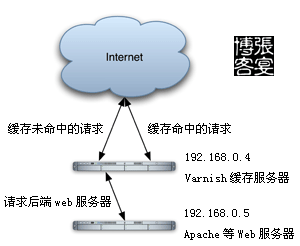
InstallationVarnishCacheaccelerator(Linuxsystem):
1、CreatewwwUser,VarnishCachefiledirectory(/var/vcache):
/usr/sbin/useradd -u 48 -g www www
mkdir -p /var/vcache
chmod +w /var/vcache
chown -R www:www /var/vcache
2、CreateVarnishLogdirectory(/var/logs/):
chmod +w /var/logs
chown -R www:www /var/logs
3、CompilationInstallationvarnish:
tar zxvf varnish-1.1.2.tar.gz
cd varnish-1.1.2
./configure –prefix=/usr/local/varnish
make && make install
4、CreateVarnishconfiguration file:
:
set backend.host = "192.168.0.5";
set backend.port = "80";
}
acl purge {
"localhost";
"127.0.0.1";
"192.168.1.0"/24;
}
sub vcl_recv {
if (req.request == "PURGE") {
if (!client.ip ~ purge) {
error 405 "Not allowed.";
}
lookup;
}
if (req.http.host ~ "^blog.zyan.cc") {
set req.backend = myblogserver;
if (req.request != "GET" && req.request != "HEAD") {
pipe;
}
else {
lookup;
}
}
else {
error 404 "Zhang Yan Cache Server";
lookup;
}
}
sub vcl_hit {
if (req.request == "PURGE") {
set obj.ttl = 0s;
error 200 "Purged.";
}
}
sub vcl_miss {
if (req.request == "PURGE") {
error 404 "Not in cache.";
}
}
sub vcl_fetch {
if (req.request == "GET" && req.url ~ "/.(txt|js)$") {
set obj.ttl = 3600s;
}
else {
set obj.ttl = 30d;
}
}
,configuration file:
(1)、Varnishreverse proxyrequestIP192.168.0.5,port80webserver;
(2)、Varnishlocalhost、127.0.0.1、192.168.0.***IPPURGECache;
(3)、Varnishblog.zyan.ccrequest,blog.zyan.ccrequest“Zhang Yan Cache Server”;
(4)、VarnishHTTPGET、HEADrequestCache,POSTrequest,Webserver。Configuration,BecausePOSTrequestdataserver,server、,Cache;
(5)、Varnish.txt.jsURLCacheSettings1,URLCacheSettings30。
5、StartVarnish
/usr/local/varnish/sbin/varnishd -n /var/vcache -f /usr/local/varnish/vcl.conf -a 0.0.0.0:80 -s file,/var/vcache/varnish_cache.data,1G -g www -u www -w 30000,51200,10 -T 127.0.0.1:3500 -p client_http11=on
6、StartvarnishncsaVarnishLogLogfile:
7、ConfigurationStartVarnish
:
/usr/local/varnish/sbin/varnishd -n /var/vcache -f /usr/local/varnish/vcl.conf -a 0.0.0.0:80 -s file,/var/vcache/varnish_cache.data,1G -g www -u www -w 30000,51200,10 -T 127.0.0.1:3500 -p client_http11=on
/usr/local/varnish/bin/varnishncsa -n /var/vcache -w /var/logs/youvideo.log &
8、OptimizationLinuxparameter
:
net.ipv4.tcp_keepalive_time = 300
net.ipv4.tcp_syncookies = 1
net.ipv4.tcp_tw_reuse = 1
net.ipv4.tcp_tw_recycle = 1
net.ipv4.ip_local_port_range = 5000 65000
ManagementVarnish:
1、Varnishserverconnection:
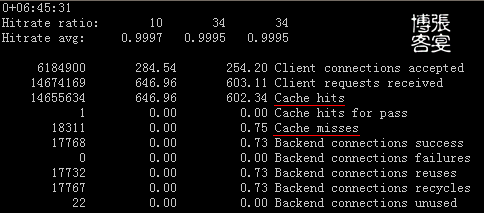
2、VarnishManagementportManagement:
helpVarnishcommand:
ping [timestamp]
status
start
stop
stats
vcl.load
vcl.inline
vcl.use
vcl.discard
vcl.list
vcl.show
param.show [-l] []
param.set
help [command]
url.purge
dump.pool
3、VarnishManagementport,Cache:
(1)、:http://blog.zyan.cc/a/zhangyan.htmlURLAddress):
(2)、:http://blog.zyan.cc/techURLAddress:
(3)、:Cache:
4、SquidCachePHPfunction(VarnishCachefunction,,):
- function purge($ip, $url)
- {
- $errstr = '';
- $errno = '';
- $fp = fsockopen ($ip, 80, $errno, $errstr, 2);
- if (!$fp)
- {
- return false;
- }
- else
- {
- $out = "PURGE $url HTTP/1.1/r/n";
- $out .= "Host:blog.zyan.cc/r/n";
- $out .= "Connection: close/r/n/r/n";
- fputs ($fp, $out);
- $out = fgets($fp , 4096);
- fclose ($fp);
- return true;
- }
- }
- purge("192.168.0.4", "/index.php");
- ?>
1:Varnish:http://www.varnish-cache.org/
2:20071210,0,VarnishLog,file,MeanwhileDeleteLogscript(/var/logs/cutlog.sh):
/var/logs/cutlog.shfile:
# This file run at 00:00
date=$(date -d "yesterday" +"%Y-%m-%d")
pkill -9 varnishncsa
mv /var/logs/youvideo.log /var/logs/${date}.log
/usr/local/varnish/bin/varnishncsa -n /var/vcache -w /var/logs/youvideo.log &
mkdir -p /var/logs/youvideo/
gzip -c /var/logs/${date}.log > /var/logs/youvideo/${date}.log.gz
rm -f /var/logs/${date}.log
rm -f /var/logs/youvideo/$(date -d "-1 month" +"%Y-%m*").log.gz
Settings00:00:
:
Address:http://zyan.cc/post/313/