

First, let’s look at the website architecture diagram:
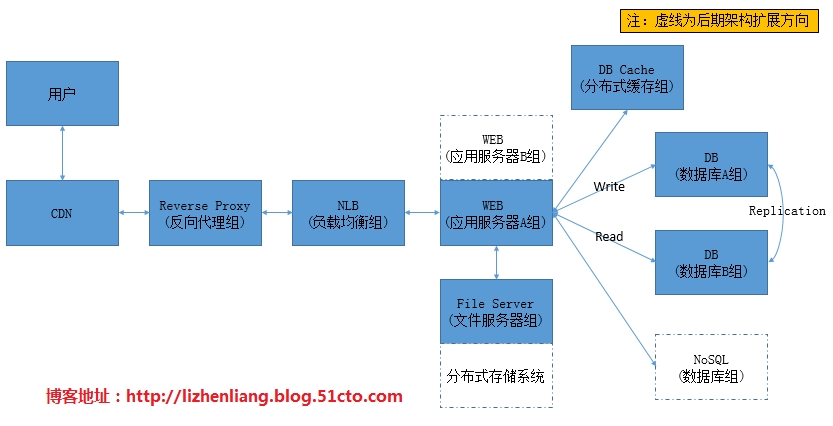
The website architecture above is widely used in medium and large-scale websites. This article analyzes the mainstream technologies and solutions used at each layer of the architecture, helping newcomers to website operations further understand website architecture and form their own architectural concepts.
Layer 1: CDN
In China, the network is mainly split between China Telecom in the south and China Unicom in the north, causing significant cross-region access latency. For websites with a certain amount of traffic, adding a CDN (Content Delivery Network) layer can effectively improve this phenomenon and is the best choice for website acceleration. CDNs cache website pages on nodes distributed nationwide, so when users access the site, they retrieve data from the nearest server, greatly reducing the network path. If you want to build your own CDN, it’s not recommended. Why? Simply put, don’t take on everything as an operations person. CDN architecture deployment is not complicated, but many factors affect its effectiveness. Later management and maintenance are also complex, and achieving the desired results is no easy task. It’s a thankless job, and in the end, the boss will still feel it’s your incompetence. It’s better to find a company specializing in CDN services. The cost is not high, they have anti-DDoS attack capabilities, the results are good, and it saves operations a lot of trouble. Why not do it!
Layer 2: Reverse Proxy (Web Cache)
If the CDN does not have the requested data cached, it forwards the request to this layer. The proxy server is configured with a local caching function. The proxy server checks if the data requested by the CDN is in its local cache. If so, it returns it directly to the CDN; if not, it requests it from the backend load balancer, which forwards the request to the WEB server. The WEB server returns the data to the proxy server, which then delivers the result to the CDN. Proxy servers generally cache static pages that don’t change frequently, such as images, JS, CSS, HTML, etc. Mainstream caching software includes Squid, Varnish, and Nginx.
Layer 3: Load Balancing
Websites with high traffic will use load balancing, as it’s the best way to solve the performance bottleneck of a single server. The reverse proxy forwards the request to the load balancer, which distributes it to backend WEB services based on algorithms (such as round-robin or selecting based on load). After the WEB service processes the request, it returns the data directly to the reverse proxy server. Load balancing rationally distributes requests to multiple backend WEB servers, reducing the concurrent load on a single server and ensuring service availability. Mainstream load balancing software includes LVS, HAProxy, and Nginx.
Layer 4: WEB Services
WEB services handle user requests. Their processing efficiency directly affects access speed. To avoid slow access caused by factors at this layer, tuning should be performed to ensure the WEB service operates at its best. Common WEB services include Apache and Nginx.
Apache Optimization:
1). mod_deflate Compression Module
Check if loaded:
If not installed, compile it in using apxs:
# /usr/local/apache/bin/apxs c I A apache源码目录/modules/mod_deflate.c
deflate configuration parameters:
2). mod_expires Caching Module
Check if it is loaded:
# apachectl M |grep expires
If not installed, compile it in using apxs:
# /usr/local/apache/bin/apxs c I A apache-source-dir/modules/mod_expires.c
Then enable the module in httpd.conf: LoadModule expires_module modules/mod_expires.so
There are three scopes for caching rules: global, directory, and virtual host.
3). Working Mode Selection and Optimization
Apache has two common working modes: worker and prefork. The default is worker, a hybrid MPM (Multi-Processing Module) that supports both multi-process and multi-threading. Requests are handled by threads, allowing more requests to be processed and improving concurrency, with lower system resource overhead compared to process-based MPMs. Since threads share the process memory space, a process crash will cause all its threads to crash. Prefork, on the other hand, is a non-threaded MPM. Its processes consume more system resources than worker, but because each connection is handled by a process, its operational efficiency is more stable than worker. You can check the current working mode using `apache2 -l` and specify the working mode during compilation using the `–with-mpm` parameter. Choose the appropriate working mode based on your business needs, then adjust the relevant parameters to increase processing capacity.
Configuration Parameter Description
Nginx Optimization:
1). gzip Compression Module
2). expires Caching Module
3). FastCGI Optimization
Nginx does not support directly calling or parsing dynamic programs (PHP). It must use FastCGI (Common Gateway Interface) to start the php-fpm process to parse PHP scripts. This means user requests first reach Nginx, which then hands off dynamic parsing to FastCGI, and FastCGI starts php-fpm to parse the PHP script. Therefore, it is necessary to optimize the FastCGI and php-fpm parameters appropriately.
php-fpm.conf configuration parameters:
4). proxy_cache Local Caching Module
Summary:
Enabling the compression module can save some bandwidth but will increase CPU processing on the web end. However, in the website architecture diagram above, enabling the compression module on the web end had no effect because the transmission to the upper layer goes through the local area network. For architectures directly facing users, it should still be enabled. The web end also does not need to enable the expires module because with a reverse proxy server and CDN, content never reaches the user’s browser directly, so enabling it has no effect.
If the reverse proxy uses Nginx, you can enable the expires module to cache static files in the user’s browser. When the browser initiates a request, it first checks if the requested data exists in the local cache. If it does, it then checks if it has expired. If not expired, it directly uses the cached data, even if the server resource has changed. Therefore, the expiration time must be set reasonably according to business requirements.
5. Using PHP Cachers to Improve Code Execution Efficiency
Without a cacher, each time a PHP page is requested, PHP will compile the code for that page. This means repeated compilation work increases server load. With a cacher, the compiled data from each execution is cached into shared memory. The next visit directly uses the pre-compiled code from the cache, avoiding the repeated compilation process and speeding up execution efficiency. Therefore, using a cacher for a PHP website is absolutely necessary! Mainstream PHP cachers include: eAccelerator, XCache.
Layer 5: Dynamic and Static Separation
Dynamic and static separation, as the name suggests, is about separating dynamic pages and static pages onto different servers for processing. For example, if the web server uses Nginx, you can deploy FastCGI on a separate server dedicated to parsing PHP dynamic pages, while static pages are handled by Nginx by default, with proper caching strategies in place. Another example: a shopping mall website with a large number of images might consider adding a file server cluster, directing both image requests and uploads to the file server. Mainstream file server solutions use NFS, which has a single point of failure; you can deploy a high-availability setup with DRBD+HeartBeat+NFS. If a single server is under too much pressure, consider using distributed file systems like GlusterFS, MooseFS, etc.>>
t: 28px; text-indent: 2em; font-family: tahoma, arial, 宋体; font-size: 14px;”>Layer 6: Database Caching
Use caching technology to store hot data in memory. If the requested data exists in the cache, return it directly; otherwise, fetch it from the database and then update the cache with the retrieved data. This improves read performance and reduces database pressure. Cache implementations include local caching and distributed caching. Local caching stores data in the local server’s memory or files. Distributed caching stores data in memory in a distributed manner, capable of caching massive amounts of data with excellent scalability. Mainstream distributed caching systems include Memcached and Redis. Memcached offers stable performance and high speed, with QPS reaching around 80,000. If you require data persistence, choose Redis, whose performance is not inferior to Memcached.
Layer 7: Database
This layer plays a leading role in the entire website architecture, directly determining user experience, and its architectural optimization is relatively complex.
Core Principle: Reduce the request layers