

Larger websites all face the challenge of preserving user sessions. Common solutions include database storage, memcache storage, and various other methods. Among these, memcache is often the best choice because it is memory-based, offering the fastest speed.
1. Download
First, you need to download memcache and the corresponding php_memcache.dll extension that supports your PHP version.
Windows Version
1. Click the attachment below to download from our site, or search and download it elsewhere. The package downloaded from our site includes memcache and a file to check your PHP version.
/uploadfile/down/memcached.zip
2. Download the corresponding version of php_memcached.dll and place it in the ext directory.
Linux: CentOS is used as an example below
1. yum install -y memcached
2. Download the corresponding version of php_memcached.dll and place it in the ext directory.
2. Installation
1. Windows Version
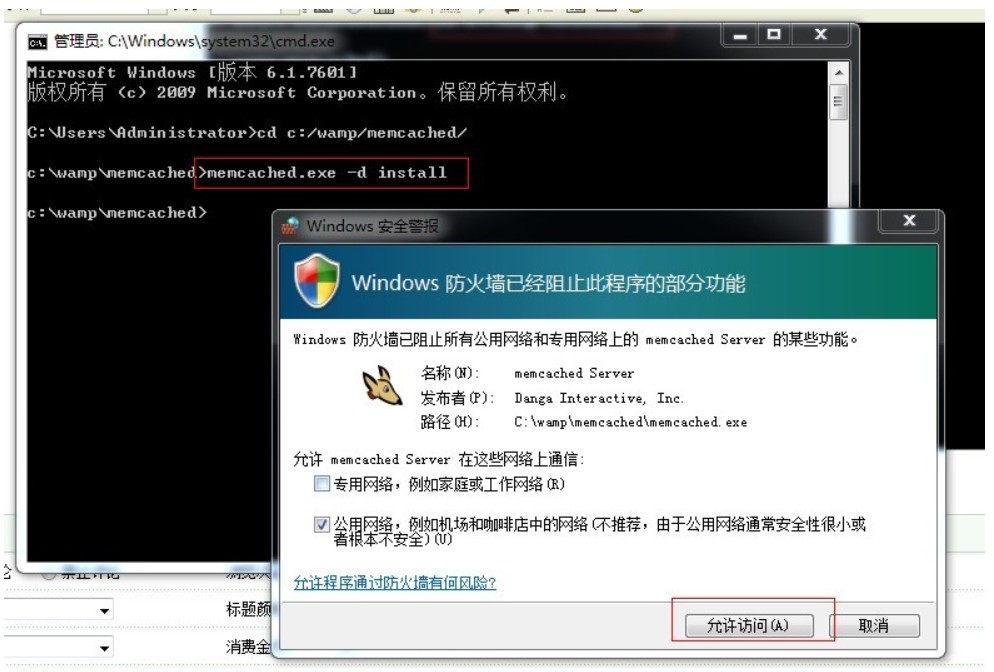
1.1 Open cmd
1.2. Switch to the directory where memcache is located
1.3. Install: memcached -d install
1.4. Start: memcached -d start
1.5. Check if memcached is running: Use netstat -an and check if port 11211 is listening. If it is, the startup is successful.
2. Linux Version
yum install -y memcached automatically completes the installation of the software and its dependency packages.
3. Configuration
Modify php.ini, find session.save_handler and session.save_path, and change them to the following configuration:
session.save_handler = memcache
session.save_path = "tcp://127.0.0.1:11211"
4. Start and Stop
Windows Version:
1. Start/Stop memcached: memcached -d start/stop
2. Start/Stop Apache: net stop/start apache2.2
Linux Version:
1. Start/Stop/Restart: service memcached start/stop/restart
2. Start/Stop Apache/Nginx:
service httpd restart/stop/start
nginx -s reload