

Memcached is a high-performance, distributed memory object caching system designed to reduce database load for dynamic web applications. It decreases the number of times the database is read
by caching data and objects in memory, thereby boosting the speed of dynamic, database-driven websites.
Before installation, you will need several software packages
libevent libevent-1.4.9-stable.tar.gz
memcached memcached-1.2.6.tar.gz
The first two are required. Since I need to access memcached via a PHP client, I installed memcache
memcache memcache-2.2.6.tgz
Web monitoring tool for memcache memcachephp.zip
Now let us install libevent
-
[root@localhost Desktop]# tar zxvf libevent-1.4.9-stable.tar.gz
		[root@localhost Desktop]# cd libevent-1.4.9-stable
		[root@localhost libevent-1.4.9-stable]# ./configure --prefix=/usr/local/libevent
		[root@localhost libevent-1.4.9-stable]# make
		[root@localhost libevent-1.4.9-stable]# make install
Then install memcached
-
[root@localhost Desktop]# tar zxvf memcached-1.2.6.tar.gz
		[root@localhost Desktop]# cd memcached-1.2.6
		[root@localhost memcached-1.2.6]# ./configure --prefix=/usr/local/memcached --with-libevent=/usr/local/libevent/
		[root@localhost memcached-1.2.6]# make
		[root@localhost memcached-1.2.6]# make install
Start memcached
-
[root@localhost memcached-1.2.6]# /usr/local/memcached/bin/memcached -u root run &
Install memcache
-
[root@localhost Desktop]# tar zxvf memcache-2.2.6.tgz
		[root@localhost Desktop]# cd memcache-2.2.6
		[root@localhost memcache-2.2.6]# /usr/local/php/bin/phpize
		[root@localhost memcache-2.2.6]# ./configure --with-php-config=/usr/local/php/bin/php-config
		[root@localhost memcache-2.2.6]# make
		[root@localhost memcache-2.2.6]# make install
Now configure PHP to support memcache
-
[root@localhost memcache-2.2.6]# vi /etc/php.ini
Find
-
extension_dir = "./" in /etc/php.ini
Change it to
-
extension_dir ="/usr/local/php/lib/php/extensions/no-debug-non-zts-20060613/"
And add the following lines after this line, then save:
-
extension = "memcache.so"
		extension = "pdo_mysql.so"
		extension = "imagick.so"
-
Then find output_buffering = Off
		Change it to output_buffering = On
Restart the Apache service and it will be ready
Installing the Memcached Web Monitoring Tool
Unzip the memcachephp file to obtain the memcache.php page, and place the page into your website directory, for example:
-
[root@localhost memcached-1.2.6]# /usr/local/www/memcache.php
Edit this file
-
[root@localhost www]# vi /usr/local/www/memcache.php
		Enter a username here, e.g.: sunpeng
		define('ADMIN_USERNAME','sunpeng');   // Admin Username
		Enter a password here, mine is: sunpeng
		define('ADMIN_PASSWORD','sunpeng');      // Admin Password
		Enter the local machine IP here
		$MEMCACHE_SERVERS[] = '127.0.0.1:11211'; // add more as an array
Save and log in using http://127.0.0.1/memcache.php with the account: sunpeng and password: sunpeng
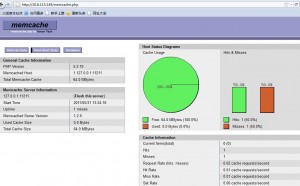
http://tech.firss.com/memcached-web.html