

First, modify the php.ini file.
Rename php.ini-dist in c:/php (you need to show file extensions first) to php.ini, open it with Notepad, find extension_dir = “./”, then change ./ to c:/php (adjust the path according to your actual setup).
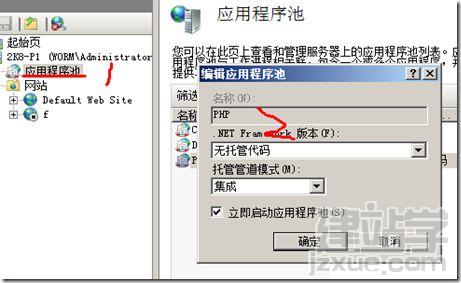
1. Add an Application Pool
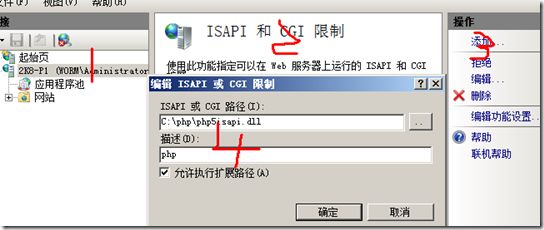
2. Add ISAPI and CGI Restrictions
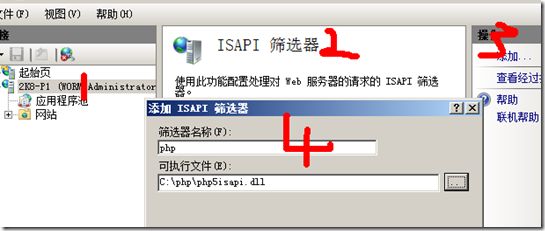
3. Add an ISAPI Filter
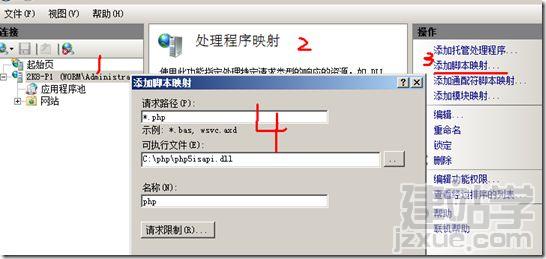
4. Add a Script Mapping
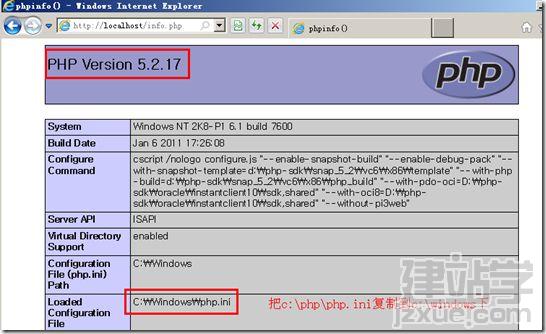
5. Test (a phpinfo.php file was created earlier) Same as before, open localhost/phpinfo.php to check the result:
PHP 5.2.17 Download:http://mirror.cnop.net/php/windows/php-5.2.17-Win32-VC6-x86.zip