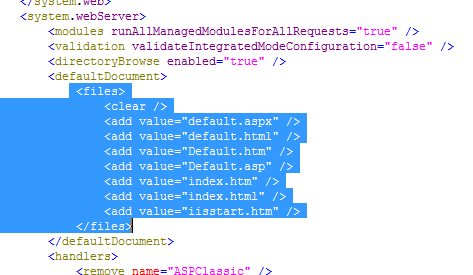
Home › Web › IIS › web.config Causing the Default Homepage to Fail web.config Causing the Default Homepage to Fail Categories: IIS 2014-09-15 root Comments (0) The web.config file can cause the default homepage to become invalid. The configuration file is shown below—simply remove it: « Previous Implementing Site-Wide HTTPS Access on IIS 6.0 Next »How to Install PHP 5.2.17 on IIS 7 Related Posts HTTP Error 404.15 – Not Found Request Filtering Module Configured to Deny Query String 2015-12-20 Fix “Error Description: 由于应用程序配置不正确” When Running PHP 2015-11-30 How to Enable Gzip Compression (HTTP Compression) on IIS 2015-10-24 How to Configure web.config for Multiple Domain 301 Redirects in IIS7 Virtual Hosting 2015-10-06 How to Convert IIS 6.0 Logs Between LOG and IBL Formats 2015-09-14 How to Set Up 301 Redirects on IIS7 Correctly 2015-08-07 Leave a Comment Cancel replyYour email address will not be published.Comment * Name * Email * Website Save my name, email, and website in this browser for the next time I comment. Δ