

First, install IIS7. During installation, pay attention to three checkboxes that need to be ticked.
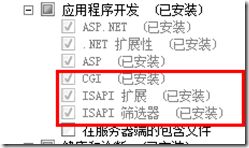
Note: CGI will be used in the IIS7 + PHP 5.3.5 environment.
ISAPI Extensions and ISAPI Filters are used for IIS7 + PHP 5.2.17.
Now let’s add PHP support to IIS.
IIS7 + PHP 5.3.5
1. Extract the downloaded PHP 5.3.5 archive to the C:/php directory (you can place it elsewhere, but adjust the subsequent paths accordingly).
2. Rename php.ini-development to php.ini.
3. Edit php.ini, search for data.timezone, and change it to date.timezone = “Asia/Shanghai” (this must be changed, otherwise a warning will appear). Find the Windows Extensions section and enable the required modules, such as: php_curl.dll php_mysql.dll php_mysqli.dll php_xmlrpc.dll php_curl.dll Simply remove the preceding semicolons and save.
4. Add a <Module Mapping>.
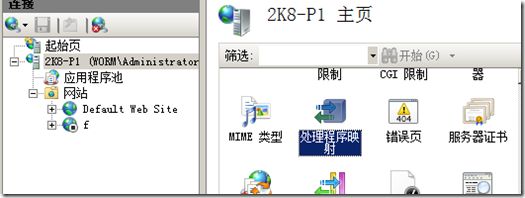
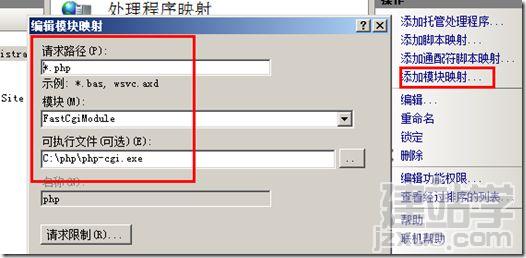
Fill in the paths here according to your actual setup.
5. Create a new text file named phpinfo.php in the website’s root directory.
6. Test by opening your browser and navigating to: localhost/phpinfo.php. If you see a page similar to the one below, you have succeeded:
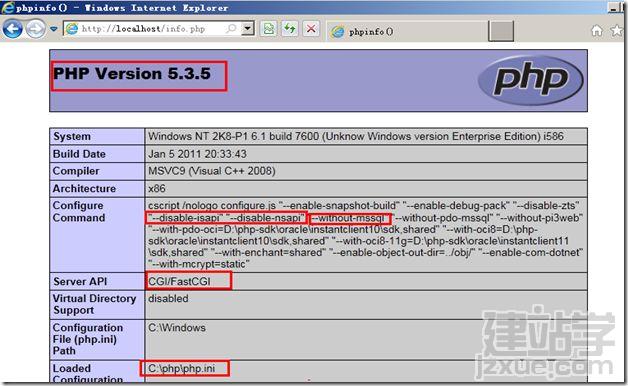
That’s it. Now you can successfully run PHP applications.