

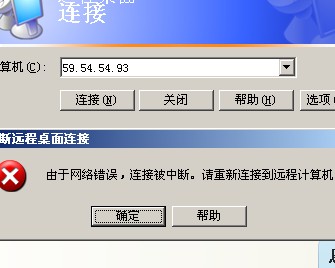
A server suddenly became unreachable via Remote Desktop. Its port 3389 was open, but it could not be pinged. After disabling the Windows Firewall, it could be pinged. It could still connect to other servers via Remote Desktop. When a client attempted to connect, it prompted an error similar to “The connection was interrupted due to a network error. Please reconnect to the remote computer.”
Solution
- Open the Run dialog, type regedit, and launch the Registry Editor.
- Navigate to HKEY_LOCAL_MA CHINE/SYSTEM/CurrentCon trolSet/Services/TermService/ Parameters.
- Delete the Certificate entry.
- Restart the computer. The issue will be resolved.