

Most PHP developers are probably familiar with lnmp/lamp stacks. I recently installed the lamp package from https://lnmp.org/ and found that regular user cron jobs were not executing. After uninstalling it, everything returned to normal.
Here’s the fix:
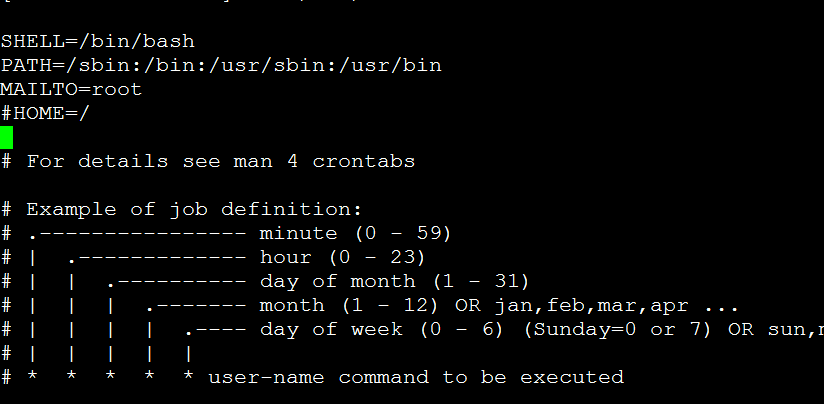
vi /etc/crontab # Edit the file
SHELL=/bin/bashPATH=/sbin:/bin:/usr/sbin:/usr/binMAILTO=rootHOME=/# For details see man 4 crontabs# Example of job definition:# .—————- minute (0 – 59)# | .————- hour (0 – 23)# | | .———- day of month (1 – 31)# | | | .——- month (1 – 12) OR jan,feb,mar,apr …# | | | | .—- day of week (0 – 6) (Sunday=0 or 7) OR sun,mon,tue,wed,thu,fri,sat# | | | | |# * * * * * user-name command to be executed
Change it to
SHELL=/bin/bashPATH=/sbin:/bin:/usr/sbin:/usr/binMAILTO=root#HOME=/# For details see man 4 crontabs# Example of job definition:# .—————- minute (0 – 59)# | .————- hour (0 – 23)# | | .———- day of month (1 – 31)# | | | .——- month (1 – 12) OR jan,feb,mar,apr …# | | | | .—- day of week (0 – 6) (Sunday=0 or 7) OR sun,mon,tue,wed,thu,fri,sat# | | | | |# * * * * * user-name command to be executed
/sbin/service crond restart # Restart the cron service
In short, remove the “HOME=/ ” entry.