

lnmp/lamp相信熟悉php程序的基本都用过,这两天安装了一个 https://lnmp.org/ 的lamp程序后发现crontab定时任务普通用户不执行,卸载后恢复正常。
下面说下解决方法:
vi /etc/crontab #编辑文件
SHELL=/bin/bashPATH=/sbin:/bin:/usr/sbin:/usr/binMAILTO=rootHOME=/# For details see man 4 crontabs# Example of job definition:# .—————- minute (0 – 59)# | .————- hour (0 – 23)# | | .———- day of month (1 – 31)# | | | .——- month (1 – 12) OR jan,feb,mar,apr …# | | | | .—- day of week (0 – 6) (Sunday=0 or 7) OR sun,mon,tue,wed,thu,fri,sat# | | | | |# * * * * * user-name command to be executed
改为
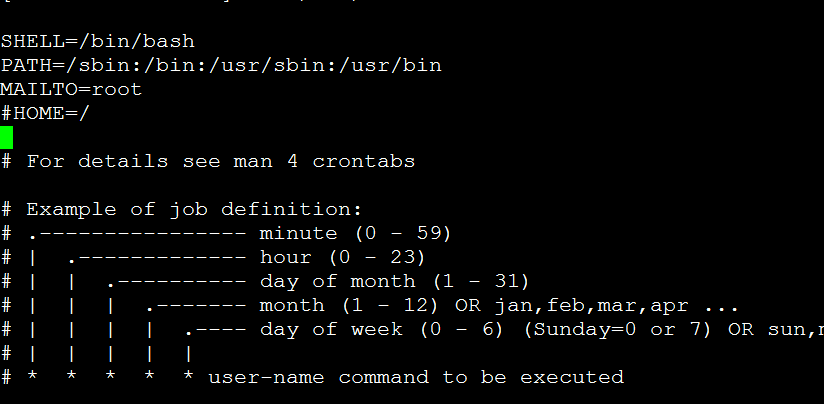
SHELL=/bin/bashPATH=/sbin:/bin:/usr/sbin:/usr/binMAILTO=root#HOME=/# For details see man 4 crontabs# Example of job definition:# .—————- minute (0 – 59)# | .————- hour (0 – 23)# | | .———- day of month (1 – 31)# | | | .——- month (1 – 12) OR jan,feb,mar,apr …# | | | | .—- day of week (0 – 6) (Sunday=0 or 7) OR sun,mon,tue,wed,thu,fri,sat# | | | | |# * * * * * user-name command to be executed
/sbin/service crond restart #重启定时程序
即,去除“HOME=/ ”相关内容。