

Create the relevant entries in the startup directory.
cd /etc/init.d
vi /etc/init.d/tomcat
Using the Tomcat installation directory /usr/local/tomcat/ as an example, fill in the code as follows:
#!/bin/sh#chkconfig: 2345 10 90# description: Starts and Stops the Tomcat daemon.###############################################Startup script for Tomcat on Linux#filename tomcat.sh#Make sure the java and the tomcat installation path has been added to the PATHJAVA_HOME=/usr/java/jdk1.8.0_77CATALINA_HOME=/usr/local/tomcatexport JAVA_HOMEexport CATALINA_HOME###############################################start_tomcat=/usr/local/tomcat/bin/startup.shstop_tomcat=/usr/local/tomcat/bin/shutdown.shstart() {echo -n "Starting tomcat: "${start_tomcat}echo "tomcat start ok."}stop() {echo -n "Shutting down tomcat: "${stop_tomcat}echo "tomcat stop ok."}# See how we were calledcase "$1" instart)start;;stop)stop;;restart)stopsleep 10start;;*)echo "Usage: $0 {start|stop|restart}"esacexit 0
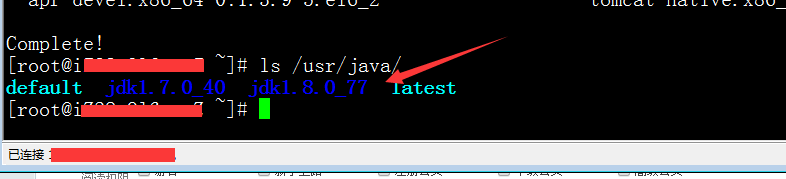
Note: For JAVA_HOME=/usr/java/jdk1.8.0_77, please adjust the JDK version and path according to the version installed on your system. The method is:
ls /usr/java/
Grant script permissions:
chmod 755 tomcat
Add to services:
chkconfig –add tomcat
Enable startup at boot:
chkconfig –level 345 tomcat on
Done. Now you can start Tomcat using the command service tomcat start. Commands for stopping and restarting the service are similar, simply replace start with stop or restart.
Attachment download link https://www.cnop.net/uploadfile/2016/0805/20160805022735452.zip