

For various reasons, many users managing their VPS/servers with the WDCP control panel have likely forgotten the MySQL ROOT password and are seeking a solution—some may even forget the WDCP admin login password. These issues are relatively simple, requiring only a clear troubleshooting approach. Of course, if you’re worried about running into problems, you can always ask me, Lao Jiang, for help.
1. Resetting the WDCP Panel ROOT MySQL Password
First, ensure you are using the latest version of the WDCP control panel. I have previously shared the WDCP installation guide. SSH into your VPS and enter the following command:
sh /www/wdlinux/tools/mysql_root_chg.sh
After a short wait, you will see an execution screen showing the newly reset password.
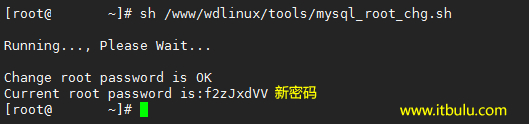
You can then log into your MySQL database management via ip:8080/phpmyadmin.
2. Resetting the WDCP Admin Login Password
Navigate to ip:8080/phpmyadmin to access the WDCP database management interface. If you know the ROOT MySQL password, log in directly. If you don’t know it, or have forgotten it, refer to step one to reset it.
Then find the WDCPDB database and modify the corresponding admin fields in the wd_member table.
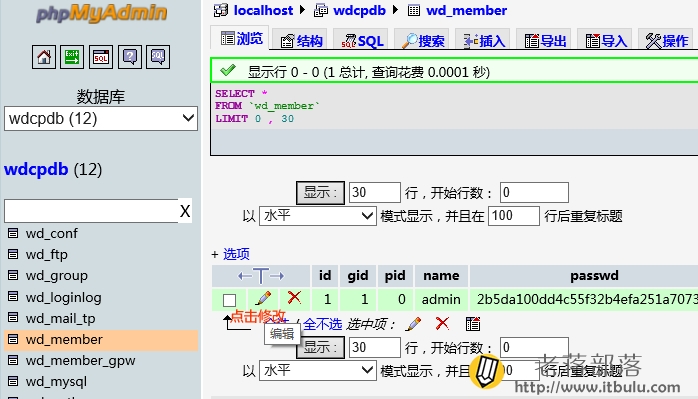
Click the "pencil icon" to edit the PASSWD field string, and replace it with "2b5da100dd4c55f32b4efa251a7073f1" (the red part). After saving, log in to the WDCP panel again. The password I set here is itbulu.com
After logging in, you can change the password to something more familiar to you.
Original article http://www.itbulu.com/reset-wdcp-pws.html