

I. Installing Chinese Support on the System
1. Install Chinese language pack:
yum -y groupinstall chinese-support
2. Modify the character encoding configuration file
vi /etc/sysconfig/i18n
Enter:
LANGUAGE=”zh_CN.GB18030:zh_CN.GB2312:zh_CN”
SUPPORTED=”zh_CN.GB18030:zh_CN:zh:en_US.UTF-8:en_US:en”
SYSFONT=”lat0-sun16″
export LC_ALL=”zh_CN.GB18030″
3. Re-login to the system.
Or refer to the following method
Solution:
1. Install Chinese support package
# yum groupinstall “Chinese Support”
2. Modify # /etc/sysconfig/i18n
Original:
LANG=”or_IN.UTF-8″
Change to
LANG=”zh_CN.UTF-8″
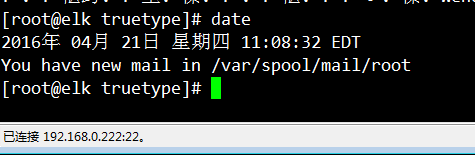
3. Test
Enter
#date
II. Installing Fonts:
1. View currently installed Chinese fonts on the system
# fc-list :lang=zh
AR PL UMing TW:style=Light
AR PL UMing HK:style=Light
AR PL UMing CN:style=Light
AR PL UKai TW MBE:style=Book
AR PL UKai CN:style=Book
AR PL UKai HK:style=Book
AR PL UKai TW:style=Book
WenQuanYi Zen Hei:style=Regular
WenQuanYi Zen Hei Mono:style=Regular
AR PL UMing TW MBE:style=Light
WenQuanYi Zen Hei Sharp:style=Regular
Note: This command displays the installed Chinese fonts. From the output, SimSun (Song) font is not installed.
2. Copy the simsun.ttc font file
You can download it from the internet, or find the corresponding font in the local Windows directory (C:/Windows/Fonts). Here we download the simsun.ttc file from this site’s download mirror:
# mkdir -p /usr/share/fonts/truetype
#cd /usr/share/fonts/truetype
#wget http://mirror.cnop.net/fonts/simsun.ttc
3. Generate font index information
# yum -y install mkfontscale
# mkfontscale
# mkfontdir
# ll
total 10276
-rw-r–r–. 1 root root 189 Jan 31 22:33 fonts.dir
-rw-r–r–. 1 root root 189 Jan 31 22:33 fonts.scale
-rw-r–r–. 1 root root 10512288 Jan 31 22:33 simsun.ttf
Note: This generates the corresponding fonts.scale and fonts.dir files.
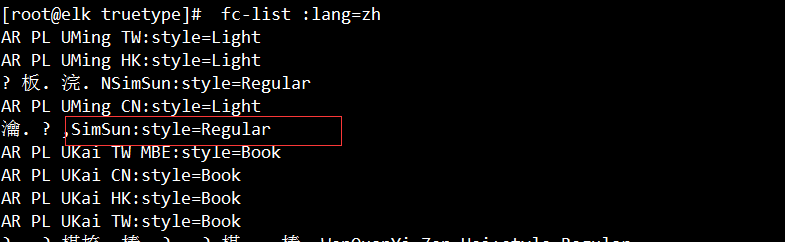
4. View installed fonts again
# fc-list :lang=zh
AR PL UMing TW:style=Light
AR PL UMing HK:style=LightNSimSun:style=Regular
AR PL UMing CN:style=LightSimSun:style=Regular
AR PL UKai TW MBE:style=BookAR PL UKai CN:style=Book
AR PL UKai HK:style=Book
AR PL UKai TW:style=BookWenQuanYi Zen Hei:style=RegularWenQuanYi Zen Hei Mono:style=Regular
AR PL UMing TW MBE:style=LightWenQuanYi Zen Hei Sharp:style=Regular
Note: At this point, the SimSun (Song) font has been successfully installed.