

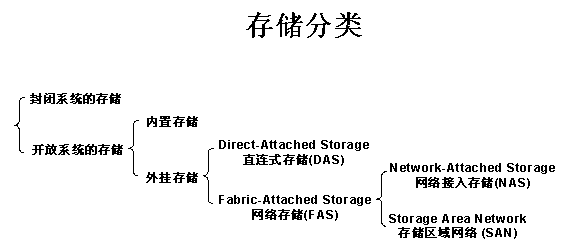
In today’s disk storage market, storage classification (see Table 1 below) is divided by server type into: closed-system storage and open-system storage. Closed systems primarily refer to mainframes, AS/400, and similar servers, while open systems refer to servers based on operating systems including Windows, UNIX, and Linux. Open-system storage is further divided into: internal storage and external storage; external storage for open systems is classified by connection method into: Direct-Attached Storage (DAS) and Fabric-Attached Storage (FAS); open-system networked storage is further divided by transport protocol into: Network-Attached Storage (NAS) and Storage Area Network (SAN). Since the vast majority of users today adopt open systems, with external storage accounting for over 70% of the current disk storage market, this article primarily discusses and explains external storage for open systems.
Table 1:
Today’s storage solutions are primarily: Direct-Attached Storage (DAS), Storage Area Network (SAN), and Network-Attached Storage (NAS). See Table 2 below: 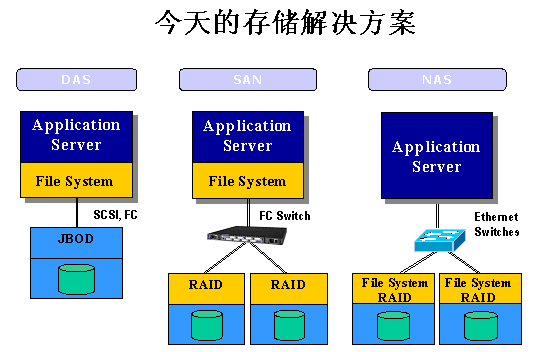
Open-system Direct-Attached Storage (DAS) has been in use for nearly forty years. As user data continues to grow, especially when exceeding hundreds of gigabytes, problems in areas such as backup, recovery, expansion, and disaster recovery increasingly trouble system administrators.
Key problems and shortcomings include:
DAS relies on the server host operating system for data I/O read/write and storage maintenance management. Data backup and recovery require server host resources (including CPU and system I/O). The data flow must loop back through the host before reaching the tape drive (library) connected to the server. Data backup typically consumes 20-30% of server host resources, so many enterprise users often schedule daily data backups late at night or when business systems are idle, to avoid impacting normal business operations. The larger the volume of data on DAS, the longer backup and recovery take, and the greater the dependency and impact on server hardware.
The connection channel between DAS and the server host typically uses SCSI, with bandwidths of 10MB/s, 20MB/s, 40MB/s, 80MB/s, etc. As server CPU processing power increases, storage disk space grows larger, and the number of drives in arrays increases, the SCSI channel becomes an I/O bottleneck. Server host SCSI ID resources are limited, restricting the number of SCSI channel connections that can be established.
Whether expanding DAS or server hosts—from a single server to a cluster of multiple servers, or expanding storage array capacity—business system downtime is inevitable, causing economic losses to the enterprise. For industries such as banking, telecommunications, and media that require 7×24 mission-critical service, this is unacceptable. Furthermore, upgrades or expansions of DAS or server hosts can only be provided by the original equipment vendor, often subject to vendor limitations.
Storage Area Network (SAN) uses Fibre Channel technology, connecting storage arrays and server hosts through Fibre Channel switches to establish a dedicated network for data storage. After more than a decade of development, SAN has become quite mature and is the de facto industry standard (though each vendor’s Fibre Channel switching technology is not entirely identical, and compatibility between servers and SAN storage must be considered). SAN storage bandwidth has evolved from 100MB/s and 200MB/s to the current 1Gbps and 2Gbps.
Network-Attached Storage (NAS) uses network technologies (TCP/IP, ATM, FDDI), connecting storage systems and server hosts through network switches to establish a dedicated private storage network. With the advancement of IP network technology, NAS technology has undergone a qualitative leap. In the late 1980s to early 1990s, with 10Mbps bandwidth, NAS served as file server storage, and its performance was limited by bandwidth. Later, with the emergence of Fast Ethernet (100Mbps), VLANs, and Trunk (Ethernet Channel), NAS read/write performance improved. The introduction and commercial adoption of Gigabit Ethernet (1000Mbps) in 1998 brought a qualitative change and widespread market acceptance for NAS. Since NAS uses TCP/IP networks for data exchange, and TCP/IP is the standard protocol in the IT industry, products from different vendors (servers, switches, NAS storage) can achieve interconnection and interoperability as long as they comply with protocol standards, without compatibility requirements. Moreover, with the emergence and commercial adoption of 10 Gigabit Ethernet (10000Mbps) in 2002, storage network bandwidth will greatly enhance NAS storage performance. The strong demand for NAS has become a reality. First, NAS inherits almost all the advantages of disk arrays, allowing devices to be connected through standard network topologies, freeing them from the constraints of servers and heterogeneous architectures. Second, amid the explosive growth of enterprise data, while products such as SAN, large tape libraries, and disk cabinets are all excellent storage solutions, their high cost and complex operation are simply unacceptable to small and medium-sized enterprises with limited capital and technical resources. NAS is precisely the product that meets this need—providing sufficient storage and expansion space while delivering extremely high cost-effectiveness. Therefore, whether from the perspective of applicability or TCO, NAS naturally becomes the best choice for most enterprises, especially small and medium-sized ones.
Analysis and Comparison of NAS and SAN
In response to the problem that I/O is the bottleneck reducing overall network system efficiency, experts have proposed various solutions. Among them, the approach that addresses the crux of the issue and has been proven most effective through practice is: separating data from general-purpose application servers to simplify storage management.
The Problem:
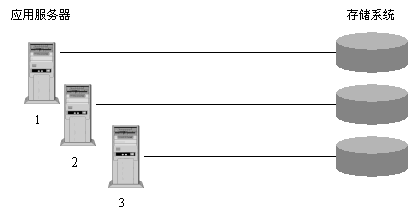
Figure 1
As shown in Figure 1, the original problem was: each new application server had to have its own storage. This made data processing complex, and as the number of application servers continued to increase, overall network system efficiency would plummet.
The Solution:
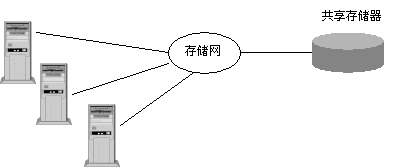
Figure 2
As seen in Figure 2: separate storage from application servers and manage it centrally. This is what is called Storage Networks.
Benefits of using storage networks:
Unity: dispersed in form but unified in spirit—logically fully integrated.
Enables centralized data management, because data is the true lifeblood of the enterprise.
Easily expandable, i.e., highly scalable.
Fault-tolerant, with no single point of failure across the entire network.
Experts have adopted two different implementation approaches for this solution: NAS (Network-Attached Storage) and SAN (Storage Area Networks).
NAS: Users access data via the TCP/IP protocol, using industry-standard file sharing protocols such as NFS, HTTP, and CIFS for sharing.
SAN: Data is accessed through dedicated Fibre Channel switches, using SCSI and FC-AL interfaces.
What is the fundamental difference between NAS and SAN?
The most essential difference between NAS and SAN is where the file management system resides. As illustrated:
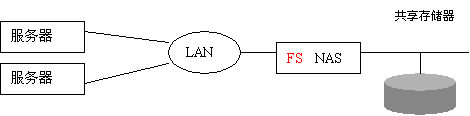
Figure 3
As seen in Figure 3, in a SAN architecture, the file management system (FS) still resides on each individual application server; whereas with NAS, each application server uses the same file management system through network sharing protocols (such as NFS, CIFS). In other words: the difference between NAS and SAN storage systems is that NAS has its own file system management.
NAS focuses on applications, users, files, and the data they share. SAN focuses on disks, tapes, and the reliable infrastructure connecting them. In the future, the comprehensive solution spanning from desktop systems to centralized data management to storage devices will be NAS plus SAN.