

1.1 Storage
Storage devices form the most fundamental layer in a website’s backend architecture. They are also the most critical part. If a storage device fails, it will directly halt the services of the upper data and application layers. Severe storage device damage and irrecoverable data loss can cause enormous economic losses for a business. Therefore, companies invest heavily in data storage, and large corporations even employ dedicated storage engineers to manage, configure, and optimize the underlying storage. Common storage devices include mechanical hard disk drives and SSDs (Solid State Drives). Mechanical disks are the most common storage medium, especially in large-scale system deployments, while SSDs, due to their high cost, are rarely used for massive data storage. However, because SSDs offer faster read and write speeds than mechanical hard drives, many companies develop software acceleration products deployed on SSDs to speed up system access.
Combining storage media (like mechanical disks) with network protocols has led to a variety of storage solutions. Typical storage solutions include DAS, SAN, NAS, and iSCSI. (For more on SAN/NAS/DAS, see http://blog.csdn.net/longxibendi/article/details/6400262). Although the specific structures of these solutions differ, many of them use RAID technology for underlying storage redundancy. Therefore, the next section will primarily analyze RAID technology.
1.2 RAID Technology
RAID (Redundant Array of Independent Disks) combines multiple independent disks into a disk group in a certain way. (Note: it can also combine disk partitions into a group.)
In practical applications, there are software-implemented RAID and hardware-implemented RAID. However, the underlying data access strategy is the same. Hardware-implemented RAID simply features dedicated RAID chips with corresponding cache and batteries.
Commonly used RAID technologies include RAID0, RAID1, and RAID5. In enterprise applications, two of these technologies, such as RAID0, RAID1, and RAID5, are often combined for use.
1.2.1 RAID0, RAID1, RAID5, RAID10, RAID0+1
The following analysis focuses on the commonly used RAID0, RAID1, RAID5, and storage redundancy schemes that combine two RAID technologies.
1.2.1.1 RAID0 Technology
RAID0 technology works by distributing data evenly across different underlying disks according to a specific strategy. The benefit is faster data writing because the movement of read/write heads on different disks does not interfere with each other, allowing for potentially parallel writing. The principle is shown in Figure 7-2-1-1.
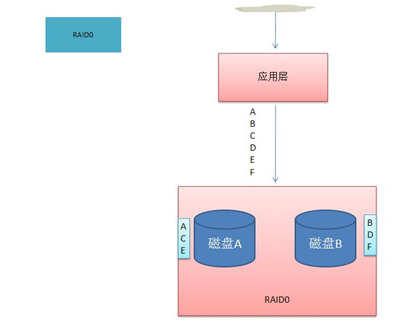
Figure 7-2-1-1
As shown in Figure 7-2-1-1, when the application layer needs to write data, such as the string ABCDEF, to the disks, the sequence A, C, E is written to Disk A, and the sequence B, D, F is written to Disk B. In this way, writing A to Disk A does not affect writing B to Disk B. Essentially, this achieves parallel data writing. It is also a load-balancing strategy for underlying storage. Therefore, RAID0 requires at least two disks. We call RAID0 striping technology.
1.2.1.2 RAID1 Technology
RAID1 technology works by writing data simultaneously to two disks according to a specific strategy, thus creating a data backup. This is shown in Figure 7-2-1-2.
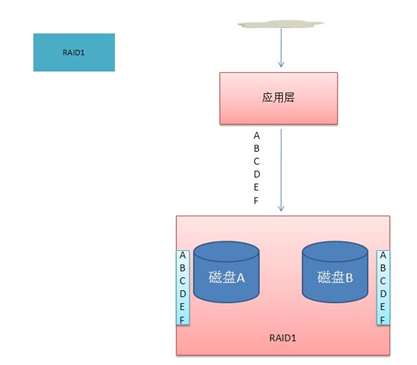
Figure 7-2-1-2
As shown in Figure 7-2-1-2, when the data ABCDEFG needs to be written to disk, it is written to both Disk A and Disk B, and the written data is identical. This achieves data backup. Similarly, RAID1 requires at least two disks. We call RAID1 mirroring technology.
1.2.1.3 RAID5 Technology
RAID5 technology distributes data evenly across various disks and writes the corresponding parity codes for data not stored on one disk to the other disks. The principle is shown in Figure 7-2-1-3.
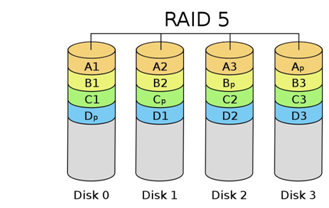
Figure 7-2-1-3
As shown in Figure 7-2-1-3, data A1, A2, A3 are written to Disk 0, while the parity code Ap corresponding to the string A1A2A3 is written to Disk 3. This way, if any single disk is damaged, data can be recovered from the corresponding other disks. Therefore, RAID5 requires at least three disks.
Compared to RAID0, RAID5 increases data security, allowing one disk failure without data loss. Like RAID0, it also offers good parallelism. Compared to RAID1, RAID5 provides parallelism in data writing. Like RAID1, it can achieve a degree of data security, allowing one disk to fail without data loss.
1.2.1.4 RAID10 Technology
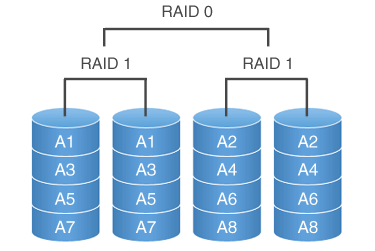
As the name suggests, RAID10 is implemented by performing RAID1 first, and then RAID0. This means mirroring the data first to create a backup, and then striping the data to achieve parallel writing. Many enterprises adopt RAID10 as their RAID level. For instance, the domestic online gaming company Sohu Changyou uses RAID10 technology for its game databases. RAID10 technology requires at least four disks. The structure diagram is shown in Figure 7-2-1-4.
&