

There are many distributed file systems, including GFS, HDFS, Taobao’s open-source TFS, Tencent’s TFS used for photo storage (Tencent FS, hereafter referred to as QFS to avoid confusion), and Facebook Haystack. Among them, TFS, QFS, and Haystack address very similar problems and share similar architectures. These three file systems are categorized as Blob FS (Blob File System). This article compares three typical file systems from a distributed architecture perspective.
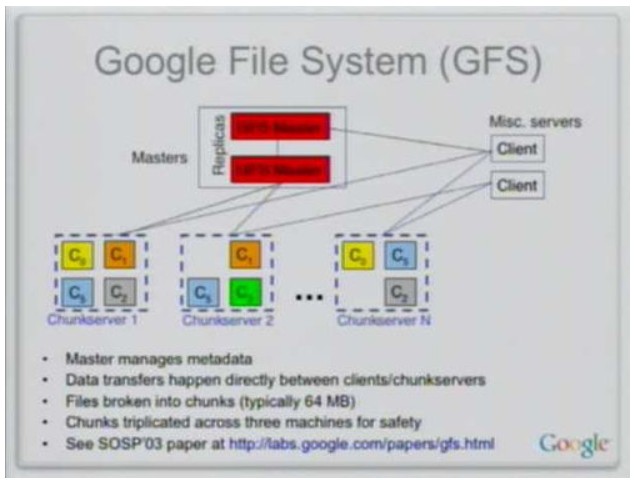
Let’s first look at GFS and HDFS. HDFS can essentially be considered a simplified implementation of GFS, so the two share many similarities. First, both GFS and HDFS use a single master + multiple workers model. A single master stores all system metadata and makes decisions regarding data distribution, replication, and backup. The master also implements metadata checkpointing, operation logging, and log replay. Worker machines store data and perform operations like data storage, migration, and computation based on the master’s instructions. Second, both GFS and HDFS provide higher reliability and better performance through data chunking and replication (multiple replicas, typically three). When one replica becomes unavailable, both systems offer automatic replica recovery. Additionally, since data is read far more often than written, read services are distributed across the machines holding the replicas, improving overall system performance. Finally, both GFS and HDFS provide a tree-structured file system, implementing operations similar to those found in Linux, such as file copying, renaming, moving, creating, deleting, and simple permission management.
However, GFS and HDFS differ significantly in key design choices. HDFS simplifies many aspects to avoid the complexity of GFS. First, the most complex part of GFS is its support for multiple clients concurrently appending to the same file, namely the multi-client concurrent Append model. GFS allows a file to be opened multiple times or by multiple clients simultaneously for data appending, treating data as records. Assuming the average GFS append record size is between 16KB and 16MB, with an average of 1MB, it would be highly inefficient to access the GFS Master for every single append. Therefore, GFS uses a Lease mechanism to delegate write permissions for each chunk to a Chunk Server. A write lease means a Chunk Server has write permission for a specific chunk during the lease’s validity period (say, 12 seconds). The Chunk Server holding the lease is called the Primary Chunk Server. If the Primary Chunk Server fails, the write lease for that chunk can be reassigned to another Chunk Server after the lease expires. Multiple clients concurrently appending to the same file forces the Chunk Server to sequence records. A client’s write operation may be retried after failure, potentially creating duplicate records. Coupled with an asynchronous client API, this also introduces record ordering problems. The issues of duplicate and out-of-order records under the Append model, combined with the Lease mechanism鈥攅specially since a chunk’s lease can migrate between Chunk Servers鈥攙astly increase the complexity of the system’s design and consistency model. In HDFS, however, a file is only allowed to be opened once for data appending. The client first writes all data to a local temporary file. Once the data volume reaches the size of one chunk (usually 64MB), it requests the HDFS Master to allocate a worker machine and a chunk number, writing an entire chunk’s worth of data to the HDFS file in one go. Since the actual HDFS write only happens after accumulating 64MB of data, the pressure on the HDFS Master is minimal, eliminating the need for a mechanism like GFS’s write lease delegation to worker machines. This also avoids the problems of duplicate and out-of-order records, greatly simplifying the system design. However, we must understand that HDFS’s lack of support for the Append model brings its own problems. Hypertable and HBase, built on top of HDFS, need to use HDFS to store their table system operation logs. Since an HDFS client needs to accumulate 64MB of data before writing to HDFS at once, if a tablet server node in Hypertable or HBase (corresponding to the Tablet Server in Bigtable) crashes, some of the operation log might not have been written to HDFS yet, leading to potential data loss. Next is the handling of single Master point of failure. GFS uses a master-slave model to back up the Master’s system metadata. When the primary Master fails, a distributed election can promote a backup machine to take over and continue providing external services. Due to the inherent complexity of replication and master-slave failover, HDFS Master’s persistent data is only written locally (potentially written to multiple disks on the Master machine to prevent single disk failure), requiring manual intervention upon failure. Another point is snapshot support. GFS implements cluster snapshot functionality internally using copy-on-write data structures, while HDFS does not provide snapshot capabilities. In large-scale distributed systems, software bugs are a normal occurrence. Although bugs can usually be fixed, it is very difficult to restore system data to a consistent state through compensatory operations alone. Often, the underlying system needs to provide snapshot functionality to roll back the system to a recent consistent state. In summary, HDFS can essentially be seen as a simplified version of GFS. Due to factors like timing and application scenarios, it simplifies certain GFS functions, drastically reducing complexity.
The requirements of a Blob File System are actually different from those of GFS/HDFS. GFS and HDFS are relatively general-purpose; you can build generic table systems like Bigtable, Hypertable, and HBase on top of them. In contrast, the application scenario for a Blog File System is typically Blob data like images and photo albums. GFS data is appended to the system incrementally, whereas Blob data generally involves a whole Blob block being prepared and written to the Blob file system at once, such as a user uploading a photo. GFS is a large-file system that prioritizes throughput, suitable for building general-purpose KV stores or table systems. A Blob file system, however, is a small-file system primarily used just for storing blob data. GFS and Blob FS appear to have many similarities. For instance, both GFS and TFS currently use a single master + multiple workers model, where the master makes decisions about data distribution, replication, and backup, and the workers store data and execute commands from the master for data storage, migration, etc. However, their differences are quite significant. Due to different business scenarios, they face different problems. In a Blob FS, since the entire blob data block is prepared in one go, the data write model is inherently simpler: each write requests the Master to allocate a Blob block ID and a list of machines to write to, and then the data is written to multiple machines at once. However, the challenge faced by Blob FS is the issue of excessively large metadata. Because a Blob FS typically stores a huge number of blob blocks鈥攆or example, TFS stores