

Server Environment: Red Hat Linux 5.5, Nginx, PHP FastCGI
Under this environment, php-cgi generally runs very stably. However, there have been cases where php-cgi consumes excessive CPU resources, causing the server to respond very slowly. The reasons I’ve encountered for php-cgi processes hogging CPU resources include:
1. Compatibility issues between certain PHP extensions and the PHP version. In practice, eAccelerater has compatibility problems with some PHP versions. The specific symptom is that about 10 minutes after starting the php-cgi process, it becomes incredibly slow, but static resources load quickly and the server load is normal (indicating Nginx is fine, and the problem lies with the php-cgi process). The solution is to disable the eAccelerater module in php.ini and then restart the php-cgi process.
2. There may be infinite loops in the program, causing the server load to spike (using the top command shows a load exceeding 100+). You need to use Linux’s proc virtual file system to find the specific problematic program.
3. Improper use of sessions in PHP programs. This happened with the open-source JishiGou microblogging script. The specific symptom is that a small number of php-cgi processes (no more than 10) have CPU usage exceeding 98%, with the server load between 4-8. Solving this issue also requires using the Linux proc file system to identify the cause.
4. The program contains excessively time-consuming and impossible-to-complete operations (again, a program issue). For example, the attachment download function in Discuz X 1.5 defined in source/module/forum/forum_attachement.php:
function getremotefile($file) {
global $_G;
@set_time_limit(0);
if(!@readfile($_G['setting']['ftp']['attachurl'].'forum/'.$file)) {
$ftp = ftpcmd('object');
$tmpfile = @tempnam($_G['setting']['attachdir'], '');
if($ftp->ftp_get($tmpfile, 'forum/'.$file, FTP_BINARY)) {
@readfile($tmpfile);
@unlink($tmpfile);
} else {
@unlink($tmpfile);
return FALSE;
}
}
return TRUE;
}
No preliminary checks are performed on the incoming parameters, and it sets an unlimited timeout. Using readfile to read a large file in one go can lead to the following issues:
A. Reading remote attachments via HTTP is excessively time-consuming.
B. When FTP cannot connect, how can errors be reported promptly?
C. readfile reads the entire file into memory at once before outputting it. When the file is too large, memory consumption is staggering.
Experiments have found that using readfile to read all at once noticeably increases memory consumption, but CPU utilization drops significantly. If a chunked reading method is used, memory consumption decreases slightly, but CPU usage increases noticeably.
A better workaround for this Discuz X 1.5 bug is to correctly reconfigure the remote attachment parameters in the backend.
Below are the troubleshooting steps I gradually compiled:
1. Get the PID (Process ID) of the php-cgi process consuming excessive CPU resources. Use the top command, as shown below:
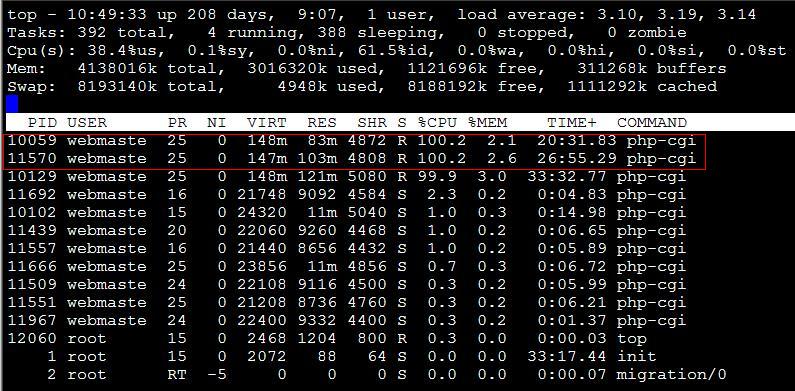
From the image above, we found two php-cgi processes with excessively high CPU resource usage, PIDs 10059 and 11570 respectively. This is typically caused by insufficient program optimization. How do we locate the problematic PHP program?
2. Identify the files used by the process.
The /proc/ file system is stored in memory, mainly preserving system status, key configurations, etc. The numeric directories under /proc/ contain information related to processes. As shown below, let’s see what files process 10059 is currently using?
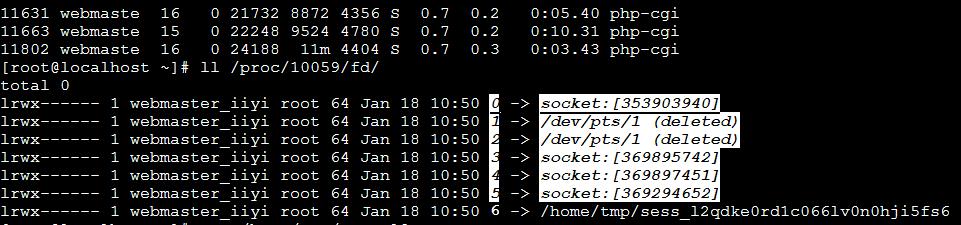
Clearly, it is using the /home/tmp/sess_* file, which is obviously a PHP session file. We checked the content of this session file: view_time|123333312412
At this point, we can suspect the issue is caused by the PHP program writing a session item called view_time. The remaining task is to check all PHP files containing view_time, then modify them (e.g., switch to using COOKIE). To be honest, view_time is not sensitive data; it only records the user’s last access time. There is really no need to use the costly session mechanism, and a cookie should be used instead.
3. Find the problematic program and modify it.
Use vi to edit the following shell script (assuming the website program is located in the /www directory)
#!/bin/bash
find /www/ -name "*.php" > list.txt
f=`cat ./list.txt`
for n in $f
do
r=`egrep 'view_time' $n`
if [ ! "$r" = "" ] ; then
echo $n
fi
done
Run this shell script to output files containing view_time. For the JishiGou microblogging system, the issue originates in the modules/topic.mod.class file.