

The general steps are as follows:
Log into the MySQL database, select the database you want to use, select the data table you want to use, and execute the relevant commands;
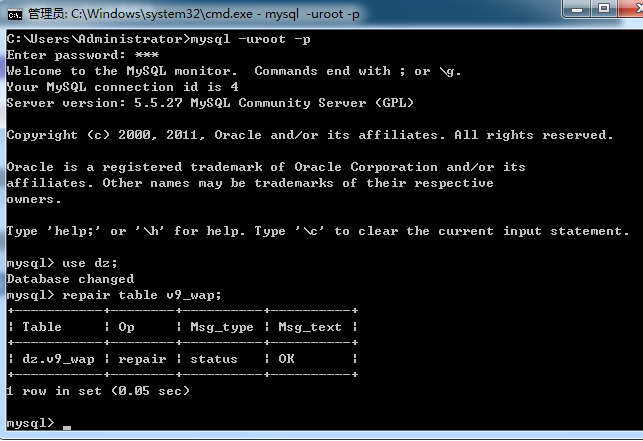
1. Log into MySQL:
mysql -uroot -p
Enter the password when prompted.
2. Select the database: using ‘dz’ as an example here
use dz;
A successful selection prompt looks like this:
Database changed
3. Select the data table to repair, check, or optimize: taking ‘v9_wap’ as an example here
Repair table:
repair table v9_wap;
A successful result looks like this:
+———–+——–+———-+———-+| Table | Op | Msg_type | Msg_text |+———–+——–+———-+———-+| dz.v9_wap | repair | status | OK |+———–+——–+———-+———-+1 row in set (0.05 sec)
Check table:
CHECK TABLE `v9_wap`;
A successful result looks like this:
+———–+——-+———-+———-+| Table | Op | Msg_type | Msg_text |+———–+——-+———-+———-+| dz.v9_wap | check | status | OK |+———–+——-+———-+———-+1 row in set (0.08 sec)
Optimize table:
OPTIMIZE TABLE `v9_wap`;
A successful repair prompt looks like this:
+———–+———-+———-+———-+| Table | Op | Msg_type | Msg_text |+———–+———-+———-+———-+| dz.v9_wap | optimize | status | OK |+———–+———-+———-+———-+1 row in set (0.04 sec)