

Add GitLab Account and Authorize SSH Key in Advance
Ensure direct clone without password. After setup, test with the following command, replacing the project with your own.
git clone [email protected]:root/111.git
Note:
url1 is the gitosis address.
Url2 is the GitLab address.
After migration, code, commit history, and related information will be preserved.

Example: Migrating Two Projects, web1 and web2:
1. Create the corresponding projects on the new GitLab in advance, with names identical to the originals.
2. Disable branch protection: Open the project, find the relevant option under Repository.
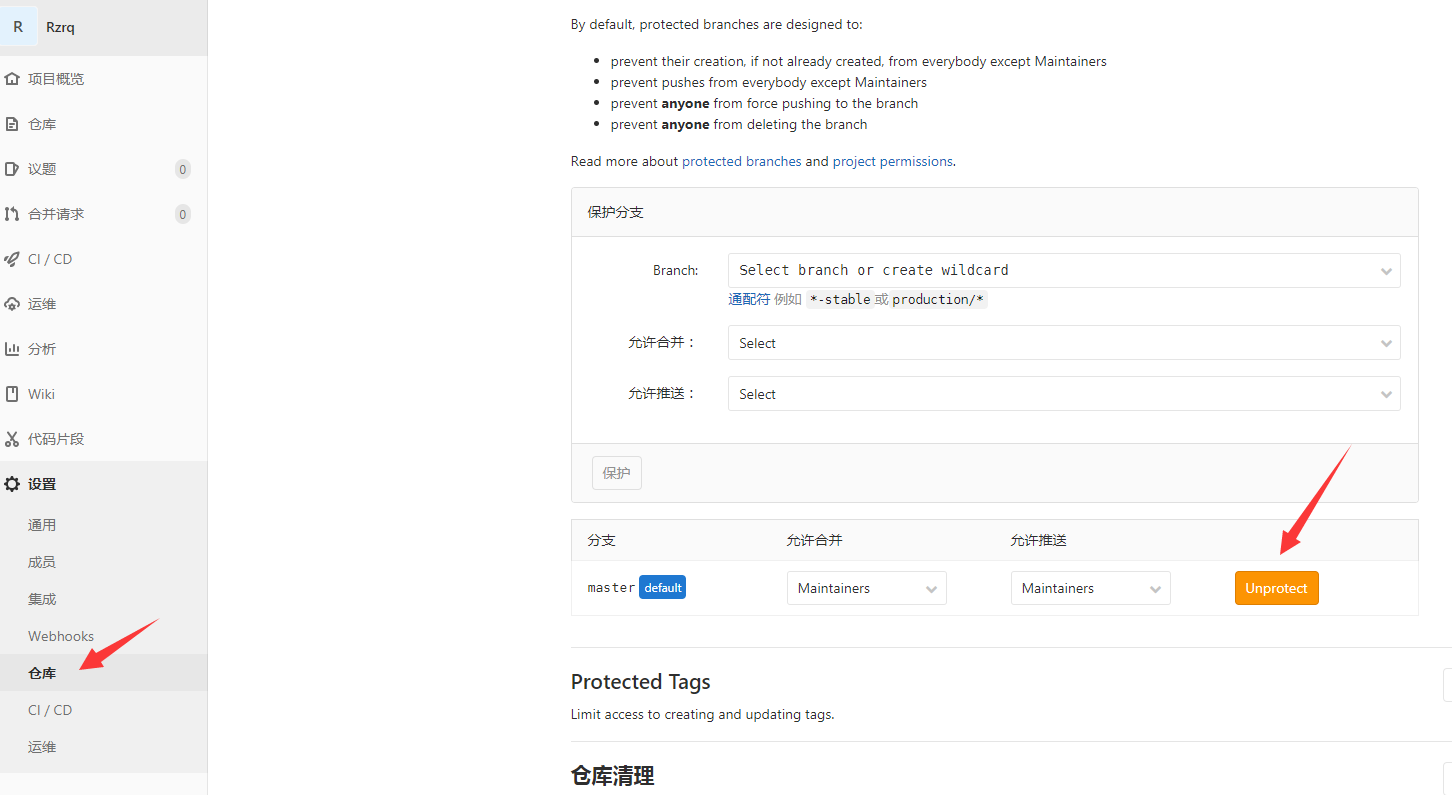
3. Modify the address part after `git clone` in the following code according to your situation.
#/bin/bash
Dir=/data/git_trans
Url=192.168.1.111
Url2=127.0.0.1
rm -rf $Dir/*
arr=("sender" )
for var in ${arr[@]}
do
cd $Dir && echo -e "/033[32m start $var: /033[0m"
git clone –mirror http://$Url:/$var.git
cd $var.git && git remote set-url –push origin git@$Url2:root/$var.git
git fetch -p origin && git push –mirror
echo -e "/033[32m done. /033[0m"
doneecho -e "/033[32m done. /033[0m"