

<<
I moved two websites to Alibaba Cloud — one reason is its stability, and the other is its touted Cloud Shield. Previously, in a blog alliance group, we simulated a CC attack against a blog hosted on an Alibaba Cloud ECS instance. The result? Cloud Shield showed no reaction whatsoever, while the website went down completely.
This time, I took a closer look at the CC protection features on Cloud Shield and realized that some users may not be using WAF correctly. So, in this article, I’ll briefly share the proper way to use Alibaba Cloud Shield’s WAF website defense.
1. Domain Name Resolution
Many users simply enable Cloud Shield and leave it at that. This is precisely why Cloud Shield remains unresponsive when many sites come under CC attack. In reality, WAF defense must be used in conjunction with domain name resolution.
Alibaba Cloud’s WAF website defense is essentially equivalent to Baidu Cloud Acceleration or 360 Website Guard, but without caching mechanisms. However, it can only be accessed via CNAME. Whether it will later integrate with HiChina DNS to add an NS access method remains unknown:
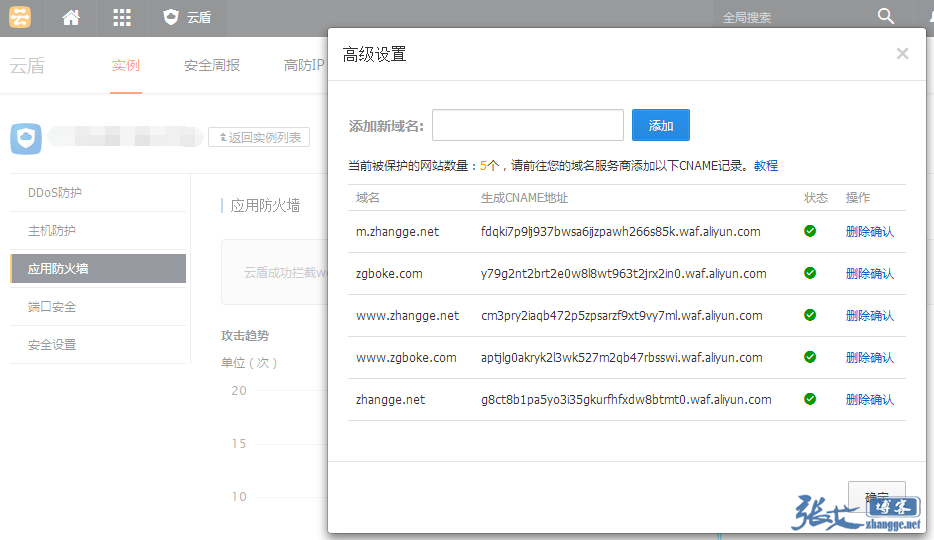
As shown above, to enable WAF website defense, you must point your host record’s CNAME to the CNAME address generated by Cloud Shield in your domain settings. Here is how user traffic flows in this scenario:
User Browser → Domain Resolution → CNAME to Cloud Shield Server → Origin Server
When an attack occurs, traffic passes through the Cloud Shield node, which triggers the scrubbing mechanism, providing CC/DDoS protection.
Of course, some users are aware of how to use WAF but, perhaps for SEO reasons, only switch to a CNAME record when under attack. This is because after using a CNAME to point to the Alibaba Cloud WAF domain, the IP address is not fixed, similar to services like Cloud Acceleration. Unfortunately, WAF lacks an automatic origin-fallback mechanism for search engines. Therefore, frequent IP changes caused by using a CNAME can negatively impact SEO!
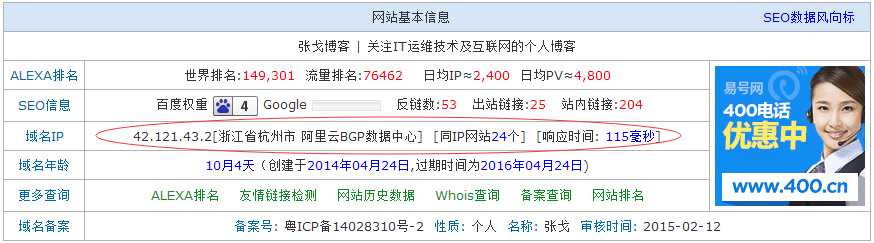
As shown below, after using WAF, the website’s IP becomes the Cloud Shield node IP:
So, how can this issue be resolved? Those who have read my previous article on Zhang Ge’s blog probably already know the answer. That’s right! It’s the same approach used to avoid SEO impact from ICP filing: set the default line to CNAME to the Alibaba Cloud WAF address, then add a new search engine line pointing to the origin server IP! This way, you can keep Cloud Shield WAF defense enabled long-term without affecting SEO!
I initially thought that Baidu’s own Cloud Acceleration DNS would be the most reliable for judging search engine lines (especially for websites relying on Baidu traffic). After all, as an in-house product, it should have a clear list of all spider IPs and not make mistakes! However, actual testing revealed that Baidu Cloud Acceleration currently does not support adding a search engine line while a default CNAME line already exists; it prompts that the record already exists!
Ps: The beta version of Baidu Cloud Acceleration does support this, available at http://next.su.baidu.com. Feel free to test it if you’re interested.
Upon further thought, while Baidu knows its own spiders thoroughly, what about the others? Like Sogou, or 360? Their coverage is probably incomplete. For the sake of comprehensiveness, I recommend using DNSPOD for DNS resolution. The reason is simple, take a look at the image:
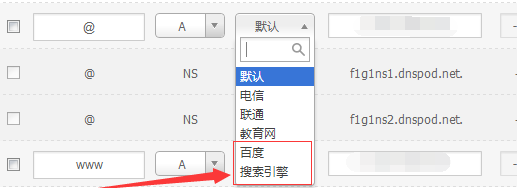
DNSPOD has cooperated with Baidu, so it features a dedicated Baidu line, plus an additional search engine line. It likely has a more complete collection of spider IPs than Baidu Cloud Acceleration!
Therefore, the correct DNS setup looks like this: 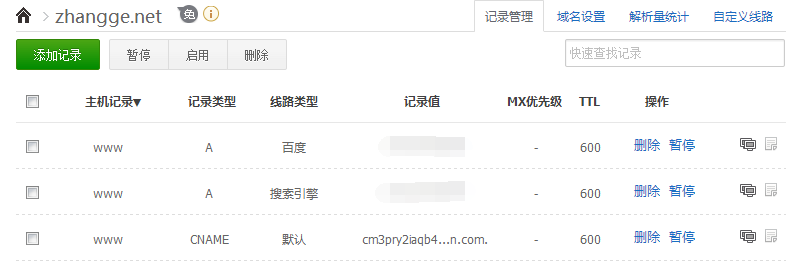
This configuration not only allows you to safely use Alibaba Cloud WAF defense, but also hides your website’s real IP address, avoiding the awkward situation of having to change your IP after your origin server gets attacked (once attackers target you via local hosts resolution, any CDN protection becomes useless!).
2. Protection Settings
You might have Cloud Shield enabled and the domain correctly configured, yet<<
: 28px; font-family: tahoma, arial, 宋体; font-size: 14px; text-align: center;”>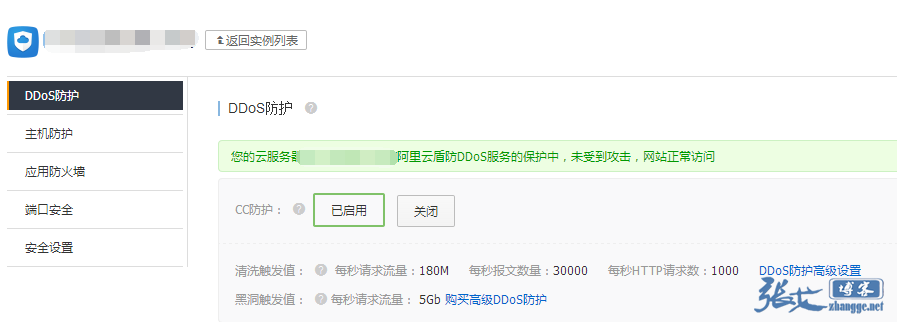
Default Scrubbing Thresholds: Inbound Traffic: 180Mbps, Packets per Second: 30000, HTTP Requests per Second: 1000
For a small blog hosted on Alibaba Cloud like ours, most bandwidth caps are only 1–2M. Just 2M of request traffic or 100+ concurrent connections can already bring your site to its knees! So even if many users enable WAF defense correctly, their sites still lag severely during an attack!
Therefore, we must configure the thresholds based on our own site’s traffic.
Looking at it, the minimum request traffic threshold is 10Mbps, meaning 10M of bandwidth. For a typical ECS instance, that pipe is way too small to handle it… So we need to set another threshold: concurrent HTTP requests.
For my 1M-bandwidth ECS, I believe 100 concurrent connections would already grind it to a halt. So let’s consider setting it below 50:
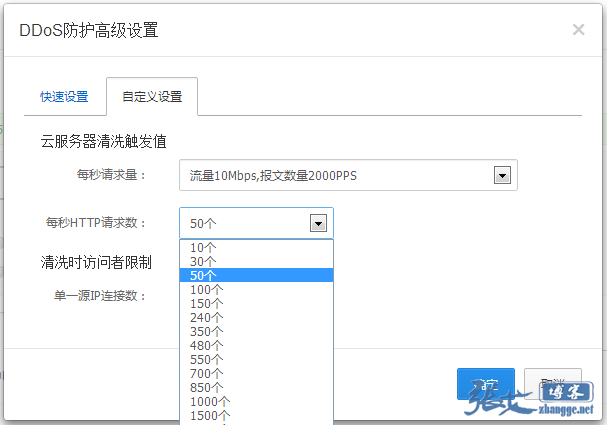
Ps: Of course, for sites that have properly implemented CDN separation of dynamic and static content, you can set it to 100+. For example, users of Qiniu CDN can do this. Ultimately, it depends on your actual situation.
The threshold is just the trigger. Below that is a scrubbing limit applied after triggering — when concurrency exceeds the threshold, Cloud Shield limits the connection count per source IP, returning a 503 error if that limit is exceeded:
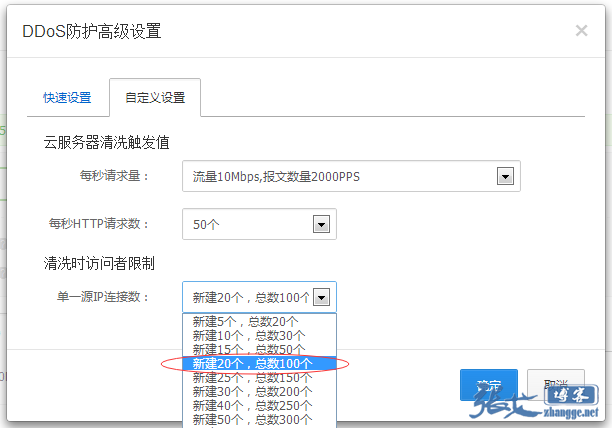
In principle, after the scrubbing threshold is triggered, the smaller the connection limit per IP, the better — but you can’t block legitimate visitors. So defining this limit depends on real-world conditions! You can, of course, simulate an attack to find a reasonable limit value, but you also need to consider scenarios where a LAN shares a single public IP (depending on your site’s audience).
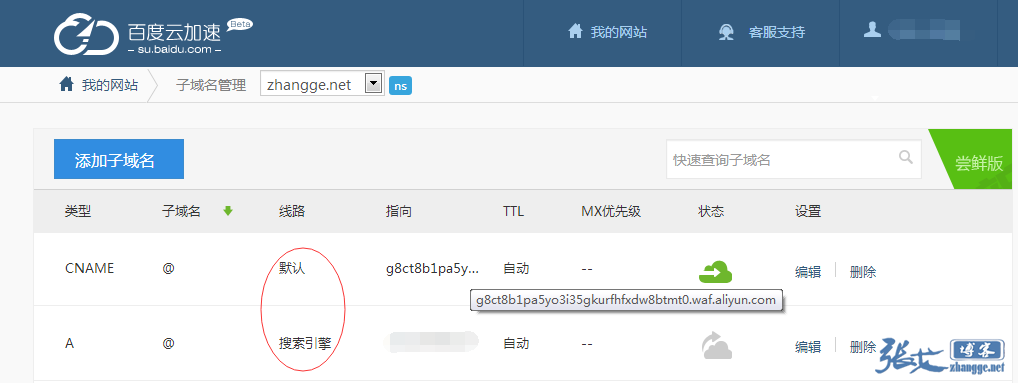
By now, I believe many Alibaba Cloud server users have gained some useful insight. In my opinion, Alibaba Cloud WAF serves two main purposes: one is basic DDoS protection, and the other is hiding the real IP of your website. When your site is frequently attacked and Cloud Shield can’t fully scrub the traffic, we can also add a layer of Baidu Cloud Acceleration on top of this setup. During normal times without attacks, set Baidu Cloud Acceleration to fetch from origin and simply turn off acceleration. I won’t elaborate further — one look at the image and you’ll understand:
Latest Update: After submitting several support tickets, I finally clarified that DDoS and WAF in Cloud Shield are two different features — looks like I misunderstood! To correct this: the DDoS/CC protection and WAF configuration are unrelated. That means it doesn’t matter if you don’t set the WAF CNAME, as long as DDoS protection is enabled! Therefore, some descriptions in