

Alibaba Cloud Shield provides free 5G attack protection for cloud customers, defending against Layer 3 to Layer 7 DDoS attacks such as SYN Flood, UDP Flood, ACK Flood, ICMP Flood, DNS Flood, and CC attacks. The specific setup method is as follows:
1. Open www.aliyun.com and click the Management Console to log in to your member account.
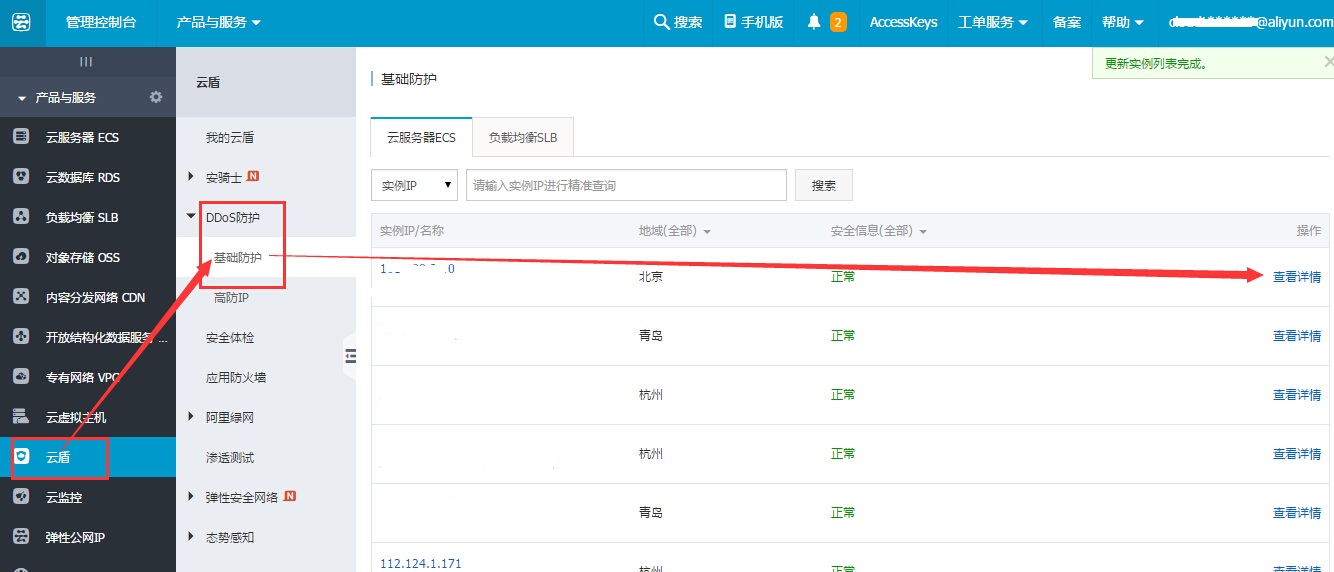
2. Click Cloud Shield Management Console on the left. Click DDoS Protection — Basic Protection in the middle to see the ECS instances with Cloud Shield enabled. Enter the IP to search for the server, then click View Details.
3. Here you can enable CC protection and set the cleansing threshold for HTTP requests per second. Once this threshold is exceeded, Cloud Shield will initiate traffic scrubbing (it is recommended to increase this appropriately if the website is running promotions or events).