

Note: Before enforcing site-wide HTTPS access, please first confirm that all pages of the website can be accessed normally via HTTPS. If unsecured elements on the site have not been resolved (i.e., the site still contains external links to images, JS, CSS, etc.), forcing site-wide HTTPS access may cause some pages to display abnormally.
Implementation Steps:
1. Open IIS Manager, locate the site that needs an SSL certificate configured, right-click and select Properties.
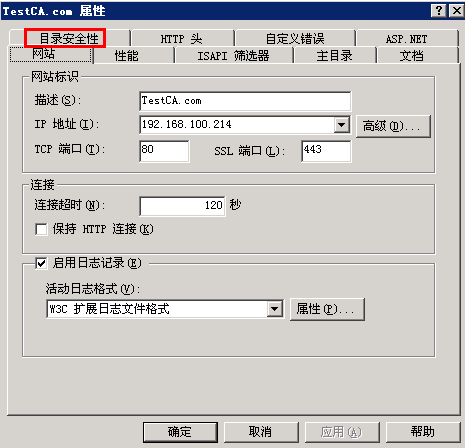
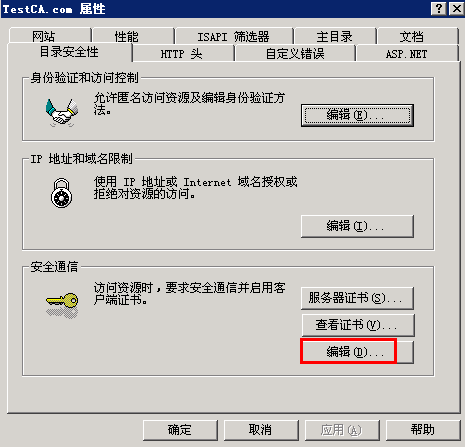
2. Select “Directory Security”, and in the “Secure Communications” section, click “Edit”.
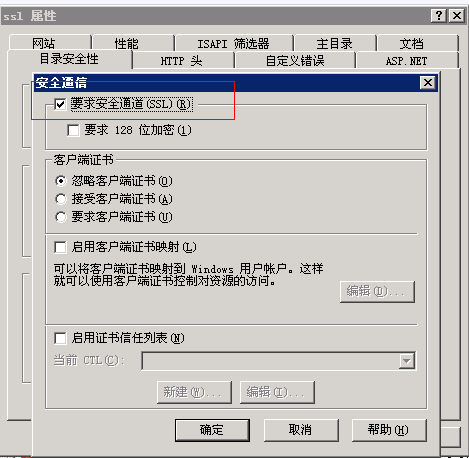
3. Check “Require Secure Channel (SSL)” and click OK to complete.
4.Modify the IIS 403 error file.
Path:C:/WINDOWS/Help/iisHelp/common/403-4.htm
Tip: Back up first before making changes.
Replace the content with:
<script type=”text/javascript”>
var url=window.location.href;
url=url.replace(“http:”,”https:”)
window.location.replace(url)
</script>