

Lately I’ve been looking into bandwidth throttling, purely out of boredom — on one hand, I don’t have any site that anyone would bother hammering for data, and on the other, I honestly just ran out of things to tinker with…… Bandwidth limiting under Nginx seems relatively straightforward. Here’s the testing process I ran between two VPSes. The test machine was a BlueVM $9.95/year OpenVZ, an impulse buy from last month; the one used to pull data was a DS $2/month plan, acquired for a hefty sum ages ago, and now…… deals like that are everywhere!
This article was tested under the Junge LNMP one-click stack environment. There are mainly two modifications needed.
Modify the default Nginx configuration file to control the number of concurrent connections per session using Nginx’s standard module ngx_http_limit_zone_module.
1 |
limit_zone one $binary_remote_addr 10m; |
【Note】We can see the following line in nginx.conf:
#limit_zone crawler $binary_remote_addr 10m;
Initially, I simply removed the # at the beginning of this line to uncomment it, but it threw an error. “crawler” must be replaced with “one”. Regarding the content added in the line above, it mainly defines a recording zone named “one” with a total capacity of 10M, using the variable $binary_remote_addr as the basis for session determination.
For testing, I resolved a domain name and added this domain host to the VPS. Next, we need to make a second modification, which is to this domain’s configuration file.
12 |
#cd /usr/local/nginx/conf/vhost#vi domain.conf |
Add the following block:
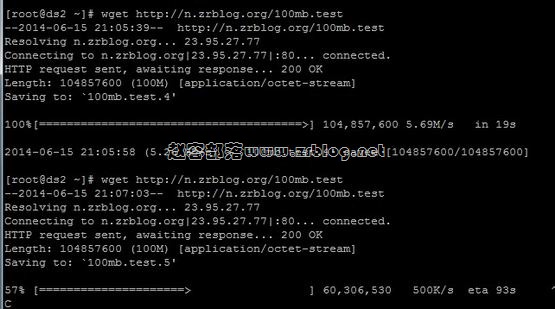
This configuration means each client is limited to a single connection, with a speed limit of 500KB/s.
After making all the changes, check the configuration file and reload Nginx.
12 |
#/usr/local/nginx/sbin/nginx –t#service nginx reload |
Actually, I encountered a small error here, as shown in the image below, but it didn’t seem to affect the result.
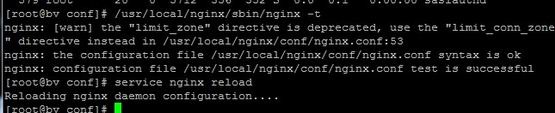
Based on this error line, I tried modifying nginx.conf, but when I followed the suggested changes, the configuration file wouldn’t even pass the validation test. If you know how to resolve this, please feel free to share your insights.
After configuration, I placed a 100MB test file. The screenshot below clearly shows the difference with and without the rate limit.
【Afterword】This rate limiting feature has its uses, for example, on your own download resource sites. However, it cannot completely prevent issues like hotlinking. We can use dedicated anti-hotlinking modules such as ngx_http_referer_module or ngx_http_accesskey_module. We can also analyze logs, match against $http_user_agent, and then return a 503 response, among other approaches.