

When connecting to a VPN server in certain network environments, you might see that the connection is successful but still cannot access some foreign websites or specific sites. Is it a problem with the VPN server? Is it due to the server’s geographic location? Usually, users feel quite frustrated at this point鈥攑aying for a service that doesn’t deliver the expected results can feel like being cheated. The author recently received such a complaint. After analysis, the conclusion is that this situation is actually not caused by the VPN server itself, but by the DNS resolution server causing trouble.
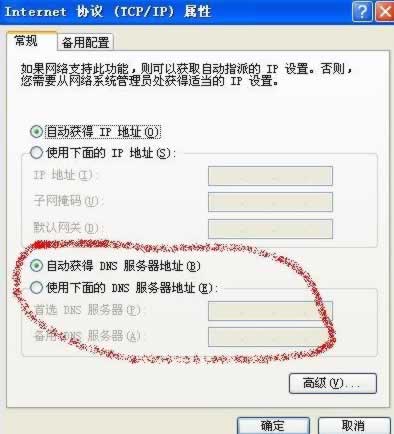
WinXP DNS Settings Screenshot
So, what is DNS?
DNS stands for Domain Name System. It is a core service on the Internet, and its main task is to map IP addresses to domain names and vice versa. When a user needs to visit a website, they only need to enter an easy-to-remember web address instead of a complex, hard-to-remember IP address.
To improve access speed, DNS usually has a cache. This allows users to instantly open a website they are browsing, bypassing the resolution server process. This principle is the same as our IE cache鈥攁 solution designed to enhance access speed. But when we need to get the latest information from a website, we usually press F5 or right-click the refresh button to retrieve new data. Similarly, after we connect to a VPN server, the DNS also has a cache, and we need to clear the DNS cache to request a fresh resolution from the server.
How to Clear DNS Cache?
鈶? Taking the Windows system as an example, click “Start” – “Run” – “cmd” to open the Windows command prompt. For Win7 or Win8 users, you need to use an administrator account, as shown in the figure:
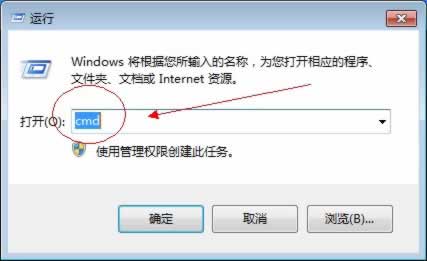
Type CMD to open the Windows command prompt
鈶? Enter the command “ipconfig/flushdns” and press Enter. When you see the message “successfully flushed the dns resolver cache,” it means the DNS has been cleared.
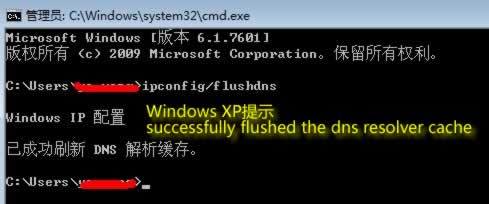
DNS Successfully Cleared Prompt
鈶? After successfully flushing, the problem of being unable to open websites generally caused by DNS issues should be resolved.
Appendix:
Free DNS provided by Google: 8.8.8.8 8.8.4.4
Free DNS provided by OpenDNS: 208.67.222.222 208.67.220.220
Copyright belongs to Hutong Network. Reprints must retain the