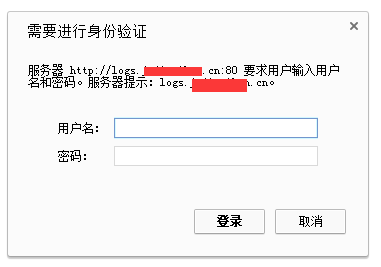
Note: The goal is to require a username and password when accessing the domain.
The ngx_http_auth_basic_module allows only visitors with the correct credentials to access web content. This is useful when you want to restrict certain web content from the public while still granting access to specific individuals. By default, Nginx has already installed the ngx_http_auth_basic_module, in case you need this functionality.
Nginx Basic Auth Directives
Syntax: auth_basic string | off;
Default: auth_basic off;
Context: http, server, location, limit_except
The default means authentication is off. If a string is provided, it will be displayed in the authentication popup.
Syntax: auth_basic_user_file file;
Default: —
Context: http, server, location, limit_except
1. Create the Password File
htpasswd -c /usr/local/nginx/passwd.db logs #Create the password file. Here we use the user ‘logs’ as an example. Adjust the path as needed.
New password: ******* //Enter the password
Re-type new password: ******** //Re-enter the password
chown www.www /usr/local/nginx/passwd.db
#Set ownership for the new file. Here the ‘www’ user is used as an example, which is typically the user Nginx runs as.
2. Nginx Configuration. Here is my example:
server
{
listen 80 ;
server_name logs.123.cn ; #Set your domain name accordingly
index index.html index.htm index.php;
location /
{
auth_basic "logs.123.cn"; #Prompt message shown to the user; you can change this.
auth_basic_user_file /usr/local/nginx/passwd.db; #Path to the password file
autoindex on; #Enables directory listing; optional.
proxy_pass http://127.0.0.1:5601 ; #I’m using a proxy pass here. You can also serve files directly from a website directory.
}
}
3. Restart and Test:
service nginx restart
When visiting the site, you will see the following prompt. Enter the username and password to proceed.