

Optimization in Nginx Directives (Configuration File)
worker_processes 8;
Number of Nginx processes. It is recommended to set this based on the number of CPUs, typically a multiple of it.
worker_cpu_affinity 00000001 00000010 00000100 00001000 00010000 00100000 01000000 10000000;
Assigns each process to a CPU. In the example above, 8 processes are assigned to 8 CPUs. You can certainly write multiple, or assign one process to multiple CPUs.
worker_rlimit_nofile 102400;
This directive specifies the maximum number of file descriptors a single Nginx process can open. The theoretical value should be the maximum number of open files (ulimit -n) divided by the number of Nginx processes, but since Nginx request distribution isn’t perfectly even, it’s best to keep it consistent with the ulimit -n value.
use epoll;
Uses the epoll I/O model. This one’s a no-brainer.
worker_connections 102400;
The maximum number of connections allowed per process. Theoretically, the maximum connections per Nginx server is worker_processes * worker_connections.
keepalive_timeout 60;
Keepalive timeout duration.
client_header_buffer_size 4k;
Buffer size for client request headers. This can be set based on your system’s page size. Generally, a request header won’t exceed 1k, but since most system page sizes are larger than 1k, set this to the page size here. You can get the page size using the command getconf PAGESIZE.
open_file_cache max=102400 inactive=20s;
This specifies caching for open files. It’s disabled by default. ‘max’ specifies the cache size, recommended to match the number of open files. ‘inactive’ refers to the time after which a file is removed from cache if it hasn’t been requested.
open_file_cache_valid 30s;
This specifies how often to check for valid cache information.
open_file_cache_min_uses 1;
The minimum number of times a file must be used within the inactive period specified in the open_file_cache directive. If this number is exceeded, the file descriptor remains open in the cache. In the example above, if a file isn’t used once during the inactive period, it will be removed.
Kernel Parameter Optimization
net.ipv4.tcp_max_tw_buckets = 6000
The number of timewait buckets. The default is 180000.
net.ipv4.ip_local_port_range = 1024 65000
The range of ports allowed for the system to open.
net.ipv4.tcp_tw_recycle = 1
Enables fast recycling of timewait sockets.
net.ipv4.tcp_tw_reuse = 1
Enables reuse. Allows TIME-WAIT sockets to be reused for new TCP connections.
net.ipv4.tcp_syncookies = 1
Enables SYN Cookies. When the SYN wait queue overflows, cookies are used to handle it.
net.core.somaxconn = 262144
In web applications, the backlog of the listen function defaults to the kernel parameter net.core.somaxconn, which limits it to 128. Nginx’s defined NGX_LISTEN_BACKLOG defaults to 511, so adjusting this value is necessary.
net.core.netdev_max_backlog = 262144
The maximum number of data packets allowed to be queued when the rate at which each network interface receives packets is faster than the kernel can process them.
net.ipv4.tcp_max_orphans = 262144
The maximum number of TCP sockets not associated with any user file handle in the system. If this number is exceeded, orphaned connections are immediately reset and a warning message is printed. This limit is solely to prevent simple DoS attacks; don’t rely on it too heavily or artificially reduce this value. It’s better to increase it (if you’ve increased memory).
net.ipv4.tcp_max_syn_backlog = 262144
The maximum value for recording connection requests that haven’t yet received client confirmation. For a system with 128M of memory, the default is 1024; for smaller memory systems, it’s 128.
net.ipv4.tcp_timestamps = 0
Timestamps can prevent sequence number wrap-around. A 1Gbps link will certainly encounter previously used sequence numbers. Timestamps allow the kernel to accept these "abnormal" packets. Here, it needs to be turned off.
net.ipv4.tcp_synack_retries = 1
To open a connection to the peer, the kernel needs to send a SYN accompanied by an ACK responding to the previous SYN. This is the second handshake in the so-called three-way handshake. This setting determines the number of SYN+ACK packets the kernel sends before giving up on the connection.
net.ipv4.tcp_syn_retries = 1
The number of SYN packets sent before the kernel gives up on establishing a connection.
net.ipv4.tcp_fin_timeout = 1
If the socket is requested to close by the local end, this parameter determines the time it stays in the FIN-WAIT-2 state. The peer could error out and never close the connection, or even crash unexpectedly. The default is 60 seconds. For 2.2 kernels, the usual value is 180 seconds. You can set it to this, but remember, even if your machine is a lightly loaded WEB server, there is a risk of memory overflow due to a large number of dead sockets. The danger of FIN-WAIT-2 is less than FIN-WAIT-1, as it can consume at most 1.5K of memory, but their lifespan is longer.
net.ipv4.tcp_keepalive_time = 30
When keepalive is enabled, the frequency at which TCP sends keepalive messages. The default is 2 hours.
A Complete Kernel Optimization Configuration
net.ipv4.ip_forward = 0net.ipv4.conf.default.rp_filter = 1net.ipv4.conf.default.accept_source_route = 0kernel.sysrq = 0kernel.core_uses_pid = 1net.ipv4.tcp_syncookies = 1kernel.msgmnb = 65536kernel.msgmax = 65536kernel.shmmax = 68719476736kernel.shmall = 4294967296net.ipv4.tcp_max_tw_buckets = 6000net.ipv4.tcp_sack = 1net.ipv4.tcp_window_scaling = 1net.ipv4.tcp_rmem = 4096 87380 4194304net.ipv4.tcp_wmem = 4096 16384 4194304net.core.wmem_default = 8388608net.core.rmem_default = 8388608net.core.rmem_max = 16777216net.core.wmem_max = 16777216net.core.netdev_max_backlog = 262144net.core.somaxconn = 262144net.ipv4.tcp_max_orphans = 3276800net.ipv4.tcp_max_syn_backlog = 262144net.ipv4.tcp_timestamps = 0net.ipv4.tcp_synack_retries = 1net.ipv4.tcp_syn_retries = 1net.ipv4.tcp_tw_recycle = 1net.ipv4.tcp_tw_reuse = 1net.ipv4.tcp_mem = 94500000 915000000 927000000net.ipv4.tcp_fin_timeout = 1net.ipv4.tcp_keepalive_time = 30net.ipv4.ip_local_port_range = 1024 65000
A Simple Optimized Nginx Configuration File
user www www;worker_processes 8;worker_cpu_affinity 00000001 00000010 00000100 00001000 00010000 00100000 01000000;error_log /www/log/nginx_error.log crit;pid /usr/local/nginx/nginx.pid;worker_rlimit_nofile 204800;events{ use epoll; worker_connections 204800;}http{ include mime.types; default_type application/octet-stream; charset utf-8; server_names_hash_bucket_size 128; client_header_buffer_size 2k; large_client_header_buffers 4 4k; client_max_body_size 8m; sendfile on; tcp_nopush on; keepalive_timeout 60; fastcgi_cache_path /usr/local/nginx/fastcgi_cache levels=1:2 keys_zone=TEST:10m inactive=5m; fastcgi_connect_timeout 300; fastcgi_send_timeout 300; fastcgi_read_timeout 300; fastcgi_buffer_size 16k; fastcgi_buffers 16 16k; fastcgi_busy_buffers_size 16k; fastcgi_temp_file_write_size 16k; fastcgi_cache TEST; fastcgi_cache_valid 200 302 1h; fastcgi_cache_valid 301 1d; fastcgi_cache_valid any 1m; fastcgi_cache_min_uses 1; fastcgi_cache_use_stale error timeout invalid_header http_500; open_file_cache max=204800 inactive=20s; open_file_cache_min_uses 1; open_file_cache_valid 30s; tcp_nodelay on; gzip on; gzip_min_length 1k; gzip_buffers 4 16k; gzip_http_version 1.0; gzip_comp_level 2; gzip_types text/plain application/x-javascript text/css application/xml; gzip_vary on; server { listen 8080; server_name ad.test.com; index index.php index.htm; root /www/html/; location /status { stub_status on; } location ~ .*/.(php|php5)?$ { fastcgi_pass 127.0.0.1:9000; fastcgi_index index.php; include fcgi.conf; } location ~ .*/.(gif|jpg|jpeg|png|bmp|swf|js|css)$ { expires 30d; } log_formataccess '$remote_addr - $remote_user [$time_local] "$request" ' '$status $body_bytes_sent "$http_referer" ' '"$http_user_agent" $http_x_forwarded_for'; access_log /www/log/access.log access; }}
About FastCGI Directives
fastcgi_cache_path /usr/local/nginx/fastcgi_cache levels=1:2 keys_zone=TEST:10m inactive=5m;
This directive specifies a path for the FastCGI cache, directory hierarchy levels, key zone storage time, and inactive deletion time.
fastcgi_connect_timeout 300;
Specifies the timeout for connecting to the backend FastCGI server.
fastcgi_send_timeout 300;
The timeout for sending a request to FastCGI. This value refers to the timeout after the two handshakes have been completed.
fastcgi_read_timeout 300;
The timeout for receiving a FastCGI response. This value refers to the timeout after the two handshakes have been completed.
fastcgi_buffer_size 16k;
Specifies the buffer size needed to read the first part of the FastCGI response. This can be set to the buffer size specified by the fastcgi_buffers directive. The directive above specifies that it will use one 16k buffer to read the first part of the response, i.e., the response header. In fact, this response header is usually very small (no more than 1k). However, if you specify a buffer size in the fastcgi_buffers directive, it will also allocate a buffer of the size specified by fastcgi_buffers for caching.
fastcgi_buffers 16 16k;
Specifies how many and what size buffers should be used locally to buffer FastCGI responses. As shown above, if a PHP script generates a page size of 256k, it will allocate 16 buffers of 16k to cache it. If the page size is larger than 256k, the portion exceeding 256k will be cached in the path specified by fastcgi_temp. This is generally not a wise approach for server load, as processing data in memory is faster than on disk. Usually, the setting of this value should be based on the median page size generated by PHP scripts on your site. For example, if most scripts on your site generate pages around 256k, you can set this value to 16 16k, or 4 64k, or 64 4k. However, the latter two are clearly not good settings. If a generated page is only 32k, using 4 64k would allocate one 64k buffer to cache it, while using 64 4k would allocate eight 4k buffers. Using 16 16k would allocate two 16k buffers to cache the page, which seems more reasonable.
fastcgi_busy_buffers_size 32k;
I’m not entirely sure what this directive does, only that its default value is twice the size of fastcgi_buffers.
fastcgi_temp_file_write_size 32k;
The data block size used when writing to fastcgi_temp_path. The default value is twice the size of fastcgi_buffers.
fastcgi_cache TEST
Enables FastCGI caching and assigns a name to it. Personally, I find enabling caching very useful as it can effectively reduce CPU load and prevent 502 errors. However, this cache can cause many issues because it caches dynamic pages. Specific usage depends on your needs.
fastcgi_cache_valid 200 302 1h;fastcgi_cache_valid 301 1d;fastcgi_cache_valid any 1m;
Specifies cache times for designated response codes. In the example above, 200 and 302 responses are cached for one hour, 301 responses for one day, and others for one minute.
fastcgi_cache_min_uses 1;
The minimum number of uses within the inactive parameter time of the fastcgi_cache_path directive. In the example above, if a file is not used even once within 5 minutes, it will be removed.
fastcgi_cache_use_stale error timeout invalid_header http_500;
I’m not sure about the function of this parameter, but I guess it lets Nginx know which types of cache are stale. The above are the FastCGI-related parameters in Nginx. Additionally, FastCGI itself has some configurations that need optimization. If you are using php-fpm to manage FastCGI, you can modify the following values in the configuration file:
<value name="max_children">60</value>
The number of concurrent requests to handle simultaneously, i.e., it will spawn a maximum of 60 child threads to handle concurrent connections.
<value name="rlimit_files">102400</value>
Maximum number of open files.
<value name="max_requests">204800</value>
The maximum number of requests each process can execute before being reset.
Some Test Results
The static page is the test file mentioned in my article about configuring Squid for 40,000 concurrent connections. The image below shows the test results after running the command webbench -c 30000 -t 600 http://ad.test.com:8080/index.html on 6 machines simultaneously:
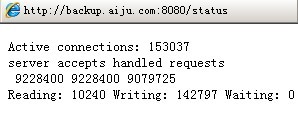
The number of connections filtered using netstat:

The result of the PHP page in status (the PHP page calls phpinfo):
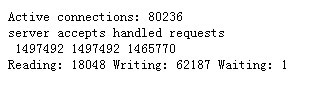
The number of connections for the PHP page filtered by netstat:

Server load before using FastCGI cache:
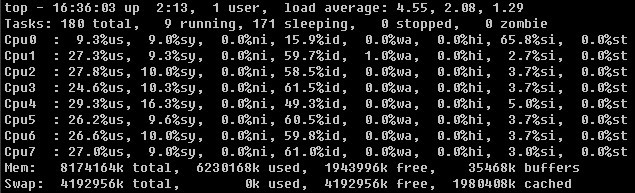
At this point, opening the PHP page was already somewhat difficult and required multiple refreshes to load. In the image above, the cpu0 load is relatively low because all NIC interrupt requests were assigned to cpu0 during testing, and 7 worker processes in Nginx were set to affinity with cpu1-7.
After using FastCGI cache:
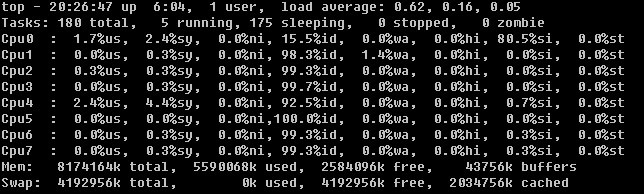
At this point, the PHP page could be opened very easily.
This test did not connect to any databases, so it does not hold much reference value. However, it is unknown if the above tests have reached the limit. Based on the memory and CPU usage, it seems not, but there were no extra machines available for me to run webbench on.