

Opening IIS revealed everything was empty — nothing appeared at all. In the Event Viewer, the following two errors were found:
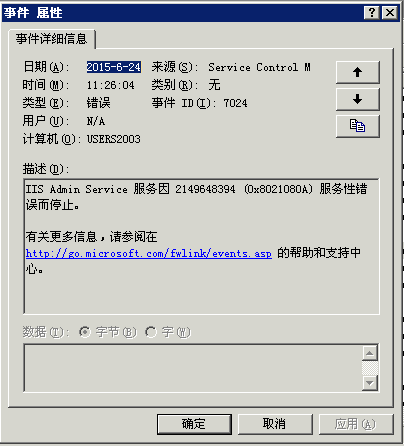
Event Type: Error
Event Source: Service Control Manager
Event Category: None
Event ID: 7024
Date: 5/11/2009
Time: 8:53:07 AM
User: N/A
Computer: HJP
Description:
The IIS Admin Service service terminated with service-specific error 2149648394 (0x8021080A).
Digging deeper revealed:
An error occurred while parsing the XML file. Reason: An invalid character was found in the text content.
Erroneous XML:
ErrorCode : 0xC00CE508Interceptor : 14OperationType : PopulateTable : MBPropertyConfigurationSource : file:///C:/WINDOWS/system32/inetsrv/MetaBase.xmlRow : 0Column : 0
How to Fix:
Take the most recent file starting with MetaBase_ from the C:/WINDOWS/system32/inetsrv/History folder, rename it to MetaBase.xml, and then replace the file in the C:/WINDOWS/system32/inetsrv directory. Open IIS and you should be able to start it.
Note: The Metabase.xml file is the configuration file for IIS, where all IIS settings are recorded.