1. ip route
Configure or delete a static route.
[ no ] ip route ip-address { mask | mask-length } { interface-name | gateway-address } [ preference preference-value ] [ reject | blackhole ]
[Parameter Description]
ip-address and mask are the destination IP address and mask in dotted-decimal format. Since the 32-bit mask requires consecutive ‘1’s, the dotted-decimal mask can be replaced by the mask-length, which is the number of consecutive ‘1’ bits in the mask.
interface-name specifies the outgoing interface name for the route, and gateway-address is the next-hop IP address of the route (in dotted-decimal format).
preference-value is the priority level of the route, ranging from 0 to 255.
reject indicates an unreachable route.
blackhole indicates a blackhole route.
[Default Behavior]
The system can obtain subnet routes for subnets directly connected to the router by default. When configuring a static route, if no priority is specified, the default is 60. If neither reject nor blackhole is specified, the default is a reachable route.
[Command Mode]
Global configuration mode
[Usage Guide]
Notes on configuring static routes:
When both the destination IP address and mask are 0.0.0.0, a default route is configured, meaning that when the routing table lookup fails, packets are forwarded according to the default route.
Different priority configurations allow flexible application of routing management policies. For example, configuring multiple routes to the same destination with the same priority enables load sharing; specifying different priorities enables route backup.
When configuring a static route, you can specify either the outgoing interface or the next-hop address. Which method to use depends on the actual situation: for interfaces that support network-address-to-link-layer-address resolution or point-to-point interfaces, specifying the outgoing interface is sufficient. For NBMA interfaces, such as X.25-encapsulated or Frame Relay-encapsulated interfaces, dial-up interfaces, etc., which support point-to-multipoint, in addition to configuring the IP route, you must also establish a secondary route at the link layer, i.e., a mapping from IP address to link-layer address (such as dialer map ip, x.25 map ip, or frame-relay map ip, etc.). In this case, when configuring a static route, you should not specify the outgoing interface; instead, you should configure the next-hop IP address.
[Example]
Configure the default route with the next hop as 129.102.0.2.
Quidway(config)#ip route 0.0.0.0 0.0.0.0 129.102.0.2
[Related Commands]
show ip route, show ip route detail, show ip route static
2. show ip route
Display the routing table summary.
show ip route
[Command Mode]
Privileged user mode
[Usage Guide]
This command outputs the routing table in list format, with each line representing one route. Contents include:
Destination address / mask length
Protocol
Priority
Metric
Next hop
Output interface
[Example]
Quidway#show ip route
Routing Tables:
Destination/Mask Proto Pref Metric Nexthop Interface
127.0.0.0/8 Static 0 0 127.0.0.1 127.0.0.1(LO0)
127.0.0.1/32 Direct 0 0 127.0.0.1 127.0.0.1(LO0)
138.102.128.0/17 Direct 0 0 138.102.129.7 138.102.129.7(EN0)
202.38.165.0/24 Direct 0 0 202.38.165.1 202.38.165.1(SL1)
[Related Commands]
ip route, show ip route detail, show ip route static
3. show ip route detail
Display detailed routing table information.
show ip route detail
[Command Mode]
Privileged user mode
[Usage Guide]
The output of this command helps users troubleshoot routing issues.
[Example]
Quidway#show ip route detail
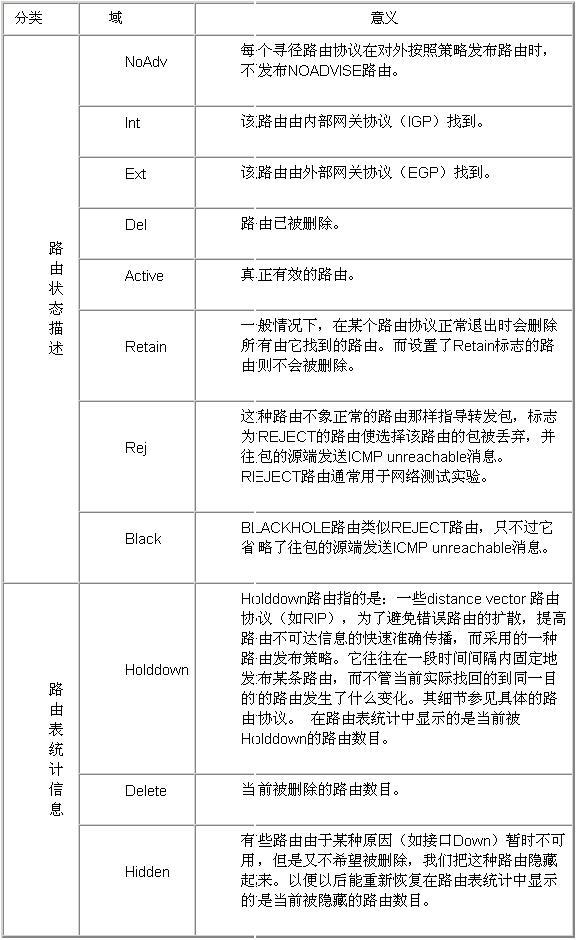
Route state description
NoAdv: do not advertise Int: AS Interior route
Ext: AS External route Del: route to be deleted
Active: current route Retain: route retains in the routing table
Rej: rejecting route Black: black hole route
Routing Tables:
Generate Default: no
+ = Active Route, – = Last Active, * = Both
Destinations: 4 Routes: 4
Holddown: 0 Delete: 9 Hidden: 0
**Destination: 127.0.0.0 Mask: 255.0.0.0
Protocol: *Static Preference: 0
NextHop: 127.0.0.1 Interface: 127.0.0.1(LO0)
State: $#@60;NoAdv Int Active Retain Rej$#@62;
Age: 19:31:06 Metric: 0/0
**Destination: 127.0.0.1 Mask: 255.255.255.255
Protocol: *Direct Preference: 0
NextHop: 127.0.0.1 Interface: 127.0.0.1(LO0)
State: $#@60;NoAdv Int Active Retain$#@62;
Age: 114:03:05 Metric: 0/0
First, the symbols used for route state description are displayed, then the overall routing table statistics, and finally each route’s detailed description is output sequentially. Their meanings are shown in Table 4-1.
Table 4-1 Routing Table Information