

Following the separation of Baidu and Jiasule’s partnership, Baidu subsequently launched its own acceleration product: Baidu Cloud Accelerator. However, for the vast number of webmasters, the free version of Baidu Cloud Accelerator offers too few nodes and imposes certain restrictions on traffic and DDoS defense. Below is a comparison of Baidu Cloud Accelerator’s package pricing:
Looking at the data above, the free Baidu Cloud Accelerator seems somewhat underwhelming. In comparison, 360 Website Guardian might perform better in this regard. 360 Website Guardian is a one-stop http://www.aliyun.com/zixun/aggregation/13744.html">management service platform integrating website protection, acceleration, and operations. It offers webmasters free services including website firewall, DDoS protection, CC protection, CDN acceleration, intelligent DNS resolution, statistical reports, page compression, caching acceleration, and website APP services.
Today, I tried out 360 Website Guardian and discovered that adding it resulted in 502 errors. To ensure your website does not encounter abnormal 502 errors after using an acceleration product,
we need to add 360 Website Guardian’s IP ranges to the server’s whitelist to prevent the Website Guardian service from being mistaken for an attack and getting its IPs blocked. Here are the IP ranges for 360 Website Guardian:
183.136.133.0-183.136.133.255
220.181.55.0-220.181.55.255
101.226.4.0-101.226.4.255
180.153.235.0-180.153.235.255
122.143.15.0-122.143.15.255
27.221.20.0-27.221.20.255
202.102.85.0-202.102.85.255
61.160.224.0-61.160.224.255
112.25.60.0-112.25.60.255
182.140.227.0-182.140.227.255
221.204.14.0-221.204.14.255
222.73.144.0-222.73.144.255
61.240.144.0-61.240.144.255
113.17.174.0-113.17.174.255
125.88.189.0-125.88.189.255
Create a shell script and execute it to add these rules to the iptables firewall
[root@ithov ~]# vi wzb_firewall.sh # Create the executable script file
[root@ithov ~]# chmod +x wzb_firewall.sh # Grant execution permissions
[root@ithov ~]# ./wzb_firewall.sh
Script content provided by Fengxin Network http://www.ithov.com
Adding firewall whitelist entries, please wait…
iptables: Saving firewall rules to /etc/sysconfig/iptables: [OK]
Firewall whitelist added successfully. You can now use 360 Website Guardian protection and online acceleration services normally!
After successful execution, you will see the prompt: “Firewall whitelist added successfully. You can now use 360 Website Guardian’s protection and acceleration services normally!”
The script content is as follows:
#!/bin/bash
echo "Script content provided by Fengxin Network http://www.ithov.com"
echo "Adding firewall whitelist entries, please wait…"
iptables -A INPUT -s 183.136.133.0/24 -j ACCEPT
iptables -A INPUT -s 220.181.55.0/24 -j ACCEPT
iptables -A INPUT -s 101.226.4.0/24 -j ACCEPT
iptables -A INPUT -s 180.153.235.0/24 -j ACCEPT
iptables -A INPUT -s 122.143.15.0/24 -j ACCEPT
iptables -A INPUT -s 27.221.20.0/24 -j ACCEPT
iptables -A INPUT -s 202.102.85.0/24 -j ACCEPT
iptables -A INPUT -s 61.160.224.0/24 -j ACCEPT
iptables -A INPUT -s 112.25.60.0/24 -j ACCEPT
iptables -A INPUT -s 182.140.227.0/24 -j ACCEPT
iptables -A INPUT -s 221.204.14.0/24 -j ACCEPT
iptables -A INPUT -s 222.73.144.0/24 -j ACCEPT
iptables -A INPUT -s 61.240.144.0/24 -j ACCEPT
iptables -A INPUT -s 113.17.174.0/24 -j ACCEPT
iptables -A INPUT -s 125.88.189.0/24 -j ACCEPT
service iptables save
echo "Firewall whitelist added successfully. You can now use 360 Website Guardian protection and online acceleration services!"
Restart the firewall
[root@localhost ~]# service iptables restart
iptables: Setting chains to policy ACCEPT: filter [OK]
iptables: Flushing firewall rules: [OK]
iptables: Unloading modules: [OK]
iptables: Applying firewall rules: [OK]
iptables: Loading additional modules: nf_conntrack_ftp [OK]
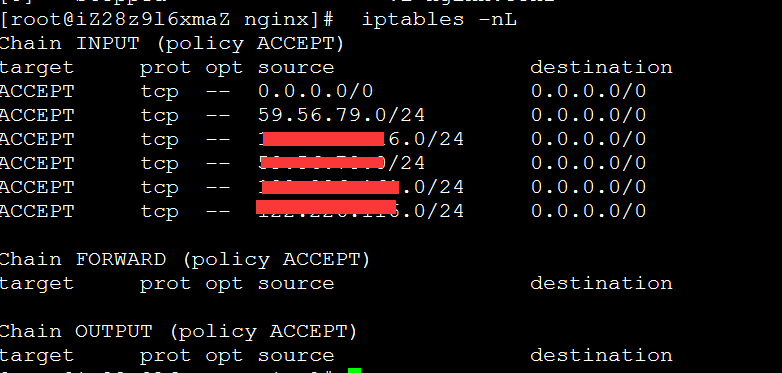
Check if the iptables rules have taken effect
[root@ithov ~]# iptables -nL
Chain INPUT (policy ACCEPT)
target prot opt source destination
ACCEPT all — 0.0.0.0/0 0.0.0.0/0 state RELATED,ESTABLISHED
ACCEPT icmp — 0.0.0.0/0 0.0.0.0/0
ACCEPT all — 0.0.0.0/0 0.0.0.0/0
ACCEPT tcp — 0.0.0.0/0 0.0.0.0/0 state NEW tcp dpt:22
ACCEPT tcp — 0.0.0.0/0 0.0.0.0/0 state NEW tcp dpt:80
REJECT all — 0.0.0.0/0 0.0.0.0/0 reject-with icmp-host-prohibited
REJECT all — 0.0.0.0/0 0.0.0.0/0 reject-with icmp-host-prohibited
ACCEPT all — 183.136.133.0/24 0.0.0.0/0
ACCEPT all — 220.181.55.0/24 0.0.0.0/0
ACCEPT all — 101.226.4.0/24 0.0.0.0/0
ACCEPT all — 180.153.235.0/24 0.0.0.0/0
ACCEPT all — 122.143.15.0/24 0.0.0.0/0
ACCEPT all — 27.221.20.0/24 0.0.0.0/0
ACCEPT all — 202.102.85.0/24 0.0.0.0/0
ACCEPT all — 61.160.224.0/24 0.0.0.0/0
ACCEPT all — 112.25.60.0/24 0.0.0.0/0
ACCEPT all — 182.140.227.0/24 0.0.0.0/0
ACCEPT all — 221.204.14.0/24 0.0.0.0/0
ACCEPT all — 222.73.144.0/24 0.0.0.0/0
ACCEPT all — 61.240.144.0/24 0.0.0.0/0
ACCEPT all — 113.17.174.0/24 0.0.0.0/0
ACCEPT all — 125.88.189.0/24 0.0.0.0/0
Chain FORWARD (policy ACCEPT)
target prot opt source destination
REJECT all — 0.0.0.0/0 0.0.0.0/0 reject-with icmp-host-prohibited
Chain OUTPUT (policy ACCEPT)
target prot opt source destination
They are now in effect and working much more stably now!
Reposted from: https://www.aliyun.com/zixun/content/3_12_516867.html