

I. Overview
Characteristics of mobile images or product images on sites like Taobao:
(1) A large number of mobile users are online simultaneously, performing image operations such as upload, download, and read.
(2) The number of files is large, with sizes generally ranging from a few KB to tens of KB.
HDFS Storage Characteristics:
(1) Streaming read mode, primarily designed for a write-once, read-many usage pattern. The write process uses an append method.
(2) Designed to store very large files, typically targeting files of hundreds of MB, GB, or even TB.
(3) This distributed system is built on a cluster of commodity PCs, significantly reducing construction costs and masking system failures, allowing users to focus on their own computing operations.
Common Ground and Contradictions Between HDFS and Small Image Storage:
(1) Both are built upon the fundamental concept of distributed storage.
(2) Both aim to reduce costs by building system clusters using commodity PCs.
(1) HDFS is not suitable for storing a large number of small files because the Namenode stores file system metadata in memory, thus the number of files stored is limited by the Namenode’s memory size. Each file, directory, and block in HDFS consumes approximately 150 Bytes. Storing 1 million files would consume at least 300MB of memory, and storing 1 billion files would exceed hardware capabilities.
(2) HDFS is suited for high throughput, not low-latency access. If 1 million files are written simultaneously, HDFS would take several hours.
(3) The streaming read mode is not suitable for multi-user writes or writes at arbitrary positions. Accessing small files requires jumping from one Datanode to another, significantly degrading read performance.
II. HDFS File Operation Flow
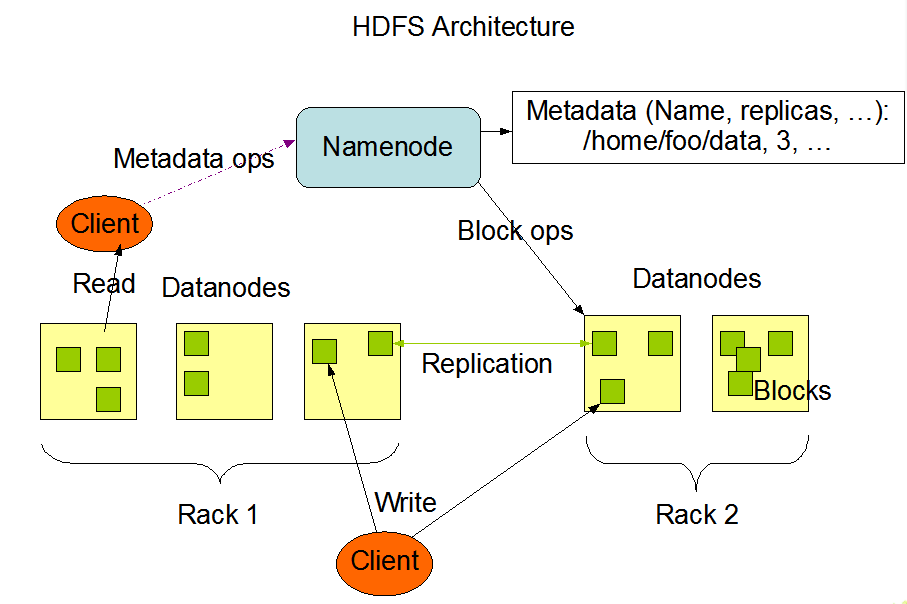
reading:
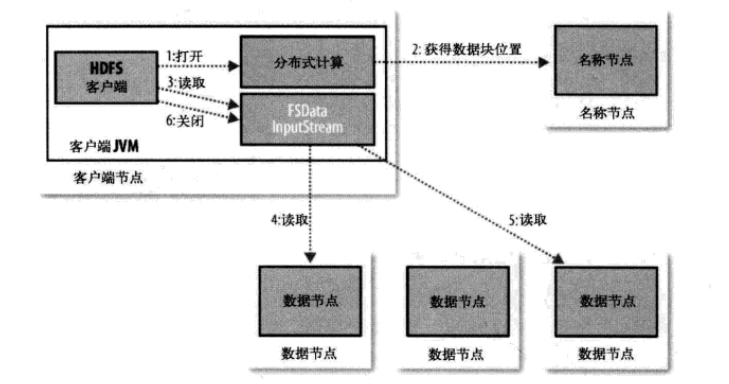
writing:
III. Built-in HDFS Solutions for Small File Storage
For the small file problem, Hadoop itself provides three solutions: Hadoop Archive, Sequence File, and CombineFileInputFormat
(1) Hadoop Archive
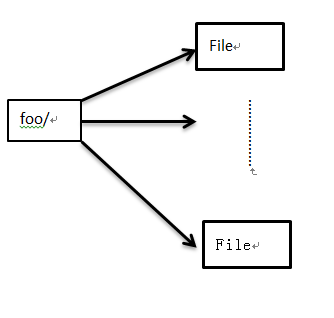
Archived as a bar.har file, whose internal structure is:
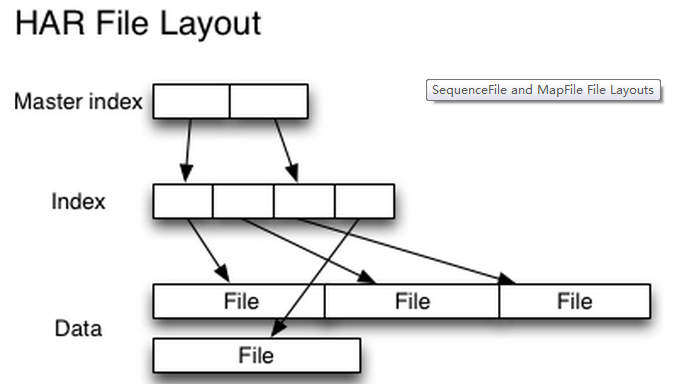
Issues with creating archive files:
1. The source file directory and the source files of the archive are not deleted automatically and need to be deleted manually.
2. The archiving process is essentially a MapReduce process, so it requires Hadoop MapReduce support.
3. The archive file itself does not support compression.
4. Once an archive file is created, it cannot be modified. To delete or add files to it, you must rebuild the archive file.
5. Creating an archive file creates a copy of the original files, so you need at least the same amount of disk space as the archive file’s capacity.
(2) Sequence File
A sequence file consists of a seriesbinary
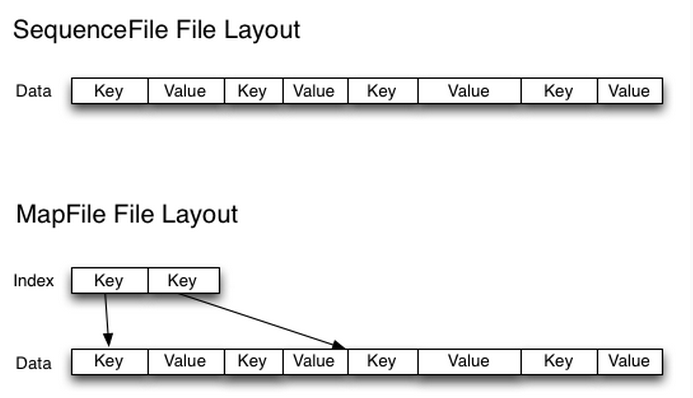
The process of creating sequence files can be accomplished using MapReduce jobs.
For the index, the lookup algorithm needs to be improved.
Access to small files is relatively flexible, with no restrictions on the number of users or files. However, this method does not support append operations, making it suitable for scenarios where a large number of small files are written once.
(3) CombineFileInputFormat
CombineFileInputFormat is a new input format designed to merge multiple files into a single split, and it also takes data locality into account.
This solution is relatively old, and online resources about it are scarce. Based on available information, it does not seem as good as the second solution.
IV. WebGIS Solution Overview
In Geographic Information Systems, data is often sliced into KB-sized files and stored in distributed file systems for easy transmission. The paper combines the relevant characteristics of WebGIS data, merging small files from adjacent geographic locations into one large file and building an index for these files. In the paper, files smaller than 16MB are treated as small files, merged into 64MB blocks, and indexed.
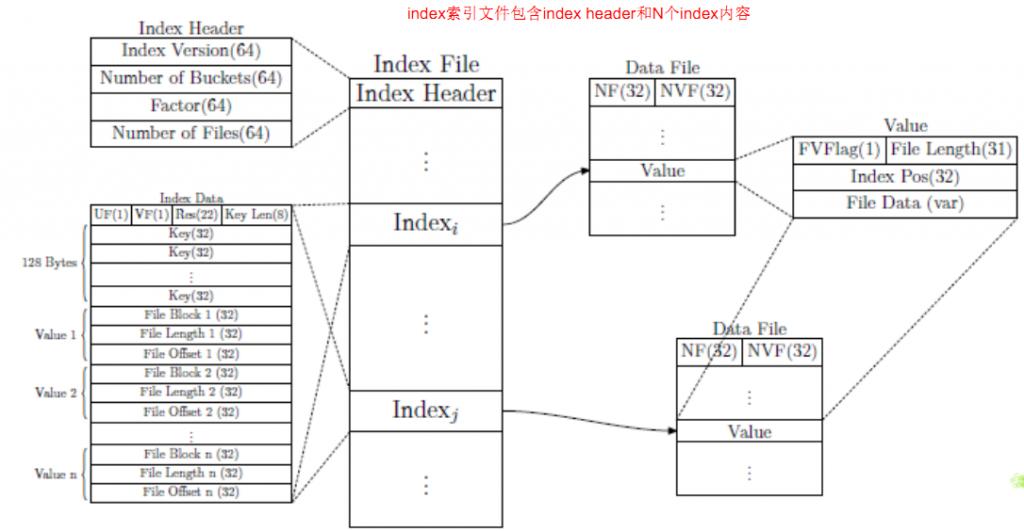
From the index structure and file storage method shown above, the index is a standard fixed-length hash index, and it uses the approach of storing a global index file.
The read process involves appending small files to the end of the large file and then updating the index.
The file deletion process uses a lazy mode, modifying the FVFlag. The file is only deleted based on this flag during the space reallocation process.
V. BlueSky Solution Overview
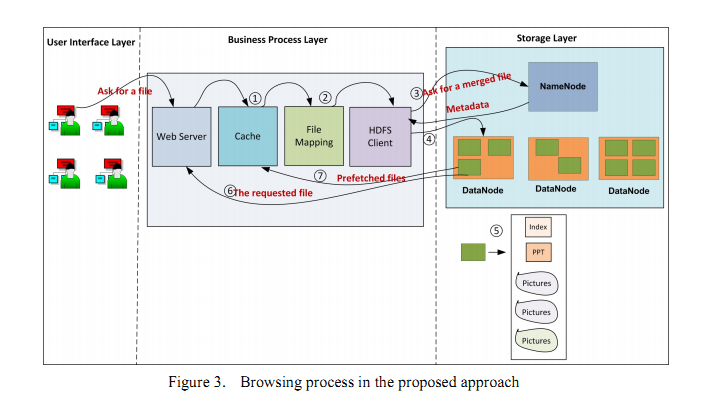
BlueSky is China’s e-learning sharing system, primarily storing teaching PPT files and video files, with the HDFS distributed storage system serving as the storage medium. When users upload PPT files, the system also stores snapshots of these files, allowing users to preview them before deciding whether to continue browsing. User requests for files exhibit strong correlations—when a user browses a PPT, other related PPTs and files are likely to be accessed within a short period. Thus, file access demonstrates both relevance and locality.
The paper mainly proposes two fundamental viewpoints:
(1) Merge small files belonging to the same courseware into one large file, thereby reducing the pressure on the namenode and improving storage efficiency for small files.
(2) A two-level prefetching mechanism is proposed to improve the read efficiency of small files (index file prefetching and data file prefetching). Index file prefetching means that when a user accesses a file, the index file corresponding to the block where that file resides is loaded into memory, so subsequent access to these files does not require further interaction with the namenode. Data file prefetching means that when a user accesses a file, all files within the same courseware are loaded into memory. This way, if the user continues to access other files, the speed is significantly improved.
BlueSky file upload process:
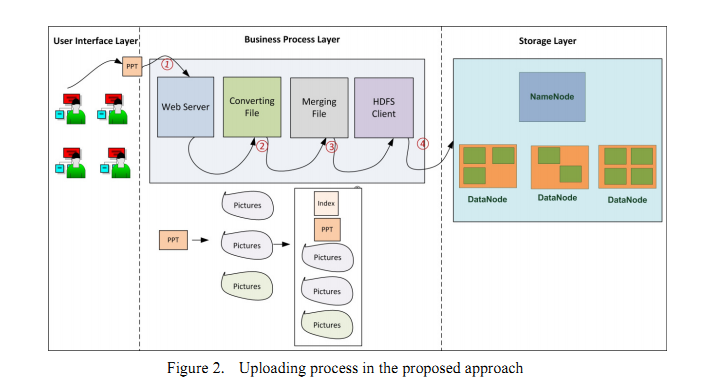
BlueSky file reading process:
File Merging:
During the file merging process, if the size of the merged file is smaller than the block size of 64MB, it is directly stored in a single block. (The merged file includes the local index file.)
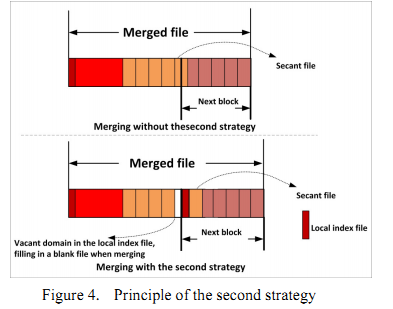
If the size of the merged file is greater than 64MB, there are two ways to split this large file:
1. The local index file, ppt file, and standard resolution picture series are stored in one block, while the remaining picture series are stored in other blocks.
2. Fill the connection points between adjacent blocks with blank files. The specific process:
File Mapping:
Files have their own naming conventions, and separated prefetch images have their own naming scheme (see the paper for details). In the file mapping process, besides the local index file within the block, there is also a global mapping file. This file stores the content
Based on the global mapping table, the datanode information can be obtained from the namenode using the merged file name and block Id, and then according to
VI. Overview of the Facebook HayStack Solution
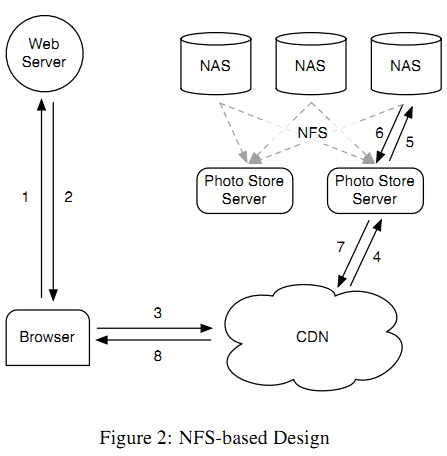
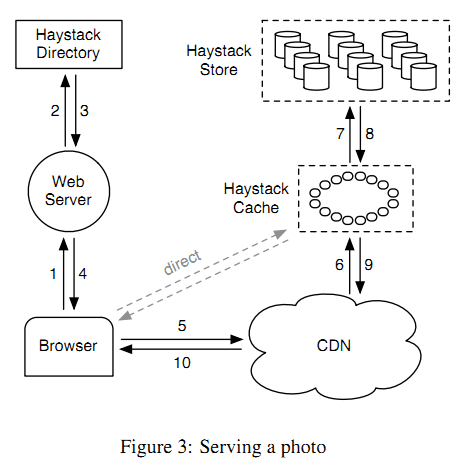
Haystack is a distributed system that differs from HDFS. If you aim to build a small file storage system on top of HDFS, I personally believe its index structure design is worth referencing.
1. The directory contains the logical volume id <-> physical volume id mapping. Based on the
VII. TFS Solution Overview
http://code.taobao.org/p/tfs/src/
TFS (Taobao FileSystem) is a highly scalable, highly available, high-performance distributed file system designed for Internet services, primarily targeting massive amounts of unstructured data. Built on clusters of ordinary Linux machines, it provides external access with high reliability and high concurrency storage. TFS provides Taobao with massive small file storage, typically with file sizes not exceeding 1MB, meeting Taobao’s needs for small file storage and being widely applied across various Taobao applications. It adopts an HA architecture and smooth scaling, ensuring the availability and scalability of the entire file system. Meanwhile, its flat data organization structure maps file names to the physical addresses of files, simplifying the file access flow and providing TFS with good read/write performance to a certain extent.
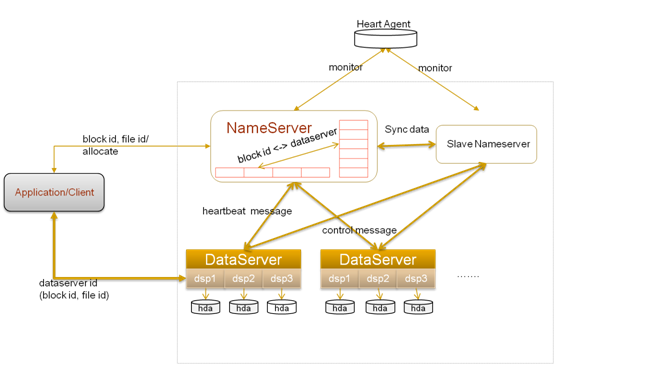
The block size in TFS can be determined by configuration items, with a commonly used block size of 64MB. TFS is designed for massive small file storage, so each block will store many different small files. The DataServer process assigns an ID (File ID, unique within each Block) to each file in the Block, and stores the information of each file within the Block in an Index file corresponding to that Block. This Index file is generally fully loaded into memory, unless there is a mismatch between the DataServer server memory and the average size of files stored in the cluster.
One reason TFS can use a NameNode to store metadata information is that, unlike HDFS metadata, it does not need to store the mapping of filename to block id and the mapping of block id to DataNode. In TFS, there is no concept of a file; only block mapping information exists. All small files are concatenated into blocks. Therefore, the NameNode only needs to store the
In TFS, a large number of small files (actual user files) are merged into a single large file, which is called a Block. TFS organizes file storage by Blocks. Each Block has a unique number across the entire cluster, assigned by the NameServer, while the DataServer actually stores the Block. The NameServer node stores information about all Blocks, and a single Block is stored on multiple DataServers to ensure data redundancy. For data read/write requests, the NameServer first selects a suitable DataServer node and returns it to the client, after which data operations are performed on the corresponding DataServer node. The NameServer needs to maintain