

Due to work, I previously tested the MooseFS distributed file system. Recently, while learning Hadoop, I noticed that MooseFS’s architecture is surprisingly similar to HDFS. I suspect the author of MooseFS must have referenced HDFS principles when developing the software!
First, let’s briefly introduce the components of the MooseFS system:
1. Metadata Server (Master): Responsible for managing the file system across the entire system. It stores metadata for each file (information, attributes, and file locations), including information about all devices and non-regular files, i.e., directories, sockets, and pipes. In my understanding, this is equivalent to the Namenode in HDFS;
2. Metadata Log Server: Backs up the logs from the Metadata Server, equivalent to the Secondary Namenode in HDFS;
3. Data Storage Server (Chunkserver): The node that actually stores data, equivalent to the Datanode in HDFS;
4. MooseFS Client: A host that uses the MooseFS file system for storage and access is called a MooseFS client. In MooseFS, any number of machines using the mfsmount process can communicate with the management server (to receive and modify file metadata) and chunkservers (for actual file data exchange). mfsmount is based on the FUSE mechanism (Filesystem in Userspace), so MooseFS can be used on every operating system that implements the FUSE mechanism (Linux, FreeBSD, Mac OS X, etc.)
Roles of Each Component:
1 Management Server: Responsible for managing each data storage server, scheduling file reads/writes, file space reclamation and recovery, and multi-node copy operations.
2 Metadata Log Server: Responsible for backing up the Master server’s change log files, with file types like changelog_ml.*.mfs, so it can take over if the Master server fails.
3 Data Storage Server (Chunkserver): Responsible for connecting to the Management Server, obeying Management Server scheduling, providing storage space, and offering data transmission to clients.
4 Client: Mounts the remote data storage servers managed by the Management Server via the FUSE kernel interface. The shared file system appears to operate with the same effectiveness as a local Unix file system.
MooseFS Features:
High reliability (multiple copies of data can be stored on different computers)
Dynamic scalability achieved by adding new computers/disks
Deleted files are retained for a configurable amount of time (a file-system-level “trash can”)
Coherent file snapshots, even while the file is being written/accessed
Architecture is as follows:
Read Process: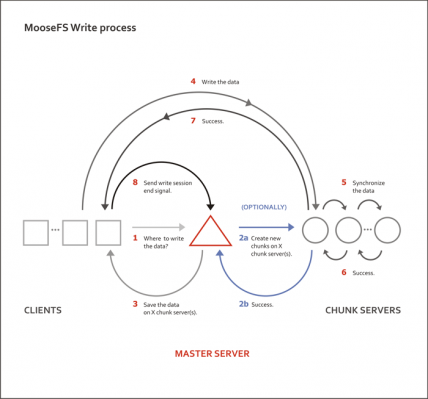
Write Process: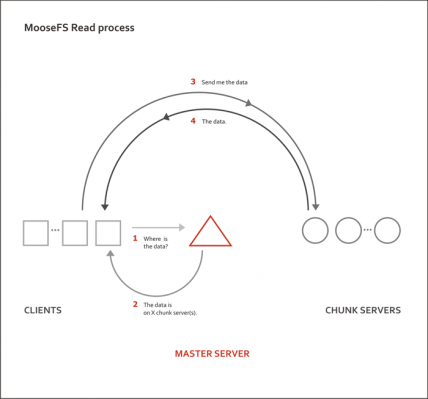
MFS Operating Principle:
Essentially, the client requests the Master, and the Master dispatches it to the appropriate location to read data.
The MFS system consists of 4 parts: Master, Metalogger, Chunkserver, and Client.
Master —— The brain of MFS, recording management information such as file size, storage location, number of copies, etc., similar to the information stored in the InnoDB shared tablespace (ibdata). This information is recorded in metadata.mfs. When this file is loaded into memory, it is renamed to metadata.mfs.back. When updates occur on a chunkserver, the master periodically writes the newly obtained information back to metadata.mfs.back to ensure the reliability of the metadata.
Hardware recommendation: Large memory, because metadata.mfs needs to be loaded into memory. The size of this file depends on the amount of data stored on your chunkservers. Memory size can become a bottleneck later; ECC memory is recommended for error correction. When the data volume in memory reaches a certain level, lacking a fault-tolerant mechanism would be disastrous. Redundant battery units and disk configurations like RAID1/RAID5/RAID10 are all for ensuring high reliability.
Metalogger —— The backup for MFS, akin to a MySQL Master-Slave structure. The Metalogger periodically downloads and synchronizes metadata, changelog, and session-type files from the Master to a local directory, renaming them with the suffix “_ml”.
Hardware recommendation: Consistent with the Master machine configuration. The Metalogger itself is a standby machine for the Master. When the Master goes down, the Metalogger can be directly promoted to Master.
Chunkserver —— The data storage location. Files are stored in chunks, with a maximum chunk size of 64MB. For files smaller than 64MB, the chunk size equals the file size. Files exceeding 64MB are split evenly, with each chunk not exceeding the 64MB limit. Files can have multiple copies; besides the original file, this is the number of additional stored copies. When the goal is 1, there is only one copy, which is randomly stored on a single chunkserver. When the goal number is greater than 1, each copy is saved on a different chunkserver. The goal number should not exceed the number of chunkservers; otherwise, extra copies will have no chunkserver to store them, making any larger goal setting meaningless. The number of copies is generally set to more than 1. This way, if one chunkserver fails, at least one copy remains. When that server is brought back online, the lost copy will be restored, maintaining the original copy count. But if the goal is set to 1 copy, then when the chunkserver holding that copy fails and later rejoins, the copy count will remain 0 and never recover to the original 1 copy.
The remaining storage space on a Chunkserver must be greater than 1GB (as mentioned in the Reference Guide) for new data to be written. Otherwise, you will see a “No space left on device” prompt. In practice, tests have found that writing fails when disk usage reaches around 95%, at which point the available space was 1.9GB.
Client —— The client uses the FUSE module loaded by the kernel, cooperates with the Master, and mounts the partitions shared by the chunkservers locally for read and write operations. Since the FUSE module is an add-on, you need to execute `modprobe fuse` to load it into the kernel after a system reboot.