

1. Install the Required Environment (Dependency Packages): CentOS Example
#yum -y install gcc gcc-c++ gcc-g77 ncurses-devel bison libaio-devel openssl-devel openssl
2. Download and Install Keepalived
Create a directory and enter it
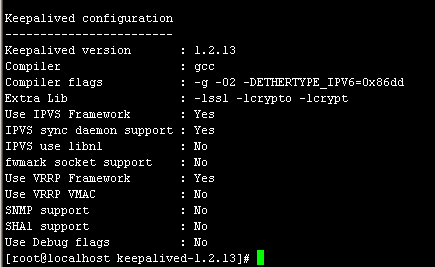
#make && make install
After installation, verify that 4 directories were created

3. Configuration
# cd /usr/local/keepalived/etc
# tree
# mkdir /etc/keepalived/
# service keepalived restart
Stopping keepalived: [FAILED]
Starting keepalived: [ OK ]
#chkconfig keepalived on
# service keepalived status
keepalived (pid 12092) is running…
keepalived.conf Configuration Options
#Global definitions block, includes email notification section
global_defs {
notification_email {
[email protected]
[email protected]
[email protected]
}
notification_email_from [email protected]
smtp_server 192.168.200.1
smtp_connect_timeout 30
router_id LVS_DEVEL // Load balancer identifier; must be unique within a network
}
#VRRP instance definition block, handles failover between load balancers
vrrp_instance VI_1 {
state MASTER // Only MASTER and BACKUP states; primary is MASTER, secondary is BACKUP, use uppercase
interface eth0 // Monitored network interface
virtual_router_id 51 //virtual_router_id must be the same within the same instance
priority 100 //Defines priority; the higher the number, the higher the priority
advert_int 1 //Synchronization check interval between MASTER and BACKUP load balancers, in seconds
authentication { //Authentication type and password
auth_type PASS
auth_pass 1111
}
virtual_ipaddress { //Virtual IP address(es); multiple can be defined
192.168.200.16
192.168.200.17
192.168.200.18
}
}
#Virtual server definition block
virtual_server 192.168.200.100 443 { //Define virtual server
delay_loop 6 //delay_loop, health check interval in seconds
lb_algo rr //Load scheduling algorithm; set to rr (Round Robin) here. Internet applications often use wlc or rr
lb_kind NAT //Load balancing forwarding rule. Generally includes DR, NAT, TUN. In my setup, DR is used throughout
nat_mask 255.255.255.0 //Subnet mask
persistence_timeout 50 //Session persistence time in seconds (can be extended appropriately to maintain sessions)
protocol TCP //Forwarding protocol type; options are TCP and UDP
real_server 192.168.201.100 443 { //Real server IP and port
weight 1 //Default is 1; 0 means disabled
SSL_GET {
url {
path /
digest ff20ad2481f97b1754ef3e12ecd3a9cc
}
url {
path /mrtg/
digest 9b3a0c85a887a256d6939da88aabd8cd
}
connect_timeout 3
nb_get_retry 3
delay_before_retry 3
}
}
}
virtual_server 10.10.10.2 1358 {
delay_loop 6
lb_algo rr
lb_kind NAT
persistence_timeout 50
protocol TCP
sorry_server 192.168.200.200 1358
real_server 192.168.200.2 1358 {
weight 1
HTTP_GET {
url {
path /testurl/test.jsp
digest 640205b7b0fc66c1ea91c463fac6334d
}
url {
path /testurl2/test.jsp
digest 640205b7b0fc66c1ea91c463fac6334d
}
url {
path /testurl3/test.jsp
digest 640205b7b0fc66c1ea91c463fac6334d
}
connect_timeout 3
nb_get_retry 3
delay_before_retry 3
}
}
real_server 192.168.200.3 1358 {
weight 1
HTTP_GET {
url {
path /testurl/test.jsp
digest 640205b7b0fc66c1ea91c463fac6334c
}
url {
path /testurl2/test.jsp
digest 640205b7b0fc66c1ea91c463fac6334c
}
connect_timeout 3
nb_get_retry 3
delay_before_retry 3
}
}
}
Configuring Primary and Backup Keepalived
a. Configure Primary and Backup Keepalived
# Primary. The following mainly lists the differing parts of keepalived.conf
vrrp_instance VI_1 {
state MASTER
interface eth0
virtual_router_id 51
priority 100
advert_int 1
authentication {
auth_type PASS
auth_pass 1111
}
virtual_ipaddress {
192.168.1.220
192.168.1.230
}
}
# Backup. The following mainly lists the differing parts of keepalived.conf
vrrp_instance VI_1 {
state BACKUP
interface eth0
virtual_router_id 51
priority 90
advert_int 1
authentication {
auth_type PASS
auth_pass 1111
}
virtual_ipaddress {
192.168.1.220
192.168.1.230
}
}
b. Test Primary/Backup Keepalived
# Start the keepalived service on the primary server
[root@MASTER ~]# service keepalived start
Starting keepalived: [ OK ]
[root@SZ-SYS-APP01 ~]# ip addr
1: lo:
link/loopback 00:00:00:00:00:00 brd 00:00:00:00:00:00
inet 127.0.0.1/8 scope host lo
inet6 ::1/128 scope host
valid_lft forever preferred_lft forever
2: eth0:
link/ether 00:50:56:84:1f:37 brd ff:ff:ff:ff:ff:ff
inet192.168.1.65/24 brd 192.168.1.255 scope global eth0
inet 192.168.1.220/32 scope global eth0 #Virtual IPs 220 and 230 are visible
inet 192.168.1.230/32 scope global eth0
inet6 fe80::250:56ff:fe84:1f37/64 scope link
valid_lft forever preferred_lft forever
3: sit0:
link/sit 0.0.0.0 brd 0.0.0.0
#Start the keepalived service on the backup server
[root@BACKUP ~]# service keepalived start
Starting keepalived: [ OK ]
#In the query results below, virtual IPs 220 and 230 do not appear on the backup server
[root@HKBO ~]# ip addr
1: lo:
link/loopback 00:00:00:00:00:00 brd 00:00:00:00:00:00
inet 127.0.0.1/8 scope host lo
inet6 ::1/128 scope host
valid_lft forever preferred_lft forever
2: eth0:
link/ether 00:50:56:84:04:2c brd ff:ff:ff:ff:ff:ff
inet 192.168.1.66/24 brd 192.168.1.255 scope global eth0
inet6 fe80::250:56ff:fe84:42c/64 scope link
valid_lft forever preferred_lft forever
3: sit0:
link/sit 0.0.0.0 brd 0.0.0.0
#Stop the keepalived service on the master server and observe whether the VIPs fail over to the backup server
[root@MASTER ~]# service keepalived stop
Stopping keepalived: [ OK ]
[root@MASTER ~]# ip addr #After stopping, this command shows that virtual IPs 220 and 230 are no longer on the master server
1: lo:
link/loopback 00:00:00:00:00:00 brd 00:00:00:00:00:00
inet 127.0.0.1/8 scope host lo
inet6 ::1/128 scope host
valid_lft forever preferred_lft forever
2: eth0:
link/ether 00:50:56:84:1f:37 brd ff:ff:ff:ff:ff:ff
inet 192.168.1.65/24 brd 192.168.1.255 scope global eth0
inet6 fe80::250:56ff:fe84:1f37/64 scope link
valid_lft forever preferred_lft forever
3: sit0:
link/sit 0.0.0.0 brd 0.0.0.0
#Now the failed-over VIP addresses can be seen on the backup server
[root@BACKUP ~]# ip addr
1: lo:
link/loopback 00:00:00:00:00:00 brd 00:00:00:00:00:00
inet 127.0.0.1/8 scope host lo
inet6 ::1/128 scope host
valid_lft forever preferred_lft forever
2: eth0:
link/ether 00:50:56:84:04:2c brd ff:ff:ff:ff:ff:ff
inet 192.168.1.66/24 brd 192.168.1.255 scope global eth0
inet 192.168.1.220/32 scope global eth0
inet 192.168.1.230/32 scope global eth0
inet6 fe80::250:56ff:fe84:42c/64 scope link
valid_lft forever preferred_lft forever
3: sit0:
link/sit 0.0.0.0 brd 0.0.0.0
#If you restart the keepalived service on the master server, the VIPs will automatically fail back to it. This is not verified here.
#Author : Leshami
#Blog :http://www.linuxidc.com
6. Configuring Dual-Master Keepalived
The dual-master keepalived configuration is essentially a mutual master-backup setup to avoid a single point of failure.
#Configure Master-Backup Keepalived
MasterA: 192.168.1.65, VirtualIP: 192.168.1.220
MasterB: 192.168.1.66, VirtualIP: 192.168.1.230
#Master, the following mainly lists the differences in keepalived.conf
vrrp_instance VI_1 {
state MASTER
interface eth0
virtual_router_id 51
priority 100
advert_int 1
authentication {
auth_type PASS
auth_pass 1111
}
virtual_ipaddress {
192.168.1.220
}
}
vrrp_instance VI_2 {
state BACKUP
interface eth0
virtual_router_id 52
priority 90
advert_int 1
authentication {
auth_type PASS
auth_pass 1111
}
virtual_ipaddress {
192.168.1.230
}
}
#Note: The following primarily lists the differing parts of keepalived.conf
vrrp_instance VI_1 {
state BACKUP
interface eth0
virtual_router_id 51
priority 90
advert_int 1
authentication {
auth_type PASS
auth_pass 1111
}
virtual_ipaddress {
192.168.1.220
}
}
vrrp_instance VI_2 {
state MASTER
interface eth0
virtual_router_id 52
priority 100
advert_int 1
authentication {
auth_type PASS
auth_pass 1111
}
virtual_ipaddress {
192.168.1.230
}
}
#From the configuration file above, you can see that an additional vrrp instance has actually been added
#Verification process omitted