

Varnish is a high-performance, open-source reverse proxy server and HTTP accelerator. It adopts a new software architecture that closely integrates with modern hardware systems. Compared to traditional Squid, Varnish offers numerous advantages such as higher performance, faster speed, and easier management. Many large websites are beginning to try replacing Squid with Varnish, which has driven Varnish’s rapid development.
Norway’s largest online newspaper, Verdens Gang (vg.no), replaced 12 Squid servers with 3 Varnish servers and achieved better performance, making it Varnish’s most successful application case.
How Varnish File Caching Works
Varnish is similar to typical server software, consisting of a master process and a child process. The master process reads the storage configuration file, calls the appropriate storage type, and then creates or reads a cache file of the corresponding size. Next, the master initializes the structure that manages this storage space, then forks and monitors the child process. During the main thread initialization, the child process mmaps the entire previously opened storage file into memory. At this point, it creates and initializes free structures, attaching them to the storage management structure for future allocation. The child process allocates several threads for work, mainly including some management threads and many worker threads.
Then, the real work begins. One of Varnish’s threads responsible for accepting new HTTP connections starts waiting for users. If a new HTTP connection arrives, it is always responsible for accepting it, then wakes up a waiting thread and hands over the specific processing to it. The worker thread reads the URI of the HTTP request, looks up the existing object. If it’s a hit, it returns the object directly and replies to the user. If it’s a miss, it needs to fetch the requested content from the backend server, store it in the cache, and then reply.
The cache allocation process works like this: It creates a cache file of the corresponding size based on the size of the read object. For read/write convenience, the program adjusts the size of each object to the nearest multiple of the memory page size. Then, it searches the existing free storage structures, finds the most suitable free storage block, and allocates it. If the free block is not fully used, the remaining memory is formed into another free storage block and attached to the management structure. If the cache is full, the oldest object is released according to the LRU mechanism.
The cache release process works like this: A timeout thread checks the lifetime of all objects in the cache. If the initially set TTL (Time To Live) has expired without access, the object is deleted, and the corresponding structure and storage memory are released. Note that during release, it checks the free memory blocks before and after the released storage memory block. If the adjacent free memory blocks are contiguous with the released memory, they are merged into a larger block.
The entire file cache management does not consider the relationship between files and memory. Essentially, it treats all objects as if they are in memory. If the system runs low on memory, the system will automatically swap them to swap space, without requiring Varnish to control this.
Downloading the Varnish Installation Package
It is recommended to download the latest stable version (the latest Varnish version is now 3.0.2). Varnish provides source code installation packages and executable program installation packages. Choose whichever package suits your platform according to your habits.
Source Code Installation
First, install the pcre library. The pcre library is for regular expression compatibility. If not installed, when installing Varnish version 2.0 or above, you will be prompted that the pcre library cannot be found. The following is the pcre installation process, with code shown in Listing 1:
Listing 1. Pcre Library Installation Code
tar zxvf pcre.tar.gz cd pcre/ ./configure --prefix=/usr/local/pcre/ Make && make install |
Install Varnish, with code shown in Listing 2:
Listing 2. Varnish Installation Code
tar xzvf varnish-3.0.2.tar.gz cd varnish-3.0.2 export PKG_CONFIG_PATH =/usr/local/pcre/lib/pkgconfig ./configure --prefix=/usr/local/varnish make make install |
Executable Package Installation
Listing 3. Varnish Installation Code
rpm -i varnish-2.1.4-2.el5.x86_64.rpm |
Listing 4. Varnish Startup Code
varnishd -f /etc/varnish/default.vcl -s file,/var/varnish_cache,1G / -T 127.0.0.1:2000 -a 0.0.0.0:9082 |
The meanings of each parameter are as follows:
-f Specifies the location of the Varnish configuration file
-s Specifies the Varnish cache storage method. A common method is: “-s file,<dir_or_file>,<size>”.
-T address:port Sets the Varnish telnet management address and its port
-a address:port Indicates the Varnish HTTP listening address and its port
VCL (Varnish Configuration Language) is the Varnish configuration language used to define Varnish’s access policies. VCL syntax is relatively simple and somewhat similar to C and Perl. The main points are as follows:
- Blocks are delimited by curly braces, statements end with a semicolon, and the ‘ # ’ symbol can be used to add comments.
- VCL uses assignment operators like “=”, comparison operators like “==”, logical operators like “!,&&,!!” forms, and also supports regular expressions and ACL matching operations using “~”.
- VCL does not have user-defined variables. You can set variable values on backend, request, or object using the set keyword. For example, set req.backend = director_employeeui;
- For concatenating two strings, there are no operators between them. Code is shown in Listing 5:
Listing 5. String Concatenation Code
set req.http.X-hit = " hit" "it"; |
- The /” character has no special meaning in VCL, which is slightly different from other languages.
- VCL can use the set keyword to set any HTTP header, and can use the remove or unset keyword to remove HTTP headers.
- VCL has if/else judgment statements, but no loop statements.
Declare and initialize a backend object, code is shown in Listing 6
Listing 6. Backend Declaration Code
backend www { .host = "www.example.com"; .port = "9082"; }
|
Using backend objects, the code is shown in Listing 7.
Listing 7. Code for Using backend
if (req.http.host ~ "^(www.)?example.com$") { set req.backend = www; }
|
VCL Backend Collections: director
VCL can aggregate multiple backends into a group called a director, which enhances performance and resilience. When one backend in the group fails, another healthy backend can be selected. VCL offers several types of directors, each using a different algorithm to choose a backend. The main ones are:
- The random director
The random director selects a backend based on the assigned weight. The .retries parameter specifies the maximum number of attempts to find a backend, and the .weight parameter represents the weight.
- The round-robin director
The round-robin director selects backends in a cyclical, sequential manner.
- The client director
The client director selects a backend based on client.identity. You can set the value of client.identity to a session cookie to identify the backend.
VCL can set up probes to check if a backend is healthy. The code for defining a backend probe is shown in Listing 8:
Listing 8. Code for Defining backend probes
backend www { .host = "www.example.com"; .port = "9082"; .probe = { .url = "/test.jpg";// Which URL Varnish should request .timeout = 1 s;// Timeout waiting period .interval = 5s// Interval between checks .window = 5;// Maintain results from 5 sliding windows .threshold = 3;// Declare backend healthy if at least 3 windows are successful } }
|
ACL creates a client access control list. You can use ACL to control which clients can access and which are prohibited. The code for defining an ACL is shown in Listing 9:
Listing 9. ACL Definition Code
Acl local{ "localhost"; "192.0.2.0"/24; !"192.0.2.23";// Exclude this IP }
|
vcl_recv Function
Used to receive and process requests. It is called when a request arrives and is successfully received, determining how to handle the request by evaluating the request data—for example, how to respond, which response to use, or which backend server to use.
This function typically ends with one of the following keywords:
pass: Enters pass mode, handing control of the request to the vcl_pass function.
pipe: Enters pipe mode, handing control of the request to the vcl_pipe function.
lookup: Enters lookup mode, handing control to the lookup instruction, which searches for the requested object in the cache and then hands control to either the vcl_hit or vcl_miss function based on the result.
error code [reason]: Returns the “code” to the client and abandons processing the request. “code” is an error identifier, such as 200 or 405. “reason” is the error message.
vcl_pipe Function
This function is called when entering pipe mode, used to pass the request directly to the backend host. Unchanged content is returned to the client while the request and response remain unchanged, until the connection is closed.
This function typically ends with one of the following keywords:
error code [reason].
pipe.
vcl_pass Function
This function is called when entering pass mode, used to pass the request directly to the backend host. After the backend host responds with data, it sends the response data to the client without any caching, ensuring the latest content is returned for every request on the current connection.
This function typically ends with one of the following keywords:
error code [reason].
pass.
restart: Restarts the process, incrementing the restart count. If the restart count exceeds max_restarts, an error warning is issued.
vcl_hash
This function is called when you want to add data to the hash.
This function typically ends with the following keyword:
hash.
vcl_hit Function
After executing the lookup instruction, this function is automatically called if the requested content is found in the cache.
This function typically ends with one of the following keywords:
deliver: Sends the found content to the client and hands control to the vcl_deliver function.
error code [reason].
pass.
restart: Restarts the process, incrementing the restart count. If the restart count exceeds max_restarts, an error warning is issued.
vcl_miss Function
After executing the lookup instruction, this function is automatically called if the requested content is not found in the cache. This function can be used to determine whether content needs to be fetched from the backend server.
This function typically ends with one of the following keywords:
fetch: Fetches the requested content from the backend and hands control to the vcl_fetch function.
error code [reason].
pass.
vcl_fetch Function
This function is called after the backend host updates the cache and fetches the content. Subsequently, by evaluating the fetched content, it decides whether to put the content into the cache or return it directly to the client.
This function typically ends with one of the following keywords:
error code [reason].
pass.
deliver.
esi.
restart: Restarts the process, incrementing the restart count. If the restart count exceeds max_restarts, an error warning is issued.
vcl_deliver Function
This function is called before the content found in the cache is sent to the client.
This function typically ends with one of the following keywords:
error code [reason].
deliver.
restart: Restarts the process, incrementing the restart count. If the restart count exceeds max_restarts, an error warning is issued.
vcl_error
This function is called when an error occurs.
This function typically ends with one of the following keywords:
deliver.
restart.
The VCL processing flow is shown in Figure 1.
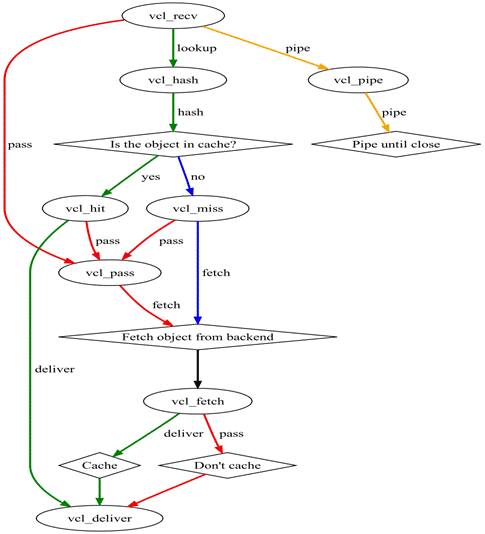
The process Varnish uses to handle an HTTP request is roughly divided into the following steps:
- Receive State (vcl_recv). This is the entry state for request processing. Based on VCL rules, it determines whether the request should be passed (vcl_pass), piped (vcl_pipe), or enter lookup (local query).
- Lookup State. After entering this state, data is searched for in the hash table. If found, it enters the hit (vcl_hit) state; otherwise, it enters the miss (vcl_miss) state.
- Pass (vcl_pass) State. In this state, it proceeds directly to the backend request, i.e., enters the fetch (vcl_fetch) state.
- Fetch (vcl_fetch) State. In the fetch state, it performs a backend fetch for the request, sends the request, obtains the data, and performs local storage according to settings.
- Deliver (vcl_deliver) State. The obtained data is sent to the client, and then this request is completed.
VCL’s built-in public variables can be used in different VCL functions. They are introduced below according to the different stages of use.
When a request arrives, the available public variables are shown in Table 1.
Table 1. Public Variables Available Upon Request Arrival
| Public Variable Name | Meaning |
|---|---|
| req.backend | Specifies the corresponding backend host |
| server.ip | Represents the server IP |
| client.ip | Represents the client IP |
| req.quest | Indicates the request type, e.g., GET, HEAD, etc. |
| req.url | Specifies the request URL |
| req.proto | Indicates the HTTP protocol version of the client request |
| req.http.header | Represents the HTTP header information in the corresponding request |
| req.restarts | Indicates the number of restarts; the default maximum is 4 |
When Varnish makes requests to the backend host, the available common variables are shown in Table 2.
Table 2. Common Variables Available When Requesting the Backend Host
| Common Variable Name | Meaning |
|---|---|
| beresp.request | Specifies the request type, e.g., GET, HEAD, etc. |
| beresp.url | Indicates the request URL |
| beresp.proto | Indicates the HTTP protocol version of the client request |
| beresp.http.header | Represents the HTTP header information in the corresponding request |
| beresp.ttl | Indicates the cache lifetime, the cache retention time (in seconds) |
After content is fetched from the cache or the backend host, the available common variables are shown in Table 3.
Table 3. Common Variables Available After Fetching Content from the Backend Host
| Common Variable Name | Meaning |
|---|---|
| obj.status | The request status code of the returned content, e.g., 200, 302, 504, etc. |
| obj.cacheable | Whether the returned content can be cached |
| obj.valid | Whether it is a valid HTTP request |
| obj.response | The request status message of the returned content |
| obj.proto | The HTTP version of the returned content |
| obj.ttl | The lifetime of the returned content, i.e., cache time, in seconds |
| obj.lastuse | The time elapsed since the last request, in seconds |
When responding to the client, the available common variables are shown in Table 4.
Table 4. Common Variables Available When Responding to the Client
| Common Variable Name | Meaning |
|---|---|
| resp.status | The HTTP status code returned to the client |
| resp.proto | The HTTP protocol version returned to the client |
| resp.http.header | The HTTP header information returned to the client |
| resp.response | The HTTP status header returned to the client |
VCL is a configuration file language and cannot be single-step debugged like C/C++. When the VCL execution results differ from expectations, it is difficult to find where the logic error lies. In addition to code review, we can use inline C language and inspect the status in objects returned to the browser to find logic errors.
We can use inline C language to print corresponding information. For example, we can print information in relevant places to check whether the VCL flow is executing correctly. The inline C code for printing information is shown in Listing 10:
Listing 10. Code for Printing Information
C{ #include<syslog.h>// First include the header file }C C{ Syslog(LOG_INFO,"VCL run here in function xxx in line xxx"); }C
|
After starting varnish, we can use the tail -f /var/log/messages command to view the corresponding print information in /var/log/messages. The viewed print information is shown in Figure 2:
Figure 2. Varnish Print Information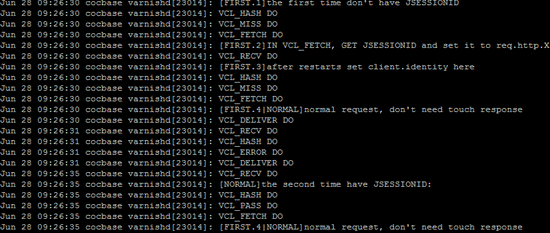
We can also set the values of certain variables onto the object returned to the browser, and then view the variable value in the browser. The code for setting a variable value is shown in Listing 11:
Listing 11. Varnish Variable Setting Code
set beresp.http.X-Cookie-Debug-req-cookie = req.http.Cookie; |
View the value of beresp.http.X-Cookie-Debug-req-cookie in the Chrome browser, with the result shown in Figure 3:
Figure 3. Viewing Varnish Variable Values in the Browser
Varnish Configuration File Code
See attachment
This article briefly introduced Varnish and provided a detailed explanation of its workflow, installation, and configuration. With this article, you can quickly master Varnish.
http://www.ibm.com/developerworks/cn/opensource/os-cn-varnish-intro/index.html