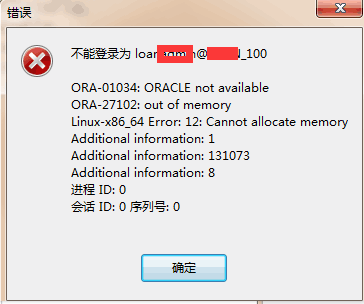
Home › Database › Oracle › Oracle Connection Error “Cannot Allocate Memory” Fix Oracle Connection Error “Cannot Allocate Memory” Fix Categories: Oracle 2017-11-21 root Comments (0) Oracle Connection Error: Cannot Allocate Memory How to Fix:Check memory usage and clear out some programs that are consuming a lot of memory, and it should recover automatically. « Previous Fix “ORA-01116: Error in Opening Database” After Shutdown Immediate Next »Fix: sqlplus64 Error While Loading Shared Libraries libsqlplus.so Related Posts How to Configure PL/SQL to Connect to Oracle 2020-03-11 How to Fix Oracle Tablespace Deletion Failed Verification Check Wrong Creation SCN 2018-05-31 How to Create a Read-Only User in Oracle 2018-05-18 How to Adjust Oracle Memory Allocation After System Configuration Changes 2018-05-08 How to Enable Oracle Archivelog Mode 2018-04-16 Linux Oracle Export EXP-00091: Exporting Questionable Statistics Fix 2018-03-23 Leave a Comment Cancel replyYour email address will not be published.Comment * Name * Email * Website Save my name, email, and website in this browser for the next time I comment. Δ