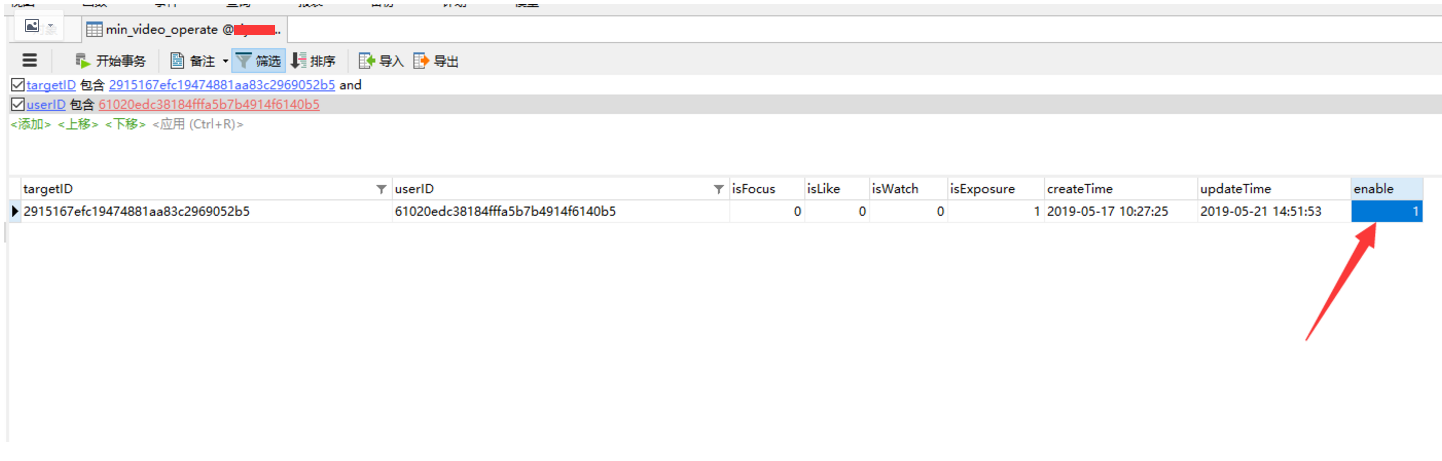
The basic principle of go-mysql-elasticsearch is: when the program starts for the first time, it first uses the mysqldump tool to perform a full sync of the source MySQL database, then writes data to ES through the elasticsearch client; then it implements a mysql client that connects to the source MySQL as a slave. The source MySQL as master will synchronize all data update operations to the slave via binlog events. By parsing the binlog events, you can obtain the updated content of the data, and then write it to ES.
Additionally, this tool also provides an operation statistics feature. Whenever there is a data insert, update, or delete operation, it increments the corresponding operation count by 1. When the program starts, it launches an HTTP service, and by calling the HTTP interface you can view the counts of insert, update, and delete operations.
Usage Notes:
1. MySQL binlog must be in ROW mode
2. The MySQL table to be synced must contain a primary key, otherwise it will be directly ignored. This is because if the table has no primary key, UPDATE and DELETE operations cannot find the corresponding document in ES and therefore cannot be synced.
3. Modifying the table structure while the program is running is not supported.
4. The MySQL user account used for connection must be granted RELOAD privilege, REPLICATION privilege, and SUPER privilege:
make # The bin folder will only appear after running make
vi etc/river.toml
# MySQL address, user and password
# user must have replication privilege in MySQL.
my_addr = "127.0.0.1:3307"
my_user = "root"
my_pass = "a123456"
my_charset = "utf8"
# Set true when elasticsearch use https
#es_https = false
# Elasticsearch address
es_addr = "127.0.0.1:9200"
# Elasticsearch user and password, maybe set by shield, nginx, or x-pack
es_user = "elastic"
es_pass = "a123456"
# Path to store data, like master.info, if not set or empty,
# we must use this to support breakpoint resume syncing.
# TODO: support other storage, like etcd.
data_dir = "./var"
# Inner Http status address
stat_addr = "127.0.0.1:12800"
# pseudo server id like a slave
server_id = 1001
# mysql or mariadb
flavor = "mysql"
# mysqldump execution path
# if not set or empty, ignore mysqldump.
mysqldump = "mysqldump"
# if we have no privilege to use mysqldump with –master-data,
# we must skip it.
#skip_master_data = false
# minimal items to be inserted in one bulk
bulk_size = 128
# force flush the pending requests if we don't have enough items >= bulk_size
flush_bulk_time = "200ms"
# Ignore table without primary key
skip_no_pk_table = false
# MySQL data source
[[source]]
schema = "test123"
# Only below tables will be synced into Elasticsearch.
# "t_[0-9]{4}" is a wildcard table format, you can use it if you have many sub tables, like table_0000 – table_1023
# I don't think it is necessary to sync all tables in a database.
tables = ["min_video_operate"]
# Below is for special rule mapping
# Very simple example
#
# desc t;
# +——-+————–+——+—–+———+——-+
# | Field | Type | Null | Key | Default | Extra |
# +——-+————–+——+—–+———+——-+
# | id | int(11) | NO | PRI | NULL | |
# | name | varchar(256) | YES | | NULL | |
# +——-+————–+——+—–+———+——-+
#
# The table `t` will be synced to ES index `test` and type `t`.
[[rule]]
schema = "test123"
table = "min_video_operate"
index = "min_video_operate"
type = "min_video_operate"
# Wildcard table rule, the wildcard table must be in source tables
# All tables which match the wildcard format will be synced to ES index `test` and type `t`.
# In this example, all tables must have same schema with above table `t`;
# Simple field rule
#
# desc tfield;
# +———-+————–+——+—–+———+——-+
# | Field | Type | Null | Key | Default | Extra |
# +———-+————–+——+—–+———+——-+
# | id | int(11) | NO | PRI | NULL | |
# | tags | varchar(256) | YES | | NULL | |
# | keywords | varchar(256) | YES | | NULL | |
# +———-+————–+——+—–+———+——-+
#
#[[rule]]
#schema = "test"
#table = "tfield"
#index = "test"
#type = "tfield"
#[rule.field]
# Map column `id` to ES field `es_id`
#id="es_id"
# Map column `tags` to ES field `es_tags` with array type
#tags="es_tags,list"
# Map column `keywords` to ES with array type
#keywords=",list"
# Filter rule
#
# desc tfilter;
# +——-+————–+——+—–+———+——-+
# | Field | Type | Null | Key | Default | Extra |
# +——-+————–+——+—–+———+——-+
# | id | int(11) | NO | PRI | NULL | |
# | c1 | int(11) | YES | | 0 | |
# | c2 | int(11) | YES | | 0 | |
# | name | varchar(256) | YES | | NULL | |
# +——-+————–+——+—–+———+——-+
#
#[[rule]]
#schema = "test"
#table = "tfilter"
#index = "test"
#type = "tfilter"
# Only sync following columns
#filter = ["id", "name"]
# id rule
#
# desc tid_[0-9]{4};
# +———-+————–+——+—–+———+——-+
# | Field | Type | Null | Key | Default | Extra |
# +———-+————–+——+—–+———+——-+
# | id | int(11) | NO | PRI | NULL | |
# | tag | varchar(256) | YES | | NULL | |
# | desc | varchar(256) | YES | | NULL | |
# +———-+————–+——+—–+———+——-+
#
#[[rule]]
#schema = "test"
#table = "tid_[0-9]{4}"
#index = "test"
#type = "t"
# The es doc's id will be `id`:`tag`
# It is useful for merge muliple table into one type while theses tables have same PK
#id = ["id", "tag"]
ES operations: You need to create the index first, otherwise an error will occur.
PUT min_video_operate
Starting the program:
./bin/go-mysql-elasticsearch -config=./etc/river.toml & # Start, preferably in the background
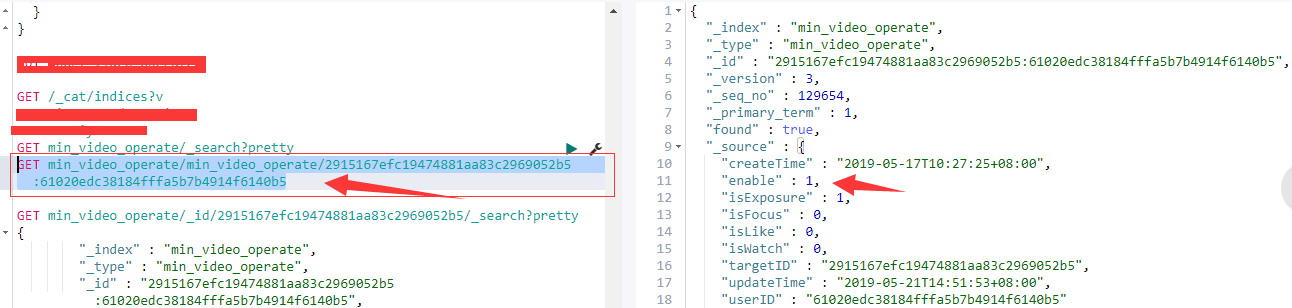
Testing: After the first launch, a full sync will be performed. Once syncing is complete, you can insert, delete, and modify relevant information and check the sync results.
GET min_video_operate/min_video_operate/2915167efc19474881aa83c2969052b5:61020edc38184fffa5b7b4914f6140b5
# In the above query, the sequence is “table_name/index_name/targetID:userID”, which can be adjusted according to your situation.