MySQL is a powerful open-source database. With more and more database-driven applications, people have been pushing MySQL to its limits. Here are 101 tips for tuning and optimizing your MySQL installation. Some tips are specific to certain installation environments, but the ideas are universal. I’ve divided them into categories to help you master more MySQL tuning and optimization techniques.
MySQL Server Hardware and OS Tuning:
1. Have enough physical memory to load the entire InnoDB file into memory——accessing files in memory is much faster than accessing them on disk.
2. Avoid Swap at all costs – swapping reads from the hard disk, which is very slow.
3. Use battery-backed RAM.
4. Use advanced RAID – preferably RAID10 or higher.
5. Avoid RAID5 – the checksums needed for database integrity come at a cost.
6. Separate your OS and data partitions, not just logically, but physically – OS read/write operations can impact database performance.
7. Put MySQL temp space and replication logs on different partitions from your data – background disk reads/writes can impact database performance.
8. More disk space equals faster speed.
9. Better and faster disks.
10. Use SAS instead of SATA.
11. Smaller hard drives are faster than larger ones, especially in RAID configurations.
12. Use a battery-backed caching RAID controller.
13. Avoid software disk arrays.
14. Consider using solid-state IO cards (not disk drives) for your data partition – these cards can support 2GB/s write speeds for almost any amount of data.
15. Set swappiness to 0 on Linux – there is no reason to cache files on a database server; this is an advantage for a server or desktop.
16. Mount filesystems with noatime and nodirtime if possible – there is no reason to update modification times for database file accesses.
17. Use the XFS filesystem – a faster and smaller filesystem than ext3, with many journaling options, and ext3 has been shown to have double-buffering issues with MySQL.
18. Tune your XFS filesystem journaling and buffer variables – for maximum performance standards.
19. On Linux systems, use the NOOP or DEADLINE IO scheduler – the CFQ and ANTICIPATORY schedulers are very slow compared to NOOP and DEADLINE.
20. Use a 64-bit OS – for MySQL, this allows greater memory support and usage.
21. Remove unused packages and daemons from the server – fewer resources consumed.
22. Put the host using MySQL and your MySQL host in a hosts file – no DNS lookups.
23. Never force-kill a MySQL process – you will corrupt the database and any running backup programs.
24. Dedicate the server to MySQL – background processes and other services can reduce the CPU time available for the database.
MySQL Configuration:
25. Use innodb_flush_method=O_DIRECT to avoid double-buffering when writing.
26. Avoid using O_DIRECT with the EXT3 filesystem – you will serialize all writes.
27. Allocate enough innodb_buffer_pool_size to load the entire InnoDB file into memory– fewer reads from disk.
28. Do not set innodb_log_file_size too large, so you can have faster writes and more disk space – discarding excess logs is generally good, and it can reduce recovery time after a database crash.
29. Do not mix innodb_thread_concurrency and thread_concurrency parameters– these two values are incompatible.
30. Allocate a minimal number to max_connections – too many connections can exhaust RAM and lock up the MySQL service.
31. Keep thread_cache at a relatively high number, around 16 – prevents slowness when opening connections. 32. Use the skip-name-resolve parameter – removes DNS lookups. 33. If your queries are repetitive and data doesn’t change often, use the query cache. But if your data changes frequently, the query cache will disappoint you.
34. Increase temp_table_size to prevent writes to disk.
35. Increase max_heap_table_size to prevent writes to disk.
36. Do not set sort_buffer_size too high, or your memory will be depleted quickly.
37. Determine the key_buffer size based on key_read_requests and key_reads; generally key_read_requests should be higher than key_reads, otherwise you are not using key_buffer efficiently.
38. Setting innodb_flush_log_at_trx_commit to 0 will improve performance, but if you keep the default (1), ensure data integrity and make sure replication does not lag.
39. Have a test environment to test your configuration and restart it often without affecting production. MySQL Schema Optimization: 40. Keep your database organized.
41. Archive old data – remove rows that return excess data or affect search queries. 42. Index your data.
43. Do not over-index, compare against your queries.
44. Compress text and BLOB data types – to save space and reduce disk reads.
45. UTF-8 and UTF-16 are less efficient than latin1.
46. Use triggers sparingly.
47. Keep redundant data to a minimum – do not duplicate unnecessary data.
48. Use linking tables instead of expanding rows.
49. Pay attention to data types; use the smallest one possible for your actual data.
50. Separate BLOB/TEXT data from other data if it is not frequently used in queries.
51. Check and optimize tables regularly.
52. Rewrite InnoDB table optimizations frequently.
53. Sometimes, when adding a column, drop the index first, then add it back—this can be faster.
54. Use different storage engines for different needs.
55. Use the Archive storage engine for log tables or audit tables—it writes more efficiently.
56. Store session data in cache (memcache) instead of MySQL – cache allows auto-expiration and prevents you from creating spatio-temporal data that is hard to read and write to MySQL.
57. Use VARCHAR instead of CHAR for variable-length strings – saves space, as CHAR is fixed-length, while VARCHAR is variable (this is unaffected by UTF8).
58. Make schema changes gradually – a small change can have a huge impact.
59. Test all schema changes in a development environment that mirrors production changes.
60. Do not arbitrarily change values in your configuration file; it can have catastrophic effects.
61. Sometimes, less is more in MySQL configs.
62. When in doubt, use a general MySQL configuration file.
Query Optimization:
63. Use the slow query log to find slow queries.
64. Use EXPLAIN to determine if queries are running properly.
65. Always test your queries to see if they are running at their optimal state – performance changes over time.
66. Avoid using count(*) on the entire table; it can lock the whole table.
67. Keep queries consistent so subsequent similar queries can use the query cache.
68. Use GROUP BY instead of DISTINCT where appropriate.
69. Use indexed columns in WHERE, GROUP BY, and ORDER BY clauses.
70. Keep indexes simple; do not include the same column in multiple indexes.
71. Sometimes MySQL uses the wrong index; in this case, use USE INDEX.
72. Check for issues using SQL_MODE=STRICT.
73. For indexed fields with fewer than 5 records, use LIMIT with UNION instead of OR.
74. To avoid SELECT before UPDATE, use INSERT ON DUPLICATE KEY or INSERT IGNORE instead of UPDATE.
75. Do not use MAX; use indexed fields and ORDER BY.
76. Avoid using ORDER BY RAND().
77. LIMIT M, N can actually slow down queries in certain circumstances; use it sparingly.
78. Use UNION instead of subqueries in the WHERE clause.
79. For UPDATES, use SHARE MODE to prevent exclusive locks.
80. When restarting MySQL, remember to warm your database to ensure your data is in memory and queries are fast.
81. Use DROP TABLE, CREATE TABLE instead of DELETE FROM to remove all data from a table.
82. Minimize the data in your queries; using * consumes a lot of time.
83. Consider persistent connections instead of multiple connections to reduce overhead.
84. Benchmark queries, including the load on the server; sometimes a simple query can affect other queries.
85. When load increases on your server, use SHOW PROCESSLIST to view slow and problematic queries.
86. Test all suspicious queries in a mirrored data environment in development.
MySQL Backup Procedures:
87. Perform backups from a secondary replication server.
88. Stop replication during backups to avoid inconsistencies in data dependencies and foreign key constraints.
89. Completely stop MySQL and back up from the database files.
90. If using MySQL dump for backups, back up the binary log files as well – ensure replication is not broken.
91. Do not trust LVM snapshots – they are likely to produce data inconsistencies that will cause problems later.
92. For easier single-table recovery, export data by table – if the data is isolated from other tables.
93. Use –opt when using mysqldump.
94. Check and optimize tables before backing up.
95. For faster imports, temporarily disable foreign key constraints during import.
96. For faster imports, temporarily disable uniqueness checks during import.
97. After each backup, calculate the size of the database, tables, and indexes to monitor data size growth.
98. Monitor replication instances for errors and delays using automated scheduling scripts.
99. Perform backups regularly.
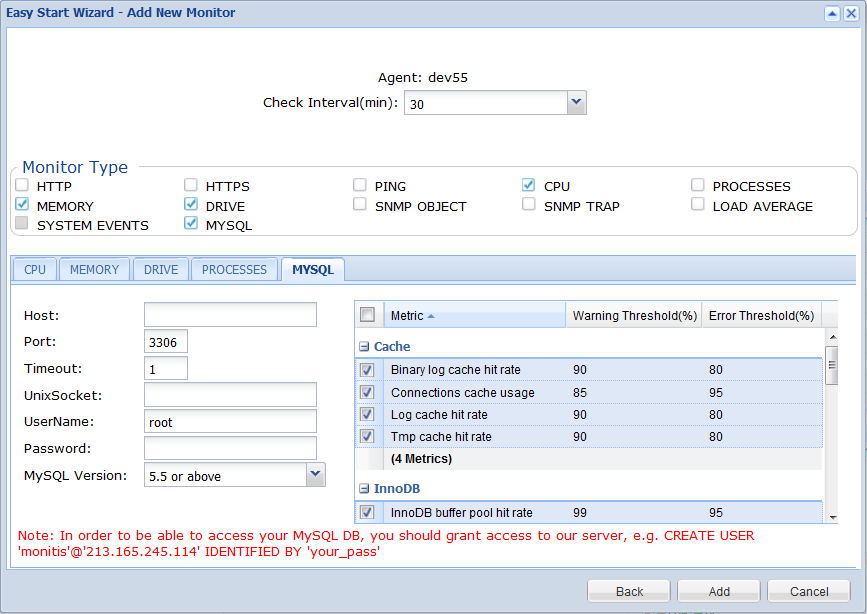
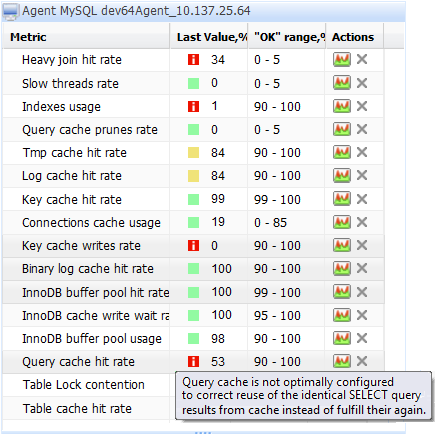
100. Test your backups periodically. Finally 101: Perform MySQL Monitoring: Monitis Unveils The World’s First Free On-demand MySQL Monitoring.