

In typical multi-server operations, Ansible is used for file distribution and command execution. However, when managing many machines with limited internal bandwidth — e.g., distributing a 1GB upgrade package to 500 machines — using Ansible directly will saturate bandwidth, cause SSH timeouts, and fail the distribution.
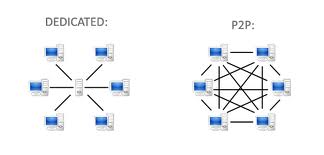
The best solution for large-scale distribution of big files is using a P2P network to save bandwidth and improve efficiency. The typical example is BitTorrent.
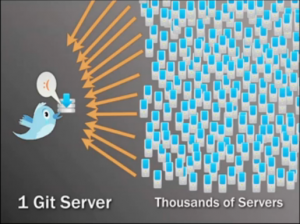
The P2P distribution tool introduced here is Murder, open-sourced by Twitter. Early Twitter needed to distribute code to tens of thousands of servers per release. The more servers, the longer it took. Twitter developed Murder to solve this — releases that took 40-60 minutes now complete in seconds.
murder

murder
murder
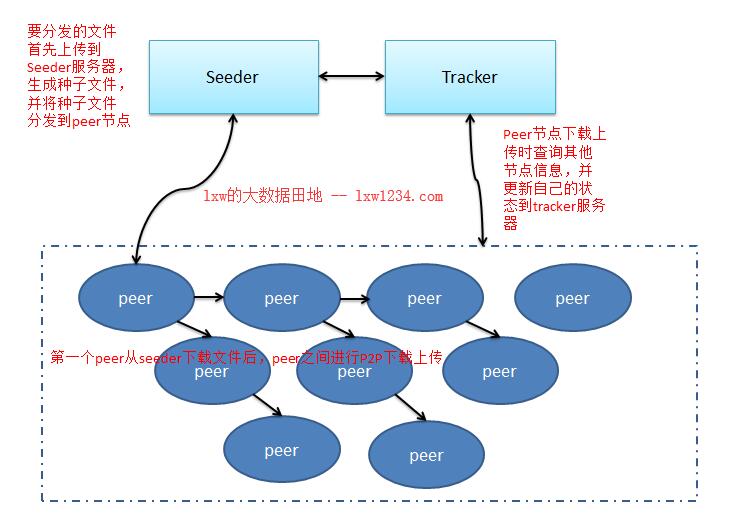
Murder Architecture
murder
Murder consists of three components:
- Tracker
A single service running on one server that tracks which torrent files are being distributed and manages peer node information and status.
- Seeder
The server hosting files to be distributed. The Seeder creates a small torrent file containing basic hash info which is distributed to peers before downloading.
- Peer
Servers that receive files; they can transfer data among themselves.
Murder Usage Example
I have 4 servers with the following roles:
tracker 192.168.1.220
seeder 192.168.1.220
peers 192.168.1.222、192.168.1.228、192.168.1.229
Tracker and Seeder are on the same server.
1. Download and Deploy Murder
Fromhttps://github.com/lg/murderdownload the zip and extract to /opt;
On all servers (Tracker, Seeder, Peers), deploy Murder in /opt — the path will be /opt/murder-master.
2. Start Tracker Service
Execute on the Tracker server:
cd /opt/murder-master/dist
nohup python murder_tracker.py –port 8998 –dfile data –logfile urder_tracker.log &
–port Tracker listening port (default 8998)
–dfile File storing download info
–logfile Tracker log file (default stdout)
3. Prepare files on Seeder server and create torrent
On theSeederserver, the files to distribute:
[liuxiaowen@test04v ~/lxw]$ du -h /home/liuxiaowen/lxw/test.tar.gz
3.1G /home/liuxiaowen/lxw/test.tar.gz
Create torrent:
cd /opt/murder-master/dist/
python murder_make_torrent.py /home/liuxiaowen/lxw/test.tar.gz 192.168.1.220:8998 /tmp/test.tar.gz.torrent
Args: 1=file to distribute, 2=Tracker server address:port, 3=torrent file path.
Distribute the torrent file toPeers:
Use Ansible (or SCP) to distribute the small torrent file to all peer nodes. Search for Ansible usage if needed.
ansible myhosts -m synchronize -a “src=/tmp/test.tar.gz.torrent dest=/tmp/”
StartSeederservice:
cd /opt/murder-master/dist/
python murder_client.py seed /tmp/test.tar.gz.torrent /home/liuxiaowen/lxw/test.tar.gz 192.168.1.220
The last IP is the Seeder server’s local IP.
4. Download on peer nodes
Single node download: on the peer node,
cd /opt/murder-master/dist/
python murder_client.py peer /tmp/test.tar.gz.torrent /tmp/test.tar.gz 192.168.1.220
One node doesn’t show Murder’s advantage. Use Ansible to download simultaneously on multiple peers:
ansible myhosts -m shell -a “python /opt/murder-master/dist/murder_client.py peer /tmp/test.tar.gz.torrent /tmp/test.tar.gz 192.168.1.220″
PS: P2P distribution shines in large-scale environments — more nodes means shorter total distribution time.
Originalhttp://lxw1234.com/archives/2018/07/915.htm