

With the release of PHP 7, its performance and compatibility have become hot topics of discussion in recent days. The impressive performance demonstrated by PHP 7 has tempted many to give it a try, and some “early adopters” have already deployed PHP 7 in production environments. Meanwhile, popular applications like LNMP have been promptly updated to support PHP 7.
Speaking of PHP performance, we must mention HHVM, which we covered earlier. This is a tool developed by Facebook to improve PHP performance, using Just-In-Time (JIT) compilation to convert PHP code into bytecode. In actual testing, HHVM delivered a qualitative leap in PHP performance, boosting PHP runtime efficiency by over 9x in highly optimized environments.
In recent years, PHP has been widely criticized for its performance bottlenecks, causing many developers to abandon PHP altogether. HHVM’s stellar performance was actually detrimental to PHP’s development. PHP 7 is the PHP community’s response to HHVM. The official release of PHP 7 has brought tremendous improvements in performance, and actual testing shows that in some scenarios, PHP 7 even outperforms HHVM.
This article brings you a PHP 7 installation and hands-on experience review. For those eager to try out PHP 7’s performance, it is advisable to run multiple compatibility tests on your applications before upgrading. Although the official claim is 99% backward compatibility, it’s still wise to remain cautious when deploying to production environments.
PHP 7 Hands-On Review: Massive Performance Boost, Strong Compatibility, Limited Extension Support — Upgrade With Caution
I. Key Points for Maximizing PHP 7 Performance
PHP 7 represents a qualitative leap in performance compared to previous PHP versions. However, as the saying goes, “a good horse deserves a good saddle,” to fully leverage PHP 7’s performance advantages, you need to prepare in the following areas: (This section is adapted from Laruence, a core developer of PHP 7 and author of projects such as Yaf, Yar, and Yac).
1. Remember to enable Zend Opcache. Enabling Opcache is very simple — just add the following to your php.ini configuration file:
zend_extension=opcache.soopcache.enable=1opcache.enable_cli=1"2. Use a newer compiler — GCC 4.8 or above is recommended, because only GCC 4.8+ will enable PHP 7’s Global Register for opline and execute_data support, which brings about a 5% performance improvement.

3. Enabling HugePages helps PHP 7 run faster. First, enable HugePages on your system, then enable Opcache’s huge_code_pages. Taking CentOS 6.5 as an example, use the command: $sudo sysctl vm.nr_hugepages=512 to allocate 512 reserved huge page memory blocks:
$ cat /proc/meminfo | grep HugeAnonHugePages: 106496 kBHugePages_Total: 512HugePages_Free: 504HugePages_Rsvd: 27HugePages_Surp: 0Hugepagesize: 2048 kBThen add to php.ini: opcache.huge_code_pages=1. This way, PHP will store its own text segment and memory allocations in huge pages, reducing TLB misses and thus improving performance.
4. Enable Opcache File Cache (experimental). By enabling this, Opcache can cache opcode caches to external files, yielding significant performance improvements for certain scripts. Add this to php.ini: opcache.file_cache=/tmp. PHP will then cache binary export files of Opcode in the /tmp directory, which can persist across PHP lifecycles.
5. PGO. If your PHP is dedicated to a specific project — for example, just for your WordPress, Drupal, or something else — you can try using PGO to boost PHP performance specifically for that project. Concretely, using WordPress 4.1 as the optimization scenario: first, when compiling PHP, run: $ make prof-gen.
6. Then train PHP with your project. For example, for WordPress: $ sapi/cgi/php-cgi -T 100 /home/huixinchen/local/www/htdocs/wordpress/index.php >/dev/null — this runs php-cgi 100 times against the WordPress homepage, generating profile data from this process. Finally:
$ make prof-clean$ make prof-use && make install7. At this point, the compiled PHP 7 you get is a custom-built, maximum-performance version tailored specifically for your project.

II. PHP 7 Installation and Compilation
1. PHP 7 official website:
- 1. Official site: http://php.net/
- 2. Downloads: http://php.net/downloads.php
2. If you’re technically inclined, you can download PHP 7 directly from the official site and compile/install it manually. If you’re accustomed to using the LNMP one-click installation package from lnmp.org, you can try the LNMP 1.3 beta release, which has already added PHP 7 support: How to Smoothly Migrate Your Website to LNMP or LAMP Hosting Environments .
3. OneinStack‘s LNMP installation package already includes one-click PHP 7 installation. When running the script, you can select PHP 7 for installation. Currently, PHP 7 only has the official bundled Zend Opcache extension available for installation.
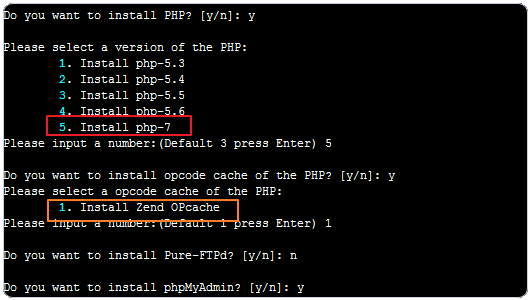
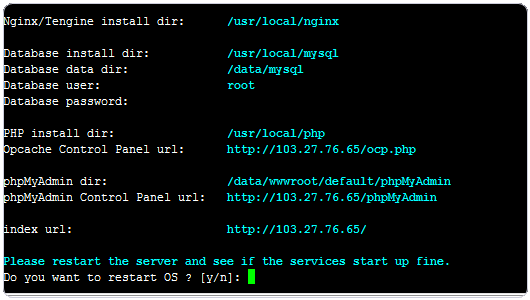
4. OneinStack PHP 7 installation completed successfully.
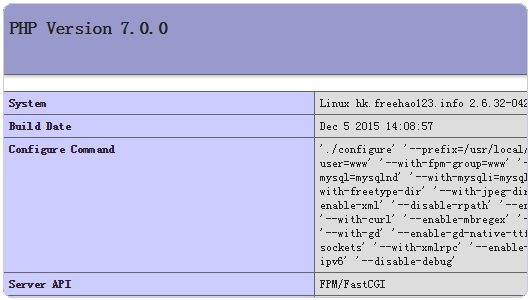
5. This is the PHP 7 information display.
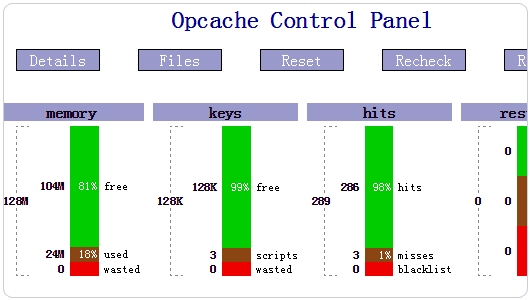
6. This is the Opcache control panel for PHP 7 provided by OneinStack.
III. PHP 7 vs. Older PHP Versions & HHVM — Performance Comparison
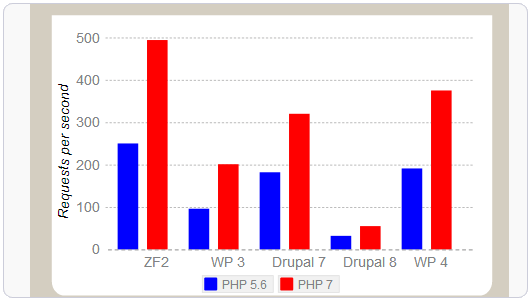
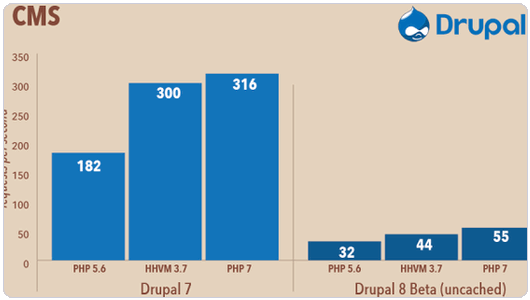
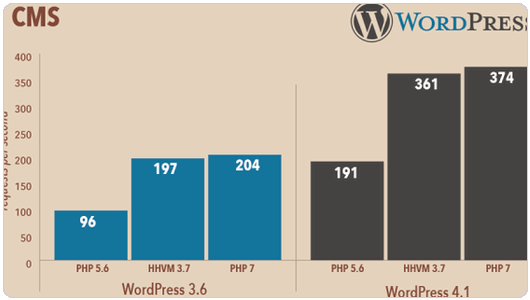
1. Below are the performance results of PHP 7 vs. PHP 5.6 tested by overseas developers on popular applications like WordPress and Drupal. The results clearly show a massive performance improvement with PHP 7.
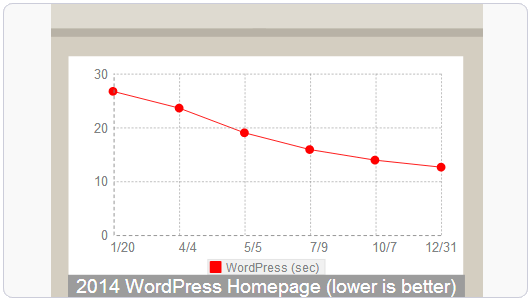
2. For applications like WordPress, PHP 7 not only improves individual execution speed — the longer WordPress runs on PHP 7, the greater the performance gains become.
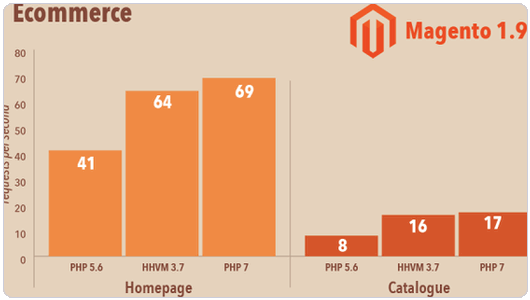
3. As mentioned earlier, PHP 7’s performance improvements have surpassed HHVM in certain aspects. Below is the execution efficiency comparison of PHP 5.6, PHP 7, and HHVM across different applications, published by the official zend.com website.
4. Testing on Magento, the professional open-source e-commerce system, shows that PHP 7 delivers twice the execution speed of PHP 5.6 while using 30% less memory.
5. On Drupal 8, PHP 7 shows the fastest efficiency, already surpassing HHVM.
6. WordPress testing reveals that PHP 5.6 requires 100MB of memory to run, while PHP 7 needs only 25MB.
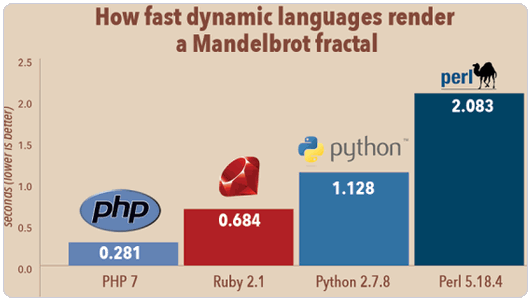
7. In terms of execution speed across different applications, PHP 7 clearly leads the pack — Ruby 2.1, Python 2.7.8, and Perl 5.18.4 all fall behind PHP 7.
IV. PHP 7 Performance Benchmark Results
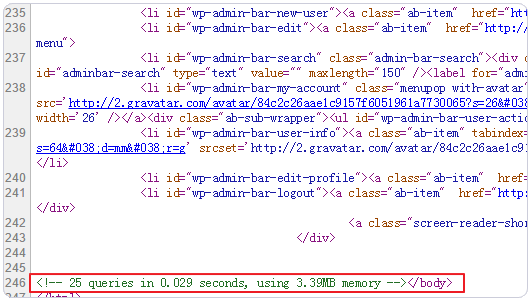
1. Talk is cheap — how does PHP 7 actually perform in real applications? Using a fresh WordPress installation as the test subject, the WordPress homepage load time running on PHP 7 was measured at 0.029 seconds with 3.39MB of memory usage.
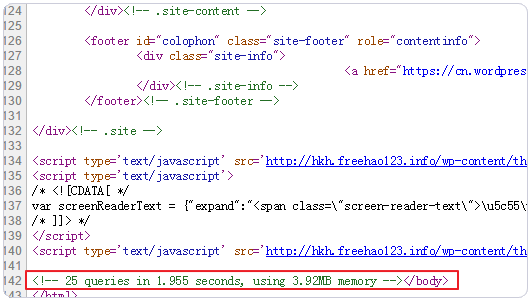
2. Here is the page load time for the same WordPress page running on PHP 5.6: 1.955 seconds, with 3.92MB of memory usage. Looking at the data, PHP 7 has completely outperformed PHP 5.6.
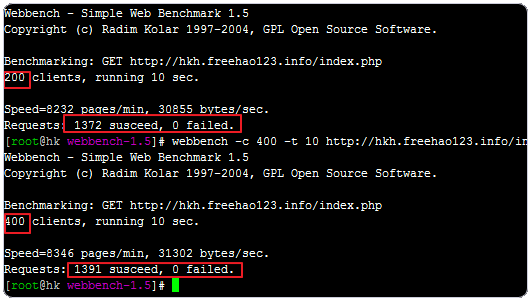
3. PHP 7’s efficiency with WordPress is indeed a qualitative leap over previous versions. To comprehensively evaluate PHP 7’s performance, following the Website Server Stress & Web Performance Testing methodology, we used Webbench to simulate 200 and 400 concurrent connections over 10 seconds, and the speed remained above 8,000 pages/minute in both cases.
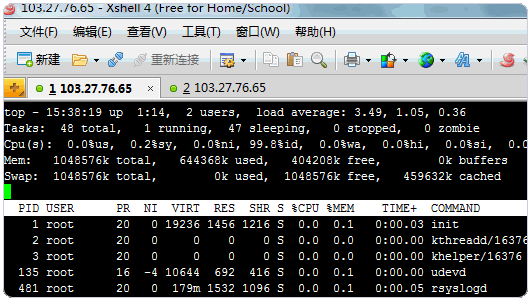
4. At this point, the VPS server’s system load was 3.49.
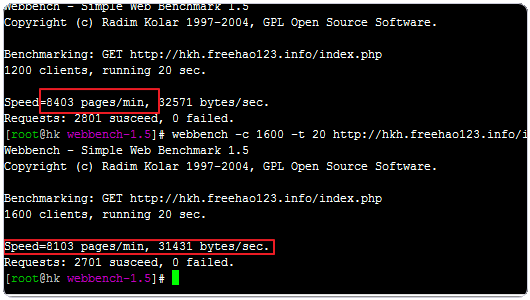
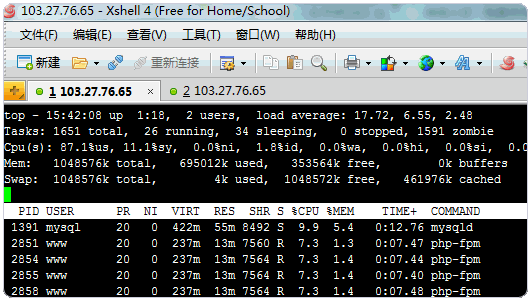
5. When the simulated connections were increased to 1,600, the speed remained above 8,000 pages/minute.
6. At this point, the VPS server’s system load was 17 — it was starting to struggle a bit.
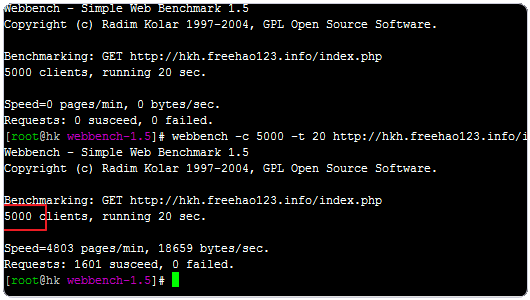
7. When the simulated connections were increased to 5,000, the speed dropped to 4,800 pages/minute — performance was starting to slow down.
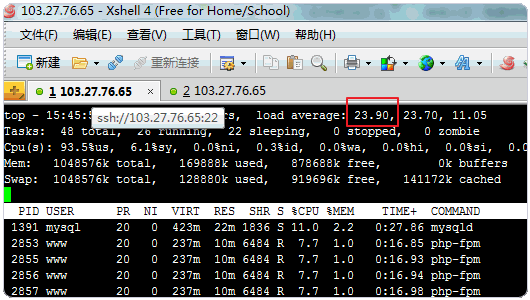
8. At this point, the VPS server’s system load was 23 — the server was under heavy load.
9. To test the limits of PHP 7 on this VPS host, Webbench simulated 10,000 concurrent connections continuously accessing the server over 20 seconds.
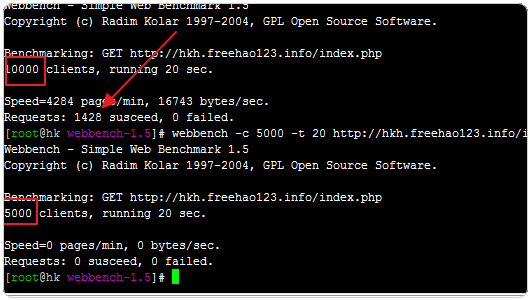
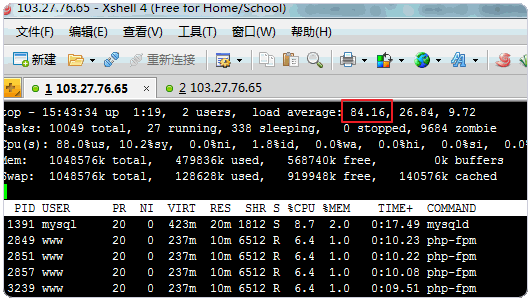
10. At this point, the VPS server’s system load approached 90 — it had likely reached its limit — but the server still did not crash.
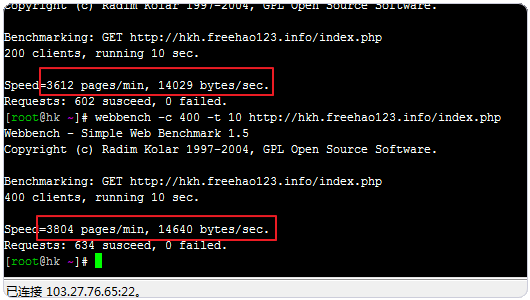
11. Next, let’s look at the stress test results for WordPress running on an identically configured VPS host. First, using Webbench to simulate 200 and 400 concurrent connections over 10 seconds, the speed was 3,600 pages/minute — roughly half the speed observed in the PHP 7 test above.
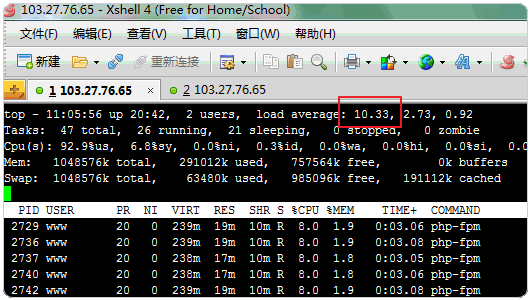
12. This is the system load for PHP 5.6 when testing 200 and 400 concurrent connections — it reached 10, significantly exceeding the 3.49 observed in the PHP 7 environment.
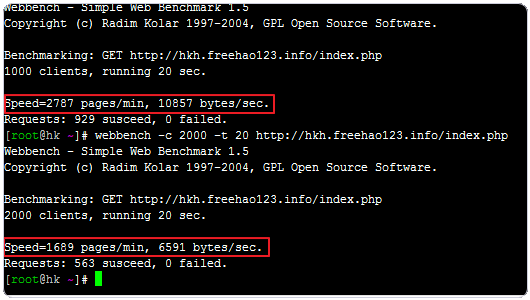
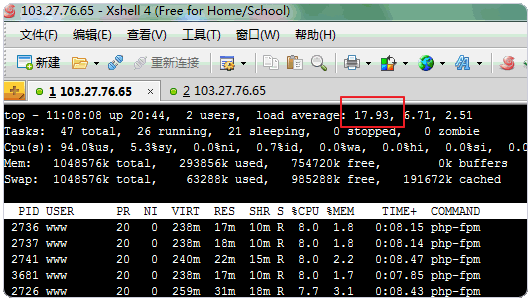
13. In the PHP 5.6 test, when simulated connections were increased to 1,000 and 2,000, the speed dropped to 1,600 pages/minute, and successful connections fell to around 500 — far below the 2,700 observed in the PHP 7 test.
14. At this point, the system load had reached 17.
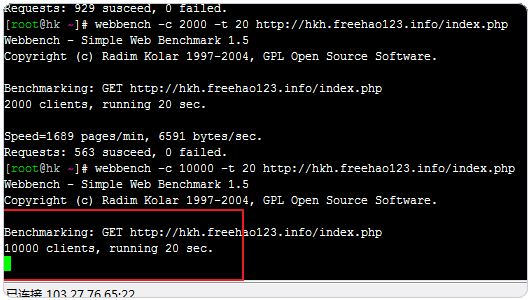
15. In the PHP 5.6 test, Webbench was set to 10,000 concurrent connections continuously accessing the server over 20 seconds. At this point, the test froze and produced no results.
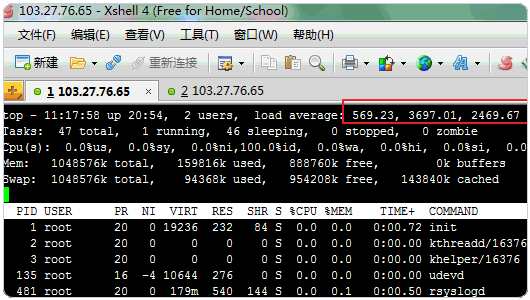
16. Here, the VPS server’s system load had exceeded 1,000 — the server had crashed.
17. The WordPress site running on PHP 5.6 had gone down.

V. PHP 7 Compatibility Issues
1. Currently, domestic applications like Discuz do not yet support PHP 7. Among PHP extensions, only the official Opcache is available for use — others such as eAccelerator, xcache, and memcached are still in progress. You can keep an eye on the extension support list at: https://github.com/gophp7/gophp7-ext/wiki/extensions-catalog. PHP’s memcache extension is already available: https://github.com/php-memcached-dev/php-memcached/tree/php7 and https://github.com/websupport-sk/pecl-memcache. Thanks to the blogger Happy Home for the reminder.
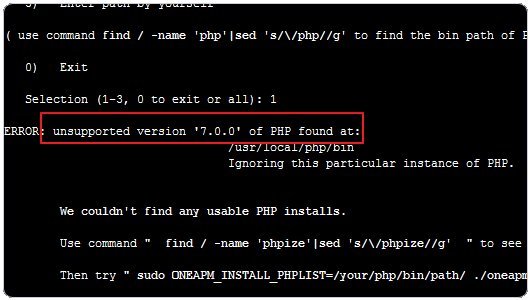
2. After testing, PHP 7 runs WordPress without any issues.

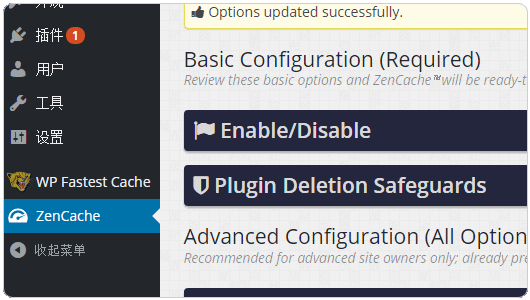
3. Installing WordPress plugins on PHP 7 presents no issues.
4. PHP 7 may have some incompatibilities with certain functions, operators, etc., but 99% of applications likely won’t encounter these.
VI. PHP 7 Hands-On Review — Summary
1. One pleasant surprise after using PHP 7 is that, as overseas developers have tested, PHP 7’s performance is essentially on par with HHVM. Since HHVM relies on a Just-In-Time compiler to translate PHP code into machine instructions, many PHP applications require modifications to run on HHVM.
2. PHP 7 combines HHVM’s ultra-high performance with PHP’s backward compatibility advantage. I believe that in the near future, PHP 7 will gain increasing recognition and adoption. Although caching, acceleration, and other extensions supporting PHP 7 are still limited, this is only a matter of time — more and more developers will join the PHP 7 development ecosystem.