

Recently, a client asked specifically about how to configure static and pseudo-static URLs in PHPCMS V9 during website optimization. CMSYOU recalled having previously shared “PHPCMS Custom URL Rule Techniques,” but that was only the theory. Today, here we are sharing practical step-by-step instructions from a user’s perspective.
First, let’s cover how to configure static HTML generation in the PHPCMS V9 backend, then we’ll explain how to customize URL rules for URL address optimization. In this article, pseudo-static is not covered — you can refer to the PHPCMS V9 Site-Wide Pseudo-Static Configuration Guide instead.
I. Static HTML Generation Settings

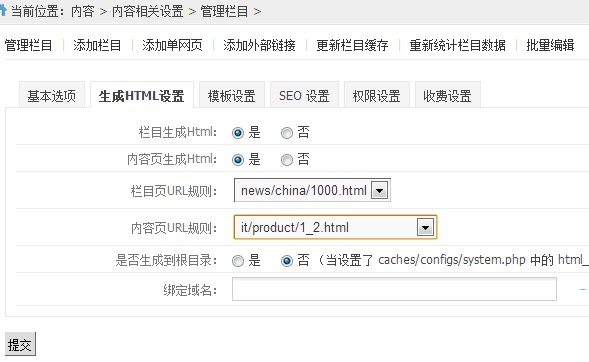
After confirming and submitting, remember to update the category cache, then proceed with publishing management: batch update category pages and batch update content pages.
II. PHPCMS V9 Custom URL Rules and URL Address Optimization
First, let’s understand the HTML generation principle of PHPCMS V9:
The directory rules for static pages generated by PHPCMS are based on URL rules. The static page content is generated by ob_clean from the frontend template files under phpcms/templates/default. Debugging static pages: modify the static page, regenerate the static page to see the effect. You can also call the frontend controller /index.php?m=openservice&c=index& a=openservice, modify the frontend template first, then regenerate.
For any static page links, always synchronize files promptly to prevent dead links and data errors.
Based on this, we can customize URL generation rules in the backend under Extended URL Rule Management, located at: Extensions > URL Rule Management.
In the next section, we will specifically share CMSYOU’s insights and examples on optimizing URL generation rules.
1. Default Category Generation Rule:
{$categorydir}{$catdir}/index.html|{$categorydir}{$catdir}/{$page}.html
When HTML is actually generated, it will appear as: news/cmsyou/1000.html.
There is a minor issue here: if the list has multiple pages, the second page just generates a numbered HTML file, e.g., 2.html for the second page of the list. CMSYOU recommends modifying it to:
{$categorydir}{$catdir}/index.html|{$categorydir}{$catdir}/index_{$page}.html
Generate based on the category index page, so the category list becomes: index.html, index_2.html, index_3.html…… which is much clearer.
If you want to customize generation to a specific fixed directory, you can add a specific English directory name in front.
2. Default Article Page Generation Rule:
{$year}/{$catdir}_{$month}{$day}/{$id}.html|{$year}/{$catdir}_{$month}{$day}/{$id}_{$page}.html
Or:
{$categorydir}{$catdir}/{$year}/{$month}{$day}/{$id}.html|{$categorydir}{$catdir}/{$year}/{$month}{$day}/{$id}_{$page}.html
Such rules create HTML page directories that are too deeply nested. CMSYOU recommends modifying to:
{$categorydir}{$catdir}/{$id}.html|{$categorydir}{$catdir}/{$id}_{$page}.html
This way, the generated static HTML files are only at the root of the category, making them easier to manage and more SEO-friendly. For example, http://www.cmsyou.com/support/84.html is an article under the CMSYOU help section — removing the trailing 84.html gives you the category homepage directly, which is very straightforward.
3. Single Page Generation Rule Optimization
The default single page generation method only has one option. CMSYOU recommends adding another:
{$categorydir}{$catdir}.html
This way, a second-level single page generates only one HTML file rather than a directory, which benefits the HTML architecture. Here is a screenshot of the settings:
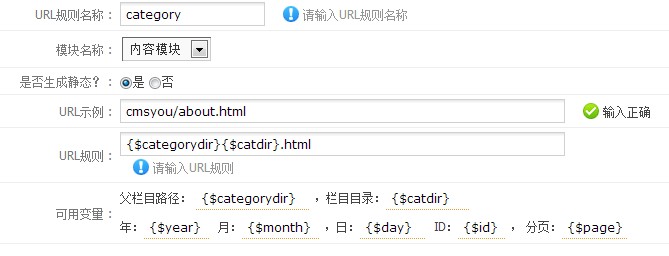
So, having shared the generation rules and optimization examples for PHPCMS V9 categories, content pages, and single pages — do you now understand how to customize HTML generation rules?