

Qiniu Cloud Storage is currently one of the top cloud storage providers in China in terms of functionality and performance. Its cloud storage product leverages ChinaNetCenter’s CDN for acceleration, with edge nodes遍布全国各地; it supports image cropping with powerful features; and its pricing is quite appealing, being cheaper than Alibaba Cloud OSS. I had considered using Qiniu Storage before, but its Web Portal had never supported online file management, which caused a lot of inconvenience for simple day-to-day file operations, so I held off. However, starting today, that changes — Qiniu Cloud Storage has launched a new (beta) version of its Web Portal, fully supporting online file management, which eliminates my last remaining concern.
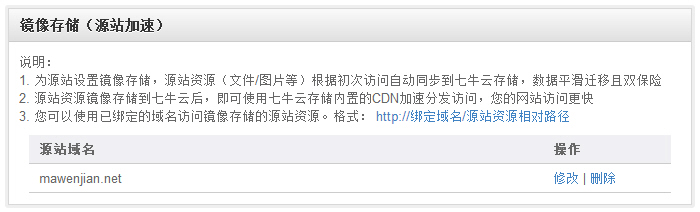
Qiniu Cloud Storage’s mirror storage (origin site management) is quite distinctive. Its principle is that when a requested file does not exist in cloud storage, the system will fetch it from a domain you specify and then store it in the cloud. This significantly lowers website migration costs and eliminates the hassle of developing corresponding plugins for various applications. As long as your resource files use a separate domain, you can easily migrate them to Qiniu.
For WordPress, it only takes two steps:
(Using mawenjian.net as an example, with mawenjian.qiniudn.com as the domain for resource files)
1. In Qiniu Cloud Storage, set the “ Mirror Storage (Origin Site Management)” source to your blog’s address, mawenjian.net;
2. Log in to your WordPress blog, open the page “http://your-domain/wp-admin/options.php”, use “Ctrl+F” to find the “upload_url_path” option, and change it to your Qiniu domain, such as “http://mawenjian.qiniudn.com”. (Note: the “http://” is required, and the domain must NOT end with a “/”)

Configuration in WordPress
Tip: Because the initial file load requires a pull-from-origin operation, the wait time can be longer. To avoid making users wait too long for that first load, you can visit all pages containing resource files after completing the configuration. This will automatically copy the files to cloud storage, and subsequent user load times will be much shorter.
New Web Portal URL: http://portal-beta.qiniu.com/