

The file libs.xml exists inside ecshop template files.
Opening it reveals many snippets of code like this:
<file name="index.dwt">
So what does this actually mean? The primary purpose of libs.xml is to restrict which library items appear, achieving the following effect:
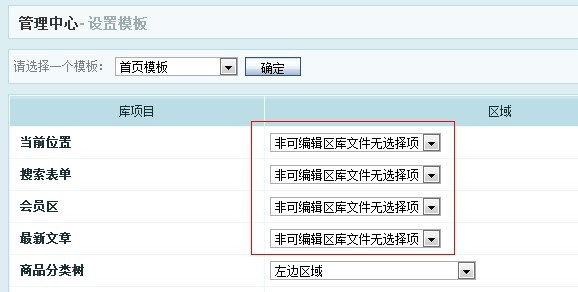
That is right — a message saying “No selectable items in non-editable area”, which means the module cannot be selected.
Let us revisit the earlier code snippet:
<file name="index.dwt"> index.dwt represents the homepage template file
<region name="Left Area"> Left Area is the position
<lib>cart</lib> Shopping cart module
<lib>category_tree</lib> Category tree module
….. and other modules
Modules not listed here will show “No selectable items in non-editable area”, meaning they cannot be edited.
We can see that ur_here.lbi, search.lbi, and similar modules do not appear in libs.xml, which explains why those modules cannot be selected.
Now you know — libs.xml is essentially a file that restricts which modules can be selected. The original design intent was to let template authors lock down certain module placements via libs.xml modifications, preventing inexperienced clients from arbitrarily changing the layout. However, most template creators never understood the purpose of this file, so it became purely decorative.
Thus, this file is of marginal utility — nice to have but not essential.
Of course, if you encounter the “No selectable items in non-editable area” message while configuring templates in the backend, simply delete the libs.xml file, and you will be able to freely place modules anywhere.