

DataX How-To: Sync MySQL to ClickHouse JSON Configuration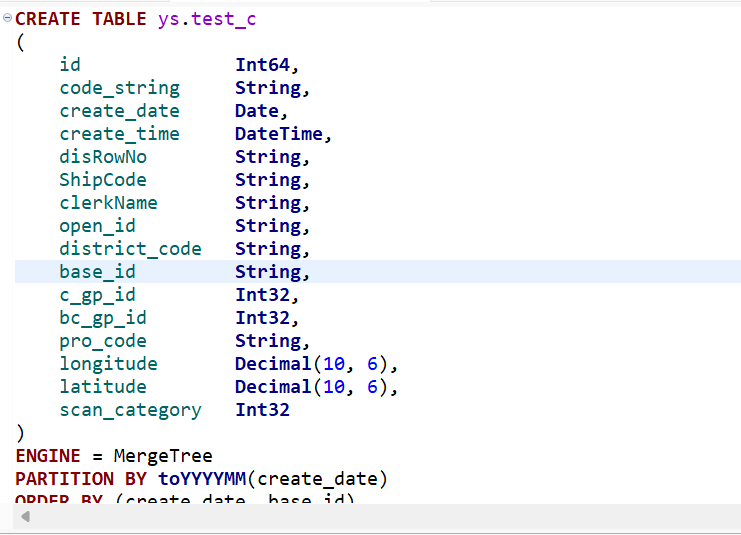
Here, we’ll demonstrate using the test_c table in the ys database. Please create the corresponding table at the destination before syncing:
{
"job": {
"setting": {
"speed": {
"channel": 3
}
},
"content": [
{
"reader": {
"name": "mysqlreader",
"parameter": {
"username": "ys",
"password": "6******",
"connection": [
{
"jdbcUrl": ["jdbc:mysql://am-xxxx.ads.aliyuncs.com:3306/ys?useUnicode=true&characterEncoding=utf8"],
"table": ["test_c"]
}
],
"column": [ "code_string",
"create_date",
"create_time",
"disRowNo",
"ShipCode",
"clerkName",
"open_id",
"district_code",
"base_id",
"c_gp_id",
"bc_gp_id",
"pro_code",
"longitude",
"latitude",
"scan_category" ]
}
},
"writer": {
"name": "clickhousewriter",
"parameter": {
"username": "default",
"password": "dgz******",
"column": [ "code_string",
"create_date",
"create_time",
"disRowNo",
"ShipCode",
"clerkName",
"open_id",
"district_code",
"base_id",
"c_gp_id",
"bc_gp_id",
"pro_code",
"longitude",
"latitude",
"scan_category" ],
"connection": [
{
"jdbcUrl": "jdbc:clickhouse://192.168.1.102:8123/ys",
"table": ["test_c"]
}
]
}
}
}
]
}
}
You can replace the database, username, address, and other details above with your own. Alternatively, you can download the attached file below and modify it with your information. Note that the default JDBC port for ClickHouse is 8123, not 9004.