

Jenkins automatic deployment suddenly throws this error:
“Build step 'Execute shell script on remote host using ssh' marked build as failure”
.
The specific error details are roughly as follows: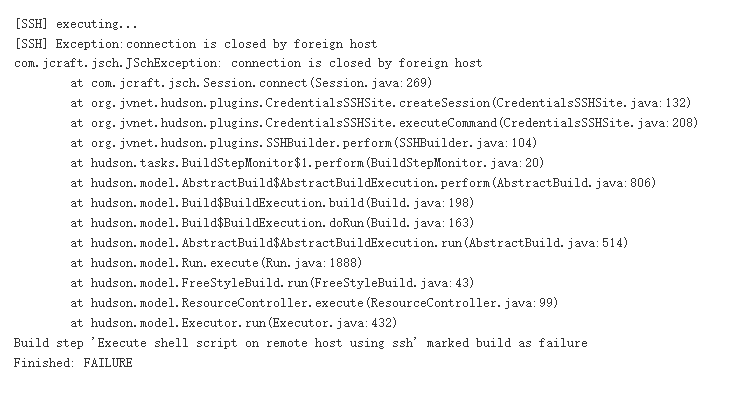
Sometimes the pull succeeds, and sometimes it doesn’t, leading to an unstable state:
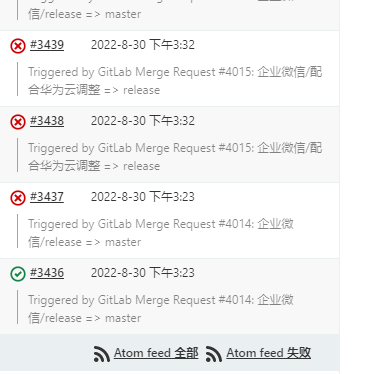
Other symptoms: When connecting to the remote server via SSH, you may also experience an inability to connect, requiring multiple attempts.
Troubleshooting
Since the error message contains information about SSH closing the connection, let’s first check the current number of SSH connections. Here we take the default port 22 as an example.
netstat -nat|grep -i "22"|wc -l

As you can see, the current connection count is 19.
vi /etc/ssh/sshd_config #Edit the SSH configuration file. Below are the parameters for MaxStartups.
#MaxStartups 10:30:100
or
#MaxStartups 10
Note: The format may vary slightly depending on the system version and the SSH software version.
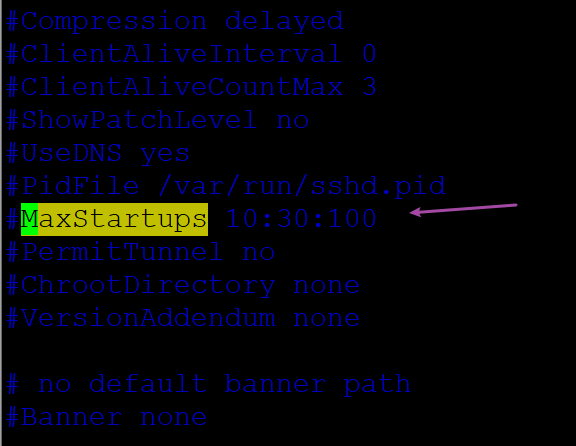
The meaning of the default configuration above is that when the number of connections exceeds 10, 30% of subsequent new connections will be refused, and once it exceeds 100, they will be refused outright.
Resolution
The number of active connections we just checked was 19, which far exceeds the default connection limit.
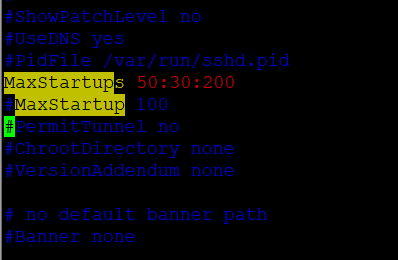
Therefore, we need to increase this value by changing it to the following (remove the comment or add a new line, and adjust based on your actual situation):
MaxStartups 50:30:200
or (Please choose the format that suits your system, as selecting the wrong one may cause the SSH service to fail to restart)
MaxStartups 100
service sshd restart
Restart the service to resolve the issue.
<<