

This situation is usually caused by a full system disk or normal disk space but excessive inode usage, preventing the system from creating new directories and files despite having available space.
Use the following two commands to check disk space and inode usage respectively:
df -i
df -h
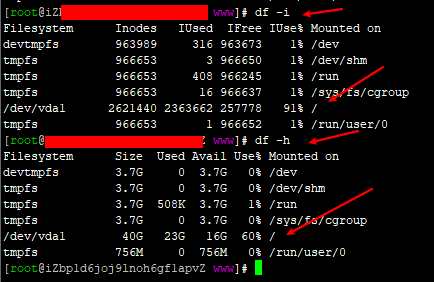
From the check, we can see that while there is plenty of disk space, inode usage is as high as 91% (this value was taken after cleaning up some files; it was basically at 100% before cleanup).
Regarding inodes, you can simply understand them as a limit on the number of files. Many server providers impose such limits. The main cause of inode exhaustion is the usage of inodes by a large number of fragmented and small files. When the number of files you store in the system exceeds the specified limit, you will be unable to create new files or directories.
Solutions:
1. Investigate and clean up invalid files, fragmented files, and junk files on the server.
2. Transfer inactive data to a data disk (or another disk) or archive it locally.
3. Consider expanding capacity when changing the system via a custom image to increase the inode limit.
4. Purchase a larger data disk to share the load.
5. Other methods…
From the above, the simplest and fastest solution is to delete some useless files in the system (especially small files). So, we just need to delete some useless logs, backups, or other files to recover a portion of inodes.
Use the command to check which directory has the most files:
for i in /*; do echo $i; find $i | wc -l; done
