

Once casually discovered that Hadoop’s system CPU usage was very high, and a quick Baidu search revealed it was actually a known issue.
RHEL6 optimized memory allocation efficiency, and in certain scenarios, it provides a significant improvement for KVM performance: http://www.linux-kvm.org/wiki/images/9/9e/2010-forum-thp.pdf.
However, Hadoop is a memory-intensive computing system, and this change seems to have introduced side effects. In theory, computation-oriented Java programs should spend more time in user-mode CPU. Cloudera officially recommends disabling THP. So I referred to some articles and made the following adjustments:
- # for hadoop , disable thp
- echo never > /sys/kernel/mm/redhat_transparent_hugepage/enabled
- echo never > /sys/kernel/mm/redhat_transparent_hugepage/defrag
The effect was very noticeable:
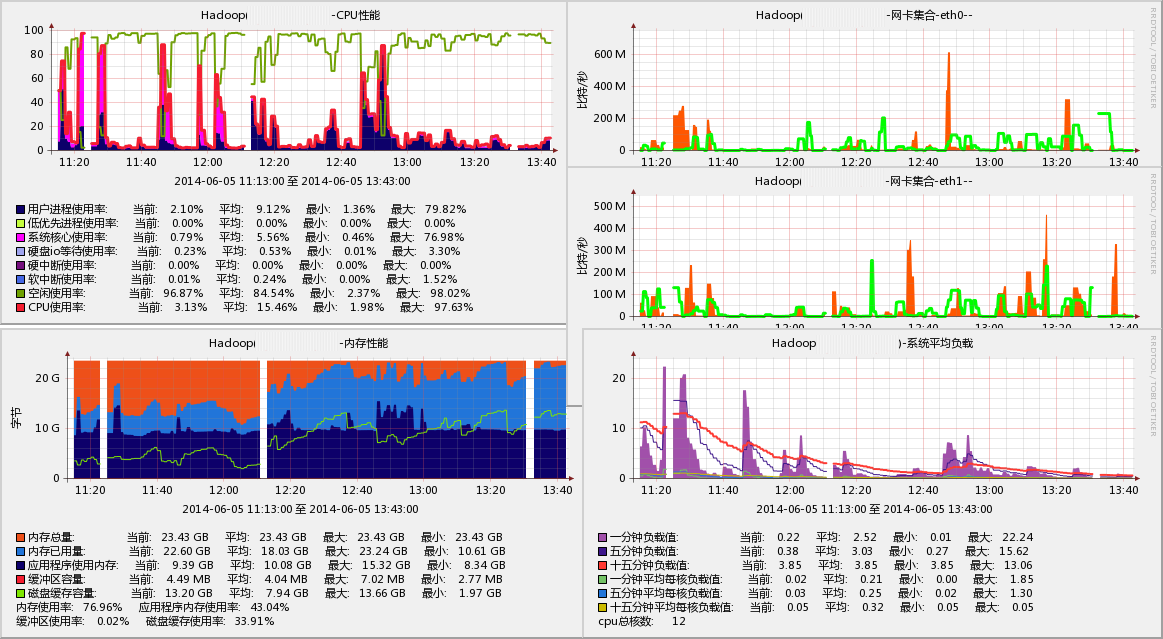
The effect was obvious. The operation was performed around 12:05, and the system-mode CPU usage basically disappeared. Cache usage increased and machine load decreased.
In addition to manually modifying runtime parameters, you can also modify the kernel boot parameters in /etc/grub.conf by appending “transparent_hugepage=never” (this option only affects /sys/kernel/mm/redhat_transparent_hugepage/enabled).
Originally, the transparent_hugepage feature was introduced after kernel 2.6.38, and Red Hat merged this feature into RHEL6; further details remain to be explored.
via : http://hi.baidu.com/higkoo/item/eb5e69c17c6b300a0ad93a00