

Apacherequiresthree configuration files forSSLcertificate installation:
1_root_bundle.crt, 2_domainname.com.crt,3_ domainname.com.key.
Note: These three certificate files are all in the folder for Apache.zip.
For example:1_root_bundle.crt is the root certificate chain, 2_domainname.com.crt is the public key, and 3_ domainname.com.key is the private key. (Among them: the certificate public key and private key files are generally named after your domain name; the certificate extensions .crt and .cer are identical in nature.)
Start Installation.
1.DownloadApache that includesopensslandinstall it.
Apache version such as:httpd-2.2.22-win32-x86-openssl-0.9.8t.zip
2. Configurethehttpd.conffile underApache.
#LoadModule ssl_module modules/mod_ssl.so
#Include conf/extra/httpd-ssl.conf Delete the comment symbol“#”at the beginning of the configuration lines
3. Modifythehttpd-sslfile underApache.
(1) Openthehttpd-ssl.conffile in theconf/extradirectory under theApacheinstallation directory, and find the following configuration statements in the configuration file:
a).SSLCertificateFile /usr/local/apache/ssl/public.cer
(Configure the server certificate public key(2_domainname.com.crt) to this path, replacing public.crt);
b).SSLCertificateKeyFile /usr/local/apache/ssl/private.key
(Configure the server certificate private key(3_domainname.com.key) to this path, replacing private.key);
c).#SSLCertificateChainFile /usr/local/apache/ssl/ca.cer
(Delete the“#” comment symbol at the beginning of the line, and configure the certificate (1_root_bundle.crt) to this path, replacing ca.cer).
(2) Save and exit, then restart Apache.
4. Local testing.
(1) If testing locally, please set up local DNS resolution: open theC:/Windows/System32/Drivers/etc/hostsfile, edit it with a text editor, and resolve the domain bound to the certificate to the local IP.

(2) Visithttps:// +the domain bound to the certificate. The test results are as follows:
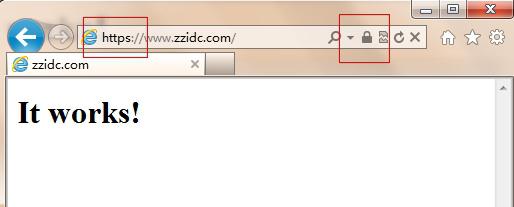
Note: After deployment, if the website cannot be accessed normally via HTTPS, check whether port 443 on the server is open or is being blocked by acceleration tools such as website guardians.
(1) How to open: Firewall settings – Exception ports – Add port 443 (TCP).
(2) If blocked by security or acceleration tools, you can add 443 to the trust list in the interception logs.
After restarting, access again via HTTPS.