

How to Install an SSL Certificate on Nginx: Complete Configuration Guide
Installing an SSL certificate on Nginx requires two configuration files: 1_root_bundle.crt and 2_domainname.com.key.
Note: These certificate files are located in the for Nginx.zip folder.
Example: 1_root_bundle.crt is the root certificate chain (public key), and 2_ domainname.com.key is the private key. (The public key and private key files are typically named after your domain; the certificate extensions crt and cer are identical in nature).
After combining the certificates, proceed with the formal installation.
1. Nginx Installation.
1. Install OpenSSL First.
(1) Extract OpenSSL: tar zxvf openssl-0.9.8k.tar.gz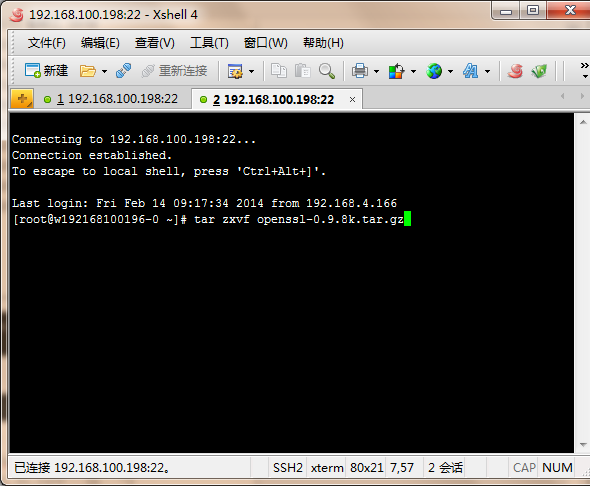
(2) Enter the OpenSSL directory: cd openssl-0.9.8k
(3) Configure OpenSSL: ./config shared zlib make make test make install mv /usr/bin/openssl /usr/bin/openssl.save mv /usr/include/openssl /usr/include/openssl.save mv /usr/lib/libssl.so /libssl.so.save ln -s /usr/local/ssl/bin/openssl /usr/bin/openssl ln -s /usr/local/ssl/include/openssl /usr/include/openssl ln -sv /usr/local/ssl/lib/libssl.so.0.9.8 /usr/lib/libssl.so
2. Install Nginx.
(1) Extract Nginx: tar zxvf nginx-1.4.0.tar.gz
(2) Enter the directory: cd nginx-1.4.0
(3) Configure Nginx, Example:
Nginx path is: /usr/local/nginx
OpenSSL directory is: /usr/local/openssl-0.9.8k
pcre directory is: /usr/local/pcre-8.31/
The command is:
./configure –prefix=/usr/local/nginx –with-http_stub_status_module –with-openssl=/usr/local/openssl-0.9.8k –with-http_ssl_module –with-pcre=/usr/local/pcre-8.31/
(4) Open the nginx.conf file in the conf directory under the Nginx installation directory
Find:
# HTTPS server
#
#server {
# listen 443;
# server_name localhost;
# ssl on;
# ssl_certificate cert.pem;
# ssl_certificate_key cert.key;
# ssl_session_timeout 5m;
# ssl_protocols SSLv2 SSLv3 TLSv1;
# ssl_ciphers ALL:!ADH:!EXPORT56:RC4+RSA:+HIGH:+MEDIUM:+LOW:+SSLv2:+EXP;
# ssl_prefer_server_ciphers on;
# location / {
# root html;
# index index.html index.htm;
# }
#}
Modify it to:
server {
listen 443;
server_name localhost;
ssl on;
ssl_certificate 1_root_bundle.crt; (Public Key Certificate)
ssl_certificate_key 2_ domainname.com.key; (Private Key)
ssl_session_timeout 5m;
ssl_protocols SSLv3 TLSv1;
ssl_ciphers HIGH:!ADH:!EXPORT56:RC4+RSA:+MEDIUM;
ssl_prefer_server_ciphers on;
location / {
root html;
index index.html index.htm;
}
}
3. Local Test Access.
For local testing, configure local DNS resolution: Open the system drive:/Windows/System32/Drivers/etc/hosts file, edit it with a text editor, and map the domain bound to the certificate to the local IP.
4. Result After Configuration.
Start Nginx and visit https:// + the domain bound to the certificate.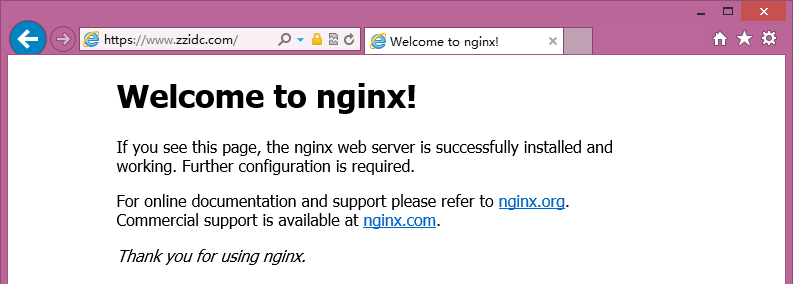
Note: If the site cannot be accessed normally via HTTPS after deployment, check whether port 443 on the server is open or blocked by acceleration tools like Web Guardian.
(1) How to open: Firewall settings – Exception ports – Add port 443 (TCP).
(2) If blocked by security or acceleration tools, add port 443 to the trusted list in the interception log.
Restart, then try accessing via HTTPS again.