

Installation (using version 1.8 as an example):
yum -y install wget vim tree gcc gcc-c++ autoconf libX11-devel openssl-devel
wget https://github.com/rdesktop/rdesktop/releases/download/v1.8.3/rdesktop-1.8.3.tar.gz
tar zxvf rdesktop-1.8.3.tar.gz && cd rdesktop-1.8.3
./configure –disable-credssp –disable-smartcard
make && make install
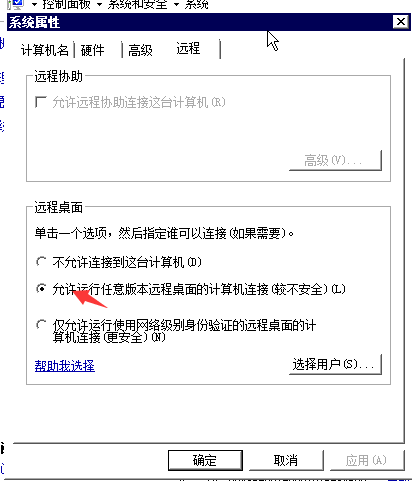
Remote Host Settings: Allow connections from any host, otherwise the following error will occur:
Autoselected keyboard map en-us
Failed to connect, CredSSP required by server.
Connecting to a Host:
rdesktop 192.168.1.xxx
Connecting with a Password:
rdesktop 192.168.1.xxx -u administrator -p password