

安装(这里以1.8为例):
yum -y install wget vim tree gcc gcc-c++ autoconf libX11-devel openssl-devel
wget https://github.com/rdesktop/rdesktop/releases/download/v1.8.3/rdesktop-1.8.3.tar.gz
tar zxvf rdesktop-1.8.3.tar.gz && cd rdesktop-1.8.3
./configure –disable-credssp –disable-smartcard
make && make install
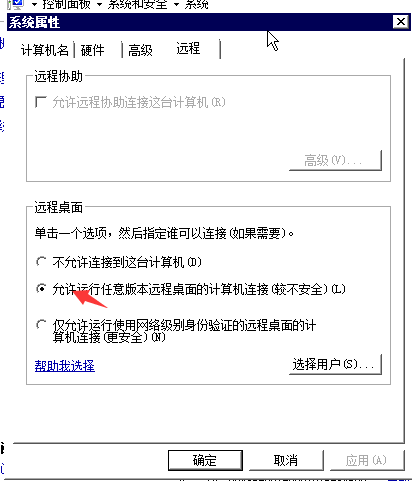
远程主机设置:允许任意主机连接,不然会出现以下错误:
Autoselected keyboard map en-us
Failed to connect, CredSSP required by server.
连接主机:
rdesktop 192.168.1.xxx
带密码的连接:
rdesktop 192.168.1.xxx -u administrator -p password